131
English
7
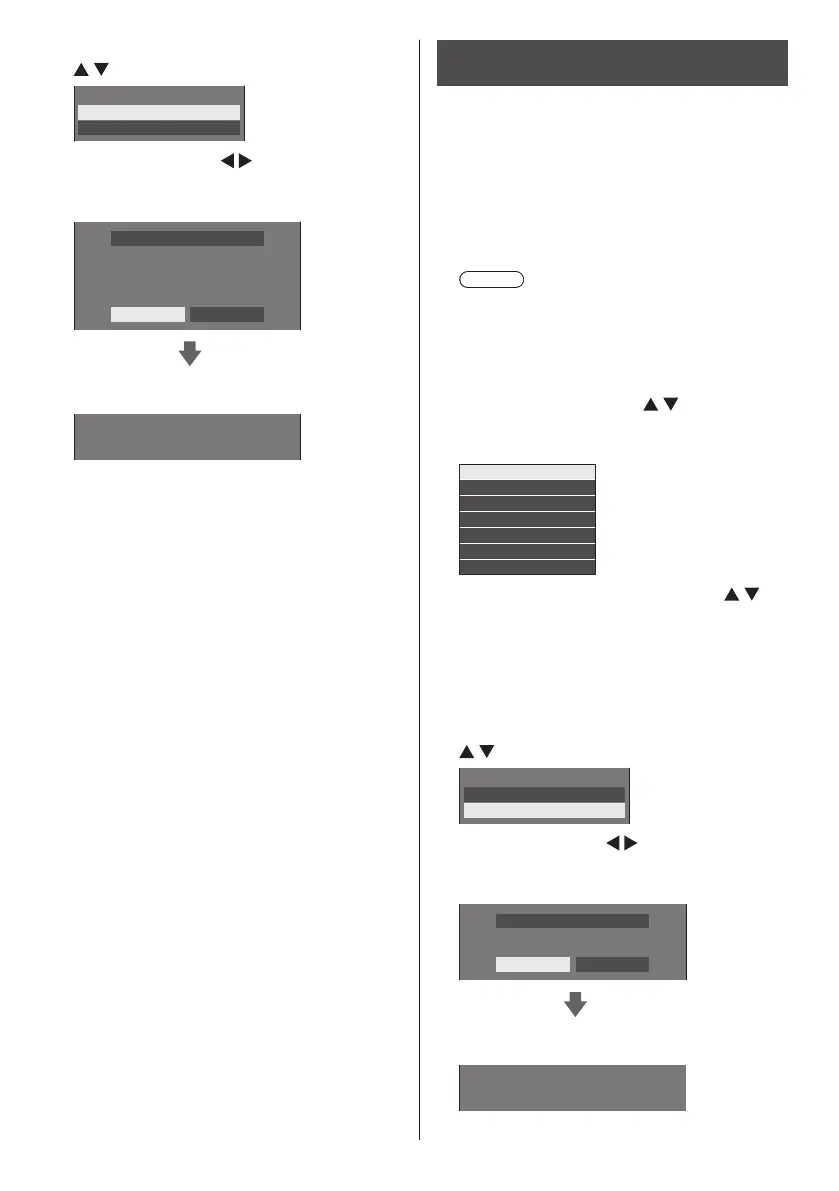
Select [Display → USB memory] with
and press <ENTER>.
Select copy type
Display→USBmemory
USBmemory→Display
8
Select [Yes] with and press
<ENTER>.
Data copy to the USB memory starts.
Data to USB memory
The data will be overwritten when any data
exists originally. Are you OK to write the data ?
Yes No
The following message is displayed after data copy
has finished.
Data copy finished.
9
After data copy has finished, remove
the USB memory device from the USB
terminal.
Copying (cloning) the USB memory
data to the display
1
Insert the USB memory device, which
the data has been copied, to the USB
terminal of the display for data copy
(same as the step 1 on page 130).
2
After the [Cloning password] screen
is displayed, go to the step 6.
When the [Cloning password] screen is not
displayed, follow the steps 3 to 5 to display.
Note
●
If the USB memory containing the data for cloning
is connected in power-on state, the [Cloning
password] screen is displayed.
3
Display [Setup] menu pressing
<SETUP>.
4
Select [Options] with and press
<ENTER>.
The following display appears.
Display information
Software licenses
Cloning password
USB data cloning
Shipping
LAN data cloning
Output log data
5
Select [USB data cloning] with
and press <ENTER>.
[Cloning password] screen is displayed.
6
Enter the cloning password, and then
press <ENTER>.
Data cloning screen is displayed.
7
Select [USB memory → Display] with
and press <ENTER>.
Select copy type
Display→USBmemory
USBmemory→Display
8
Select [Yes] with and press
<ENTER>.
Data cloning to the display starts.
Data from USB memory
Do you copy the data ?
Yes No
The following message is displayed after data
cloning has finished.
Cloning finished. Please turn off the power.


 To Next Page
 Loading...