EasyManua.ls Logo

Samsung HW-C900 - Watching a Movie (Ipod Video Function)

Samsung HW-C900
80 pages
Print Icon
To Next Page IconTo Next Page
To Previous Page IconTo Previous Page
Loading...
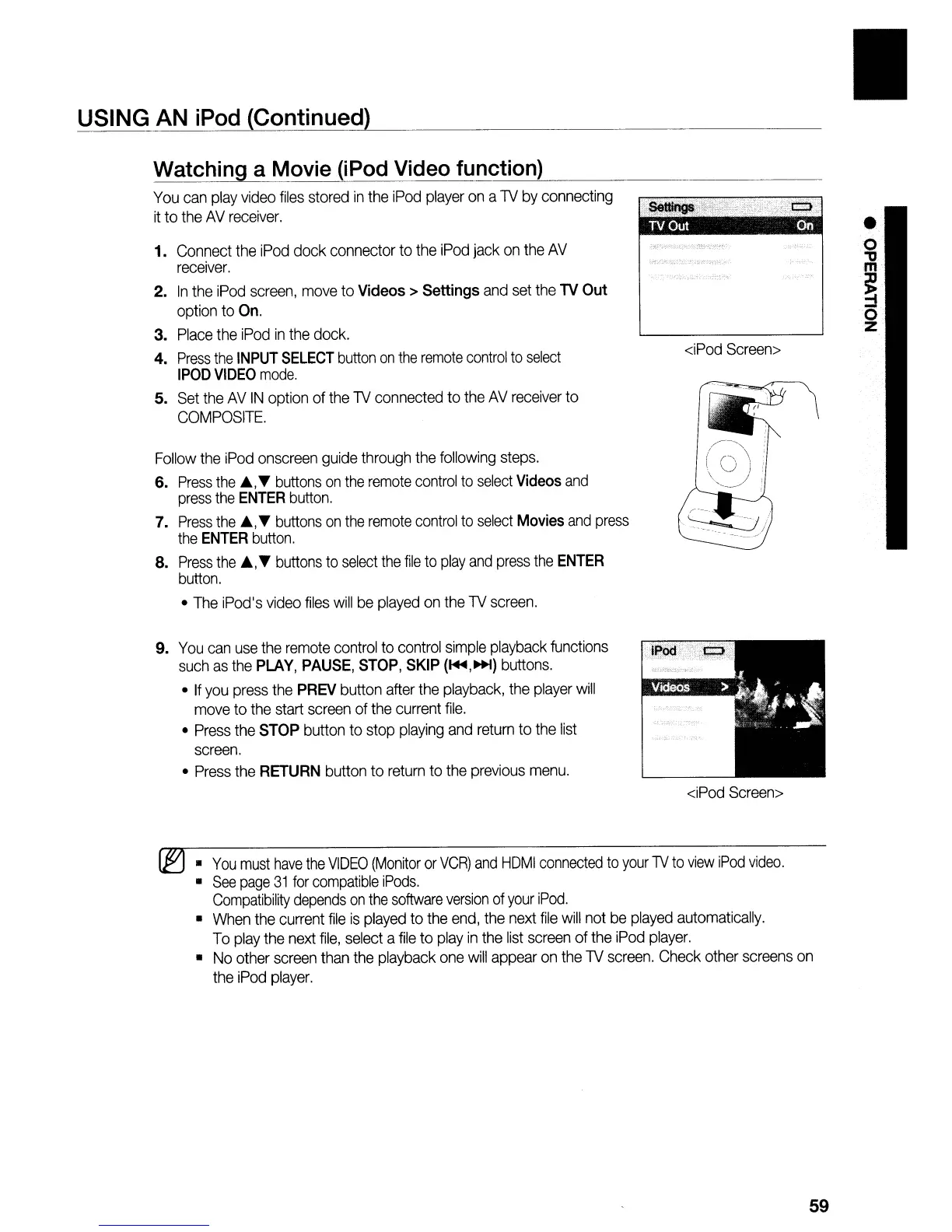
USING AN iPod (Continued)
Watching a Movie (iPod Video function)
You
can
play
video
files
stored
in
the
iPod
player
on
a
TV
by
connecting
it
to
the
AV
receiver.
1.
Connect
the
iPod
dock connector
to
the
iPod
jack
on
the
AV
receiver.
2.
In
the
iPod
screen,
move
to
Videos>
Settings
and
set
the
TV
Out
option
to
On.
3.
Place
the
iPod
in
the
dock.
4.
Press
the
INPUT
SELECT
button
on
the
remote
control
to
select
IPOD
VIDEO
mode.
5.
Set
the
AV
IN
option
of
the
TV
connected
to
the
AV
receiver
to
COMPOSITE.
Follow
the
iPod
onscreen
guide
through
the
following
steps.
6.
Press
the
A,
T
buttons
on
the
remote
control
to
select
Videos
and
press
the
ENTER
button.
7.
Press
the
A,
T
buttons
on
the
remote
control
to
select
Movies
and
press
the
ENTER
button.
8.
Press
the
A,T
buttons
to
select
the
file
to
play
and
press
the
ENTER
button.
The
iPod's
video
files
will
be
played
on
the
TV
screen.
9.
You
can
use
the
remote
control
to
control
simple
playback
functions
such
as
the
PLAY,
PAUSE,
STOP,
SKIP
(~,~)
buttons.
If
you
press
the
PREV
button
after
the
playback,
the
player
will
move
to
the
start
screen
of
the
current
file.
Press
the
STOP
button
to
stop
playing
and
return
to
the
list
screen.
Press
the
RETURN
button
to
return
to
the
previous
menu.
<iPod
Screen>
<iPod
Screen>
o
"0
m
~
o
z
~
You
must
have
the
VIDEO
(Monitor
or
VCR)
and
HDMI
connected
to
your
TV
to
view
iPod
video.
See
page
31
for
compatible
iPods.
Compatibility
depends
on
the
software
version
of
your
iPod.
When
the
current
file
is
played
to
the
end,
the
next
file
will
not
be
played
automatically.
To
play
the
next
file,
select
a
file
to
play
in
the
list
screen
of
the
iPod
player.
No
other
screen
than
the
playback
one
will
appear
on
the
TV
screen.
Check
other
screens
on
the
iPod
player.
59

Table of Contents

Related product manuals