Press
OPTIONS
during playback.
The
options menu appears.
Select
"Video
Settings" using
tf.",
and
press
ENTER.
The
"Video
Settings" screen appears.
2
To
adjust
the
picture
1
Press
DISPLAY.
The
displayed information differs depending
on
the disc type and
player
status.
8:J-M.-1J-J
You
can
check
the title information,
including the video transmission rate, etc.
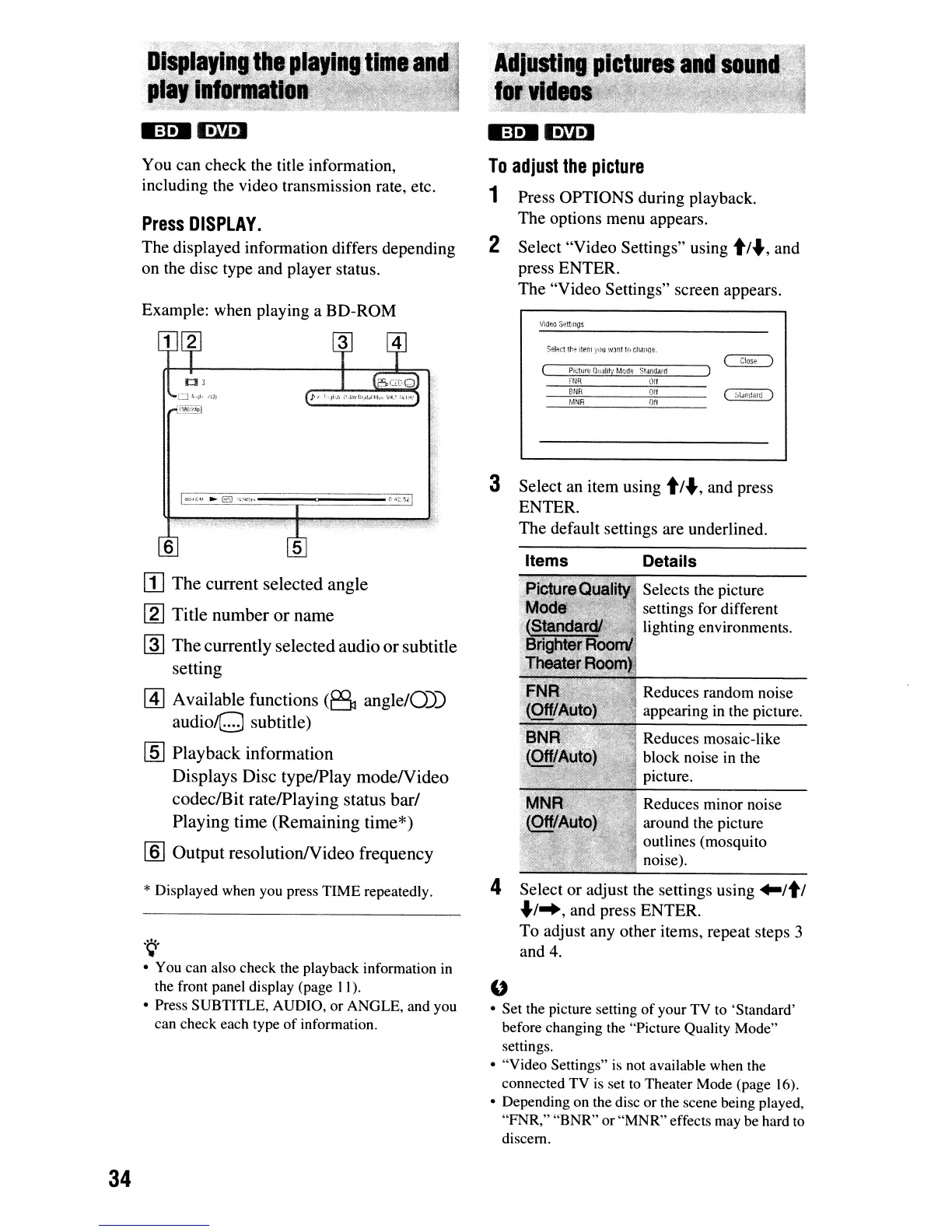
Example: when playing a
BD-ROM
Video
Sett;ngs
Picture
O!iJlit'j
Mc:1f;
Stoindarl1
DetailsItems
MW1
Off
BNR
011
Sel;n:t
tht!
item
;ioJU
W:lIlt
tQ
ch;wge.
3 Select an
item
using
t/"',
and press
ENTER.
The
default settings are underlined.
6
[I]
The
current
selected
angle
[2J
Title
number
or
name
~
The
currently
selected
audio
or
subtitle
setting
[i]
Available
functions
(B
angle/O))
audioQ
subtitle)
lID
Playback
information
Displays
Disc
type/Play
modeNideo
codeclBit
rate/Playing
status
barf
Playing
time
(Remaining
time*)
[ID
Output
resolutionNideo
frequency
Selects the picture
settings for different
lighting environments.
Reduces random noise
appearing
in
the picture.
Reduces mosaic-like
block noise
in
the
picture.
Reduces minor noise
around the picture
outlines (mosquito
noise).
* Displayed
when
you
press TIME repeatedly.
.~.
•
You
can
also
check
the
playback information
in
the
front
panel display (page I
I)
.
• Press SUBTITLE,
AUDIO,
or ANGLE,
and
you
can
check
each
type
of information.
4 Select
or
adjust the settings using
"It
I
"'1-+,
and press ENTER.
To
adjust any
other
items, repeat steps 3
and 4.
"
• Set
the
picture setting of your
TV
to
'Standard'
before changing
the
"Picture Quality Mode"
settings.
• "Video Settings"
is
not
available
when
the
connected
TV
is
set
to
Theater
Mode
(page
16).
• Depending
on
the
disc
or
the
scene being played,
"FNR," "BNR" or "MNR" effects
may
be
hard
to
discern.
34


 To Next Page
 Loading...








