44
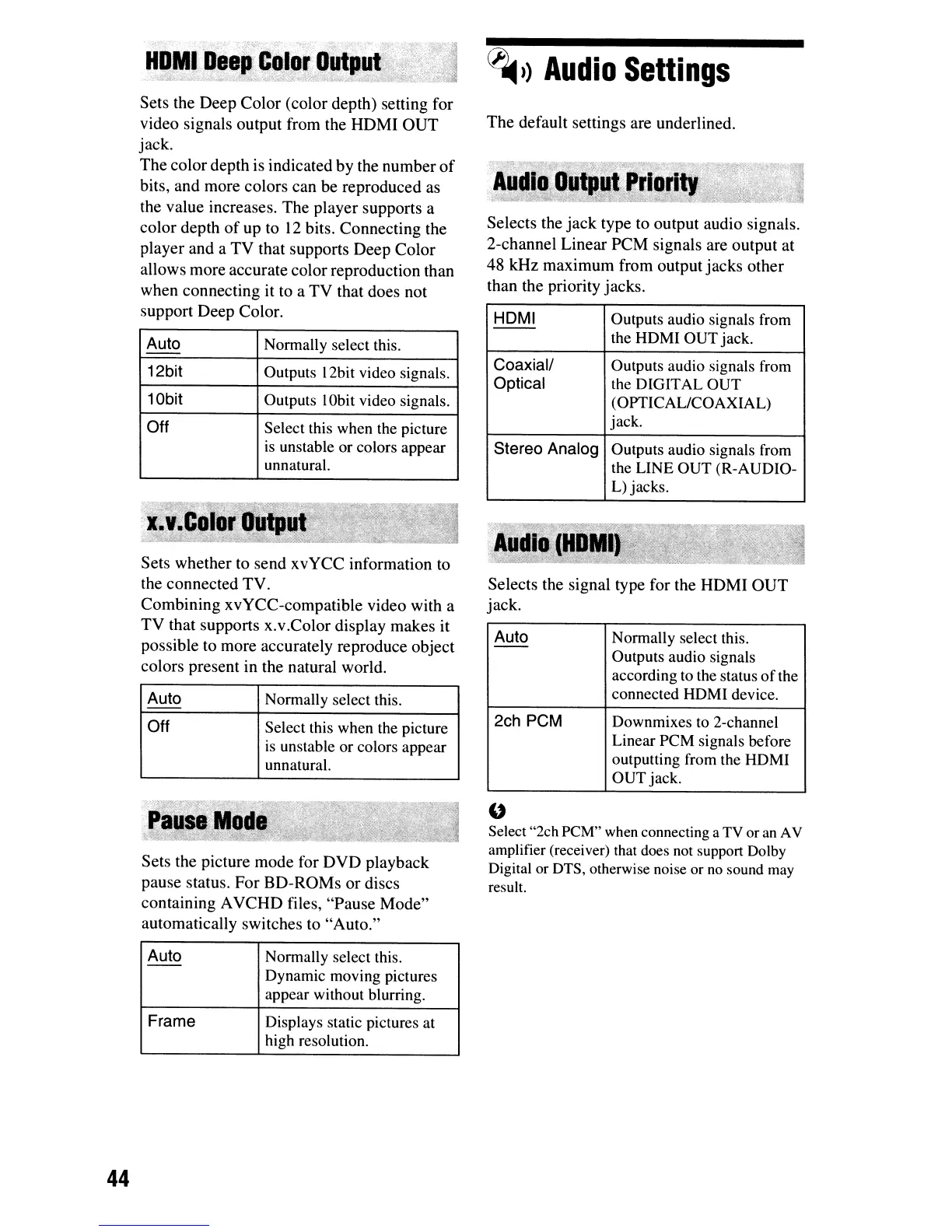
Sets the
Deep
Color
(color depth) setting for
video signals output from the
HOM!
OUT
jack.
The
color
depth is indicated
by
the
number
of
bits,
and
more colors
can
be reproduced as
the value increases.
The
player supports a
color
depth
of
up
to
12
bits. Connecting the
player and a
TV
that supports
Deep
Color
allows more accurate
color
reproduction than
when connecting it to a
TV
that does not
support Deep Color.
Auto Normally select this.
--
12bit Outputs 12bit video signals.
10bit Outputs
IObit
video signals.
Off
Select this when the picture
is
unstable or colors appear
unnatural.
Sets whether to send
xvYCC
information to
the connected
TV.
Combining
xvYCC-compatible video with a
TV
that supports
x.
v.Color display makes it
possible to more accurately reproduce object
colors present in the natural world.
Auto Normally select this.
--
Off Select this when the picture
is
unstable or colors appear
unnatural.
Sets the picture mode for
DVD
playback
pause status.
For
BD-ROMs
or
discs
containing A
VCHD
files, "Pause
Mode"
automatically switches to
"Auto."
Auto Normally select this.
--
Dynamic moving pictures
appear without blurring.
Frame
Displays static pictures at
high resolution.
~»
Audio
Settings
The
default settings are underlined.
Selects the
jack
type to output audio signals.
2-channel Linear
PCM
signals are output at
48 kHz
maximum
from output
jacks
other
than the priority jacks.
HOMI
Outputs audio signals from
--
the HOMI OUT jack.
Coaxial/
Outputs audio signals from
Optical
the DIGITAL OUT
(OPTICAL/COAXIAL)
jack.
Stereo Analog
Outputs audio signals from
the LINE OUT (R-AUDIO-
L)
jacks.
Selects the signal type for the
HOM!
OUT
jack.
Auto
Normally select this.
--
Outputs audio signals
according
to
the status
of
the
connected HDMI device.
2ch PCM
Downmixes
to
2-channel
Linear PCM signals before
outputting from the HDMI
OUT jack.
"
Select "2ch
peM"
when
connecting a
TV
or
an
AV
amplifier (receiver) that does
not
support Dolby
Digital
or
DTS,
otherwise noise or
no
sound
may
result.


 To Next Page
 Loading...








