29
GB
D:\NORM'S JOB\SO0135\4262412121_GB\GB04GET_STR-DH720-CEL.fm masterpage: Right
STR-DH720
4-262-412-12(1)
Connections
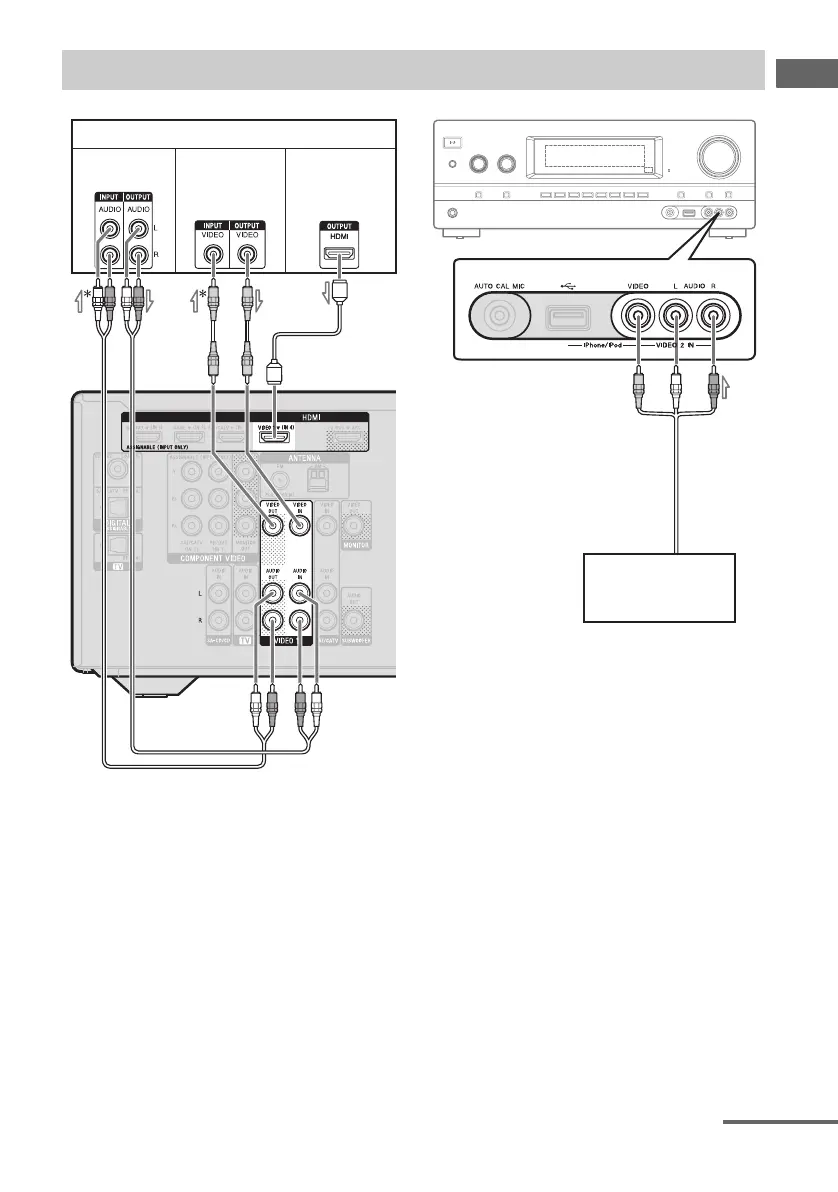
A Audio cord (not supplied)
B Video cord (not supplied)
C HDMI cable (not supplied)
Sony recommends that you use an HDMI-
authorized cable or Sony HDMI cable.
D Audio/video cord (not supplied)
* If you want to record, you must make this
connection (page 48).
Note
Be sure to change the default setting of the VIDEO
1 input button on the remote control so that you can
use the button to control your DVD recorder. For
details, see “Reassigning the input button”
(page 74).
Connecting other equipment
DVD recorder, VCR
A
Camcorder,
video game
D
Audio signals Video signals
C
Audio/video
signals
B
continued


 To Next Page
 Loading...











