31
Operation Method
Input Program; Set the Repeat Count
1
Repeat count setting procedure
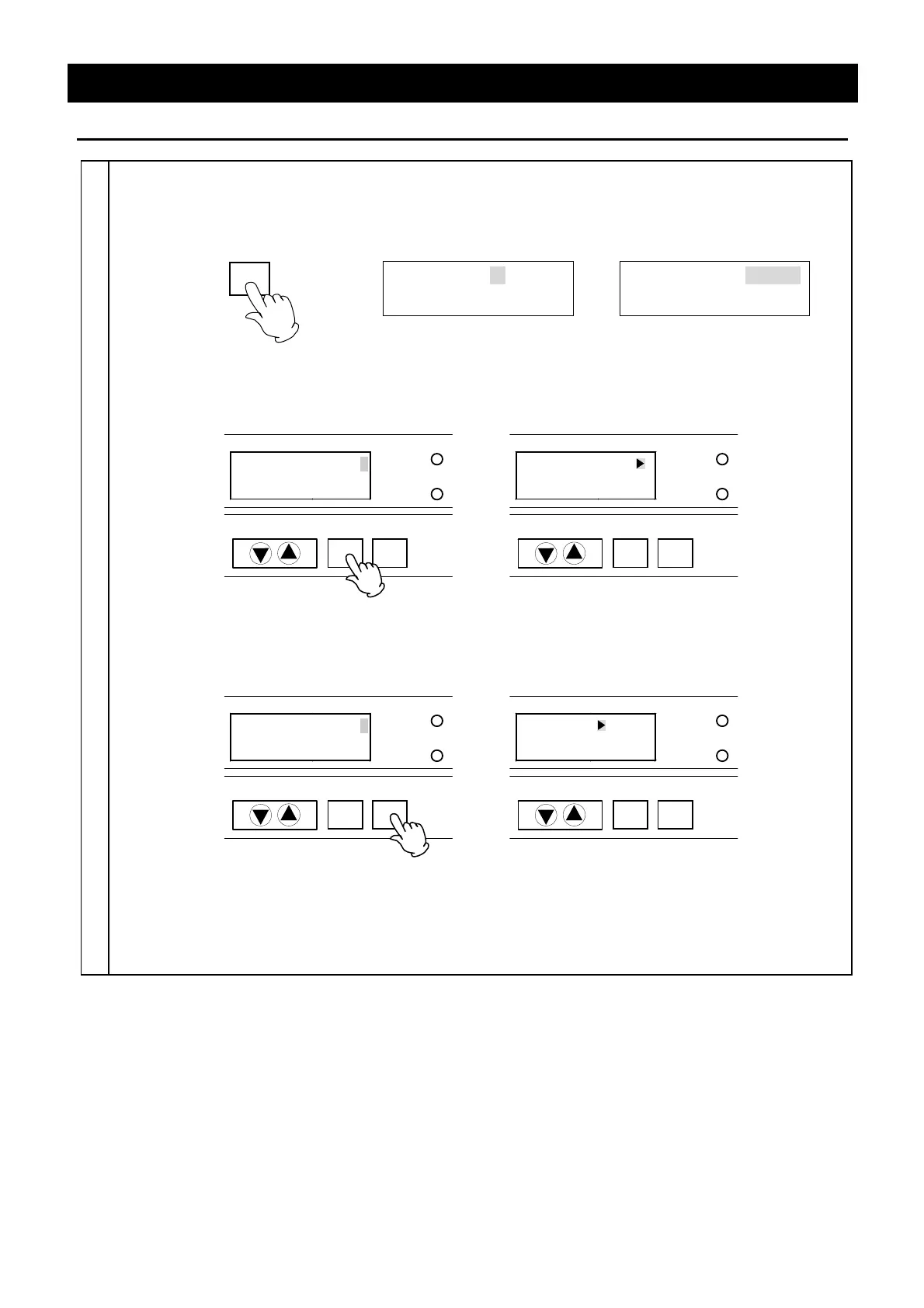
① Select the "Rep. count" and press the ENTER key. The setting edition screen is displayed. The
blinking "
" (cursor) goes out and the setting value blinks instead.
Rep. count ► Endless
S07
Rep. count Endless
S07
ENTER
(Selection screen)
→
(Edition screen)
② Select the value using "▼▲" and press the ENTER key. The setting is decided and the screen
returns to the setting item selection screen.
TROUBLE
ENTER
CANCEL
DOOR
Rep. count 1
S07
→
TROUBLE
ENTER
CANCEL
DOOR
Rep. count 1
S07
(Decide the input) (Selection screen)
③ Press the CANCEL key to cancel the input. The value is cancelled and the screen returns to the
setting item selection screen.
TROUBLE
ENTER
CANCEL
DOOR
Rep. count 3
S07
→
TROUBLE
ENTER
CANCEL
DOOR
Rep. count Endless
S07
(Cancel the input) (Selection screen)
④ Press the PROGRAM key to display the next selection screen after the repeat count setting is
completed.


 To Next Page
 Loading...