52
Operation Method
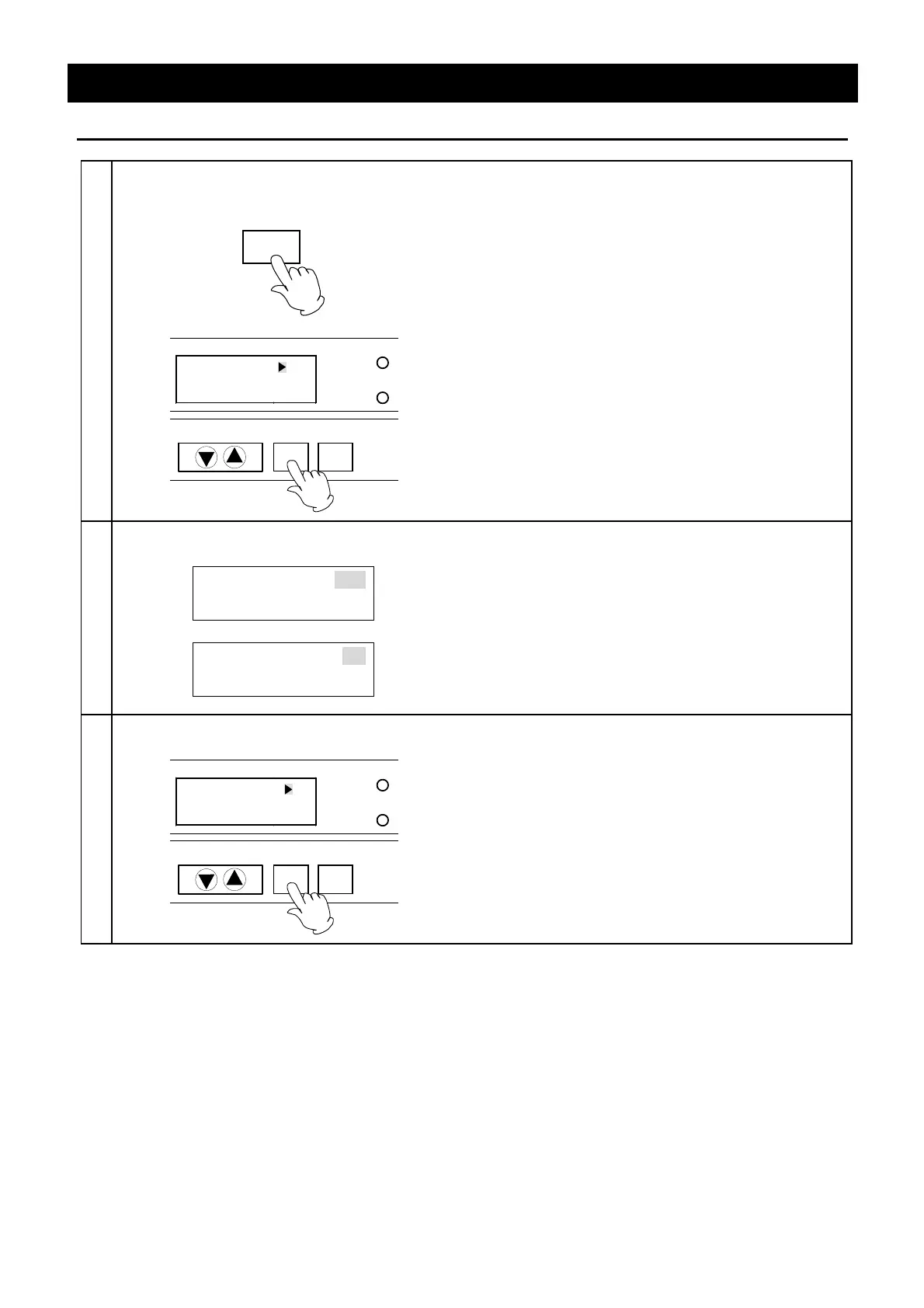
Set the Communication Lockout Mode (Optional accessory)
1
Select the item in function menu
• Check that the power in turned on.
FUNCTION
TROUBLE
ENTER
CANCEL
DOOR
Comm. Lockout OFF
① Press the FUNCTION key. The function menu
starts and the Sub Display displays the items.
Select the item using the FUNCTION key.
② Display the "Comm. Lockout" and press the
ENTER key.
2
Select mode
Comm. Lockout OFF
↓
Comm. Lockout ON
① The "
" (cursor) goes out and the mode currently
selected blinks instead. Display the "ON" or
"OFF" using the "▼▲".
3
Set communication lockout mode
TROUBLE
ENTER
CANCEL
DOOR
Comm. Lockout ON
① Press the ENTER key. The communication
lockout mode is decided and the function menu
selection screen is displayed.


 To Next Page
 Loading...