A10/A11/A10W/A11W IP Phone User Manual
ATCOM TECHNOLOGY CO., LIMITED www.atcom.cn
configurable once the Repeatedly is “On”
13.Day of week: The day of week that the phone do the check for upgrading every week, and it’s
configurable once the Repeatedly is “On”
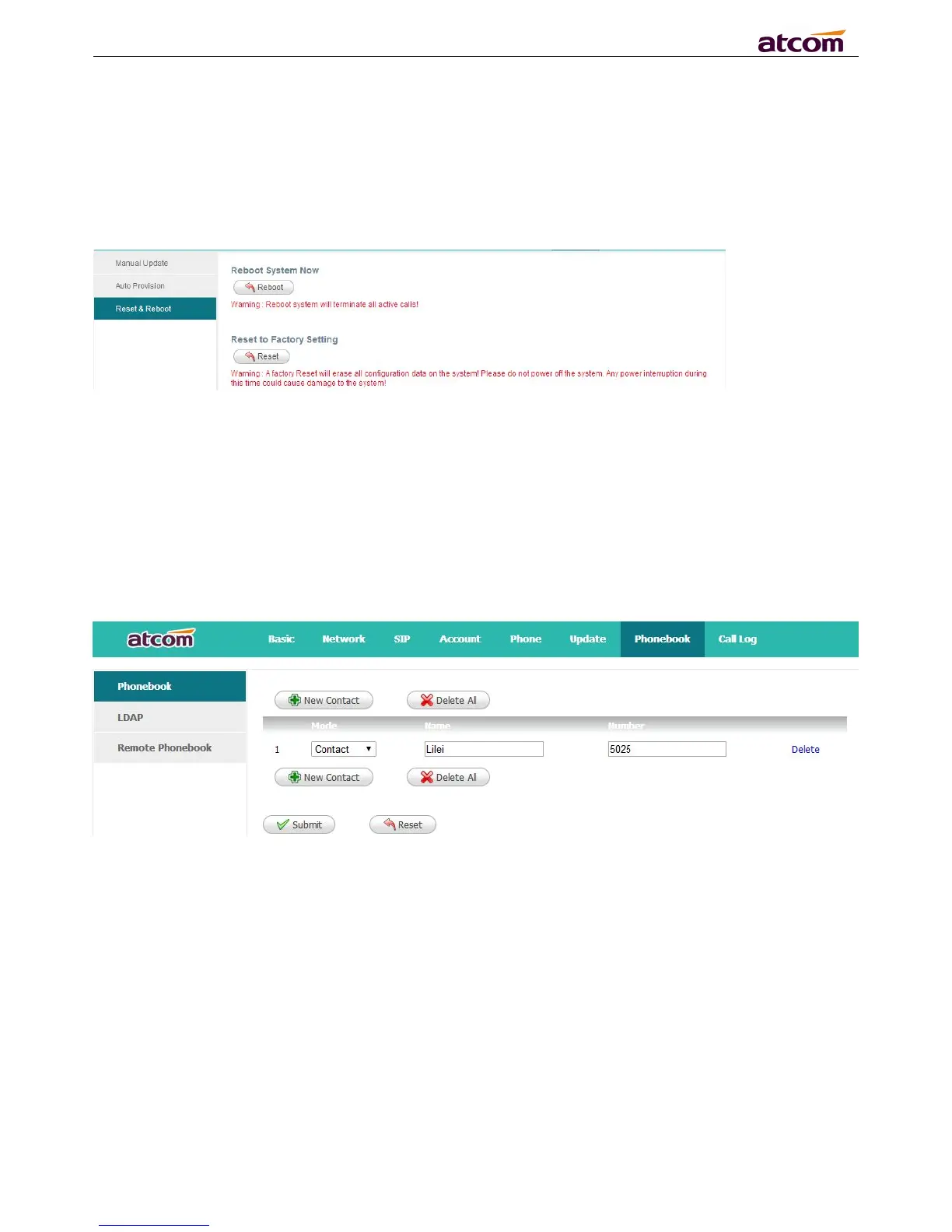
4.6.3 Reset & Reboot
Reboot will terminate all active calls, and restart the phone in a several seconds.
Click the “Reset” button will set A10/A11/A10W/A11W to factory default, please backup the
config.xml and phonebook.xml.
4.7 Phone Book
4.7.1 Phonebook
1. New Contact: Add a new phonebook record.
2. Delete All: Delete all the phonebook records.
3. Mode: Contact or Blacklist. All calls from Blacklist will be rejected.
4. Name: Specify a name for each phone number. This name will be displayed on LCD when call to
this number or call from this number.
6. Submit: Submit to apply the change.
7. Reset: Cancel the inputting.
8. Delete: Delete this record.
Notice:The maximum of records in the phone book is 1000.



 To Next Page
 Loading...




