Product Description | 2
0870211676_RA0760A_PLUS_-0004_IM_en 15 / 68
HOME
SETTINGS
OPERATIONS
CONTACT
MAINTENANCE
SYSTEM
MODEL ETHERNET
Off
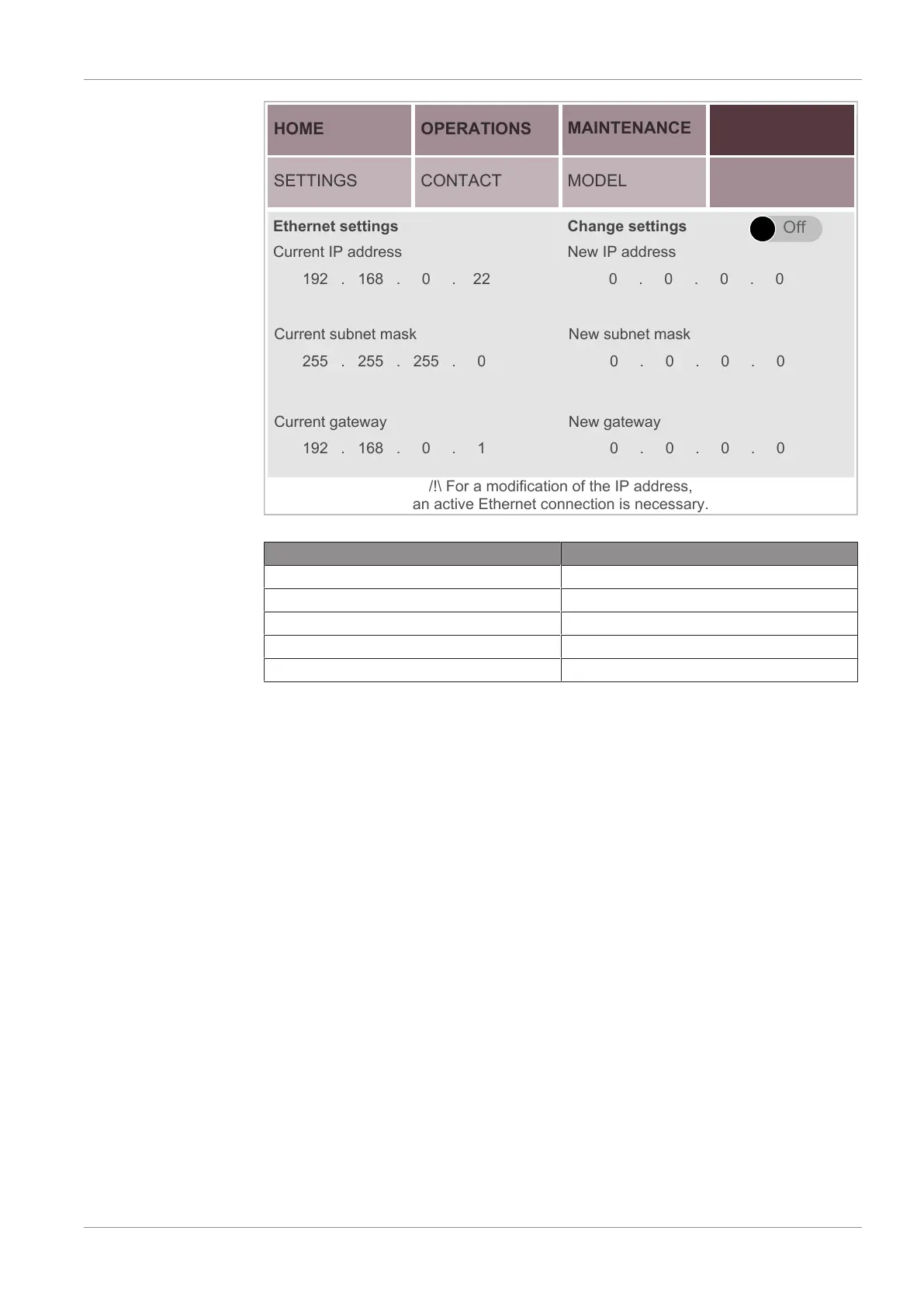
Ethernet settings
Current IP address
192 . 168 . 0 . 22 0 . 0 . 0 . 0
New IP address
Change settings
0 . 0 . 0 . 0
New subnet maskCurrent subnet mask
0 . 0 . 0 . 0
New gatewayCurrent gateway
255 . 255 . 255 . 0
192 . 168 . 0 . 1
/!\ For a modification of the IP address,
an active Ethernet connection is necessary.
Description Default value
IP address 192.168.0.22
Subnet mask 255.255.255.0
Gateway 192.168.0.1
PLC port (0-65535) 502 (cannot be changed)
PLC Slave no. 247 (F7) (cannot be changed)
2.8 Web Visualization
Each machine has a built-in Web visualization interface, which allows remote monitoring
of the main operating parameters from a computer (via a LAN connection or via an op-
tional WIFI connection), a tablet or a smartphone (via an optional WIFI connection).
To use the Web visualization interface via a LAN connection:
• Connect an Ethernet cable to the Ethernet port (COM) on the right side of the control
unit (CU) of the machine.
• Connect the Ethernet cable to the company network or to the computer. To connect
the Ethernet cable to the computer, use a USB/LAN adapter or connect it directly to
the Ethernet port of the computer and use the internal network card (administrator
access required).
• Check the ethernet settings of the machine in the “Ethernet Settings” menu of the
User Interface Display (HMI), see Ethernet Settings [►14]. By default, the ethernet
settings are:
– IP address: 192.168.0.22
– Subnet mask: 255.255.255.0
– Gateway: 192.168.0.1
• Check the ethernet settings of the computer network (Internet Protocol Version 4
(TCP/IPv4) Properties). The Subnet mask and the first 3 bytes of the IP address must
be the same as on the PLUS machine.


 To Next Page
 Loading...