5.
Holding the Camera
If
the camera moves whil
e-
a picture
is
be-
ing
taken, the resulting picture may
be
un-
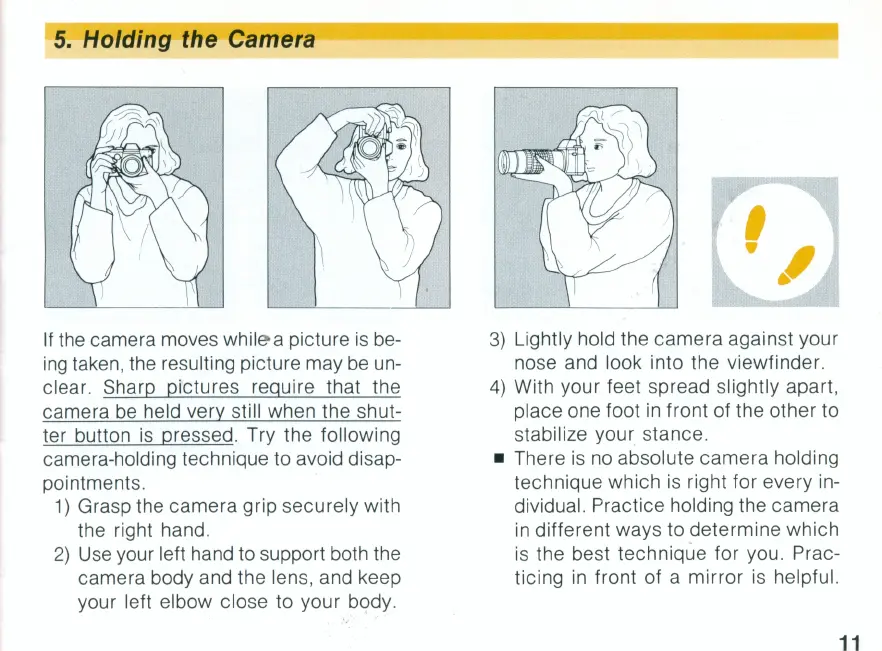
clear. Sharp pictures require that the
camera
be
held very still when the shut-
ter button
is
pressed. Try the following
camera-holding technique to avoid disap-
pointments.
1)
Grasp the camera grip securely with
the right hand.
2)
Use
your left hand to support both the
camera body and the lens, and keep
your left elbow close to your body.
3)
Lightly hold the camera against your
nose and look into the viewfinder.
4)
With your feet spread slightly apart,
place one foot
in
front of the other to
stabilize your stance.
• There
is
no
absolute camera holding
technique which
is
right for every in-
dividual. Practice holding the camera
in
different ways to determine which
is
the best technique for you. Prac-
ticing
in
front of a mirror is helpful.
11


 To Next Page
 Loading...