4.
Viewfinder Information
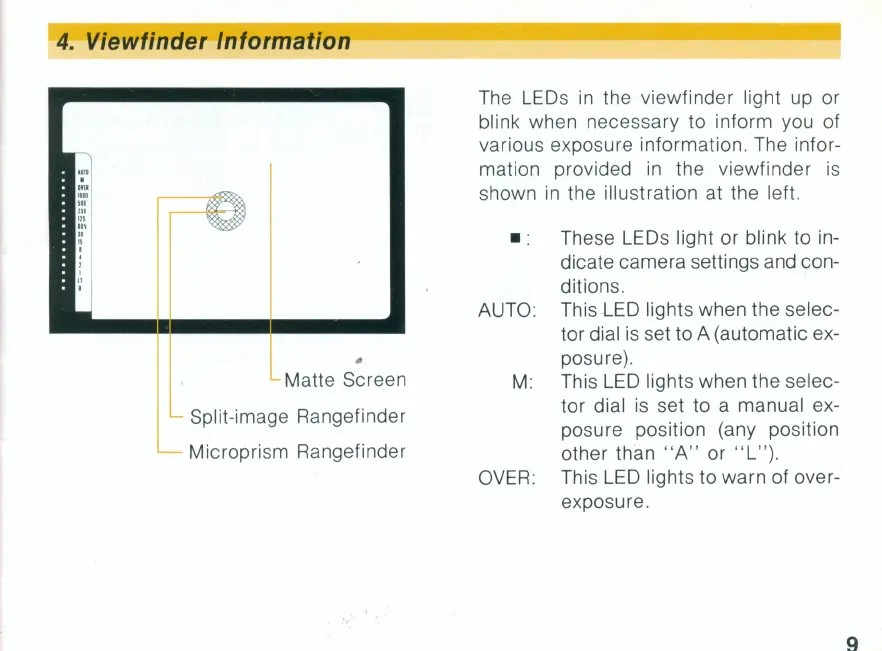
Matte Screen
Split-image Rangefinder
Microprism Rangefinder
The
LEOs
in
the viewfinder light up or
blink when necessary to inform you of
various exposure information. The infor-
mation provided
in
the viewfinder
is
shown
in
the illustration at the left .
• : These
LEOs
light or blink to in-
dicate camera settings and con-
ditions.
AUTO: This
LED
lights when the selec-
tor dial
is
set to A (automatic ex-
posure).
M: This
LED
lights when the selec-
tor dial is set to a manual ex-
posure position (any position
other than
"A"
or
"L
" ).
OVER
: This
LED
lights to warn of over-
exposure.
9


 To Next Page
 Loading...