Taking
Pictures
1.
Automatic
Exposure Operation
This
camera
is
equipped
with
an
" Aperture-priority
AE
" automatic ex-
posure mode.
In
this mode, all you have
to do
is
set the desired aperture and the
camera automatically sets the shutter
speed according the brightness of the
scene to achieve a correct exposure.
20
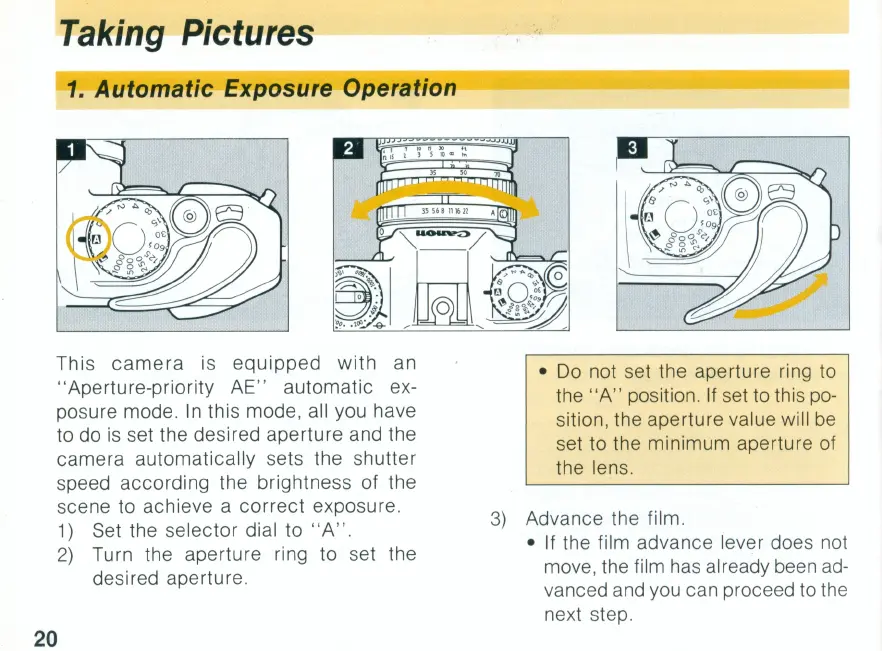
1)
Set the selector dial to " A" .
2)
Turn the aperture ring to set the
desired aperture.
•
Do
not set the aperture ring to
the "A" position. If set to this
po-
sition, the aperture value will
be
set to the minimum aperture of
the lens.
3)
Advance the
fi
lm.
• If the film advance lever does not
move, the film has already been
ad-
vanced and you can proceed to
th
e
ne
xt step.


 To Next Page
 Loading...