3)
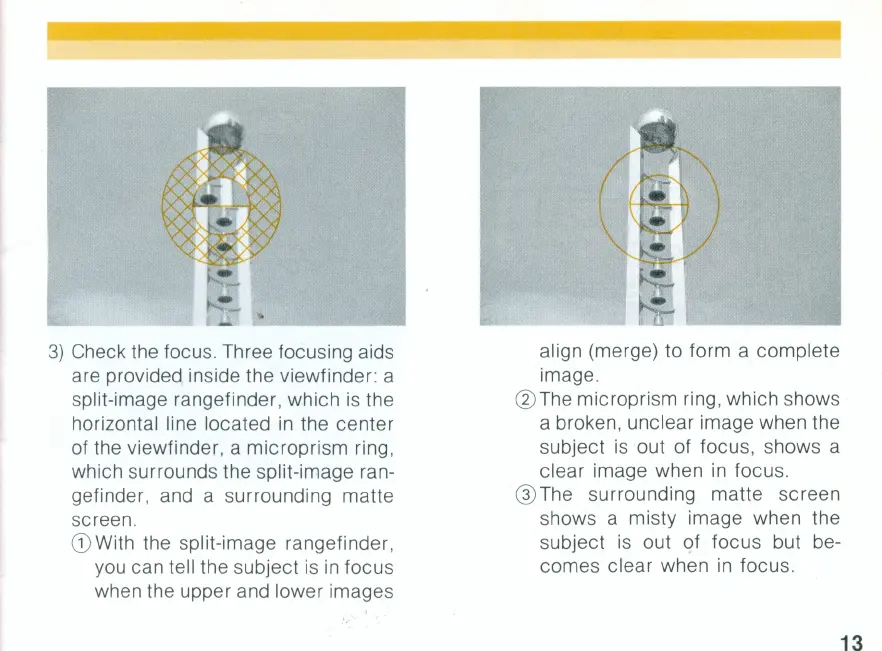
Check the focus. Three focusing aids
are provided inside the viewfinder: a
split-image rangefinder, which
is
the
horizontal line located
in
the center
of the viewfinder, a microprism ring,
which surrounds the split-image ran-
gefinder, and a surrounding matte
screen.
(D With the split-image rangefinder,
you can tell the subject is
in
focus
when the upper and lower images
align (merge) to form a complete
image.
@ The microprism ring , which shows
a broken, unclear image when the
subject
is
out of focus, shows a
clear image when
in
focus.
@ The surrounding matte screen
shows a misty image when the
subject
is
out of focus but be-
comes clear when
in
focus.
13


 To Next Page
 Loading...