Recording Audio
73
Connecting an External Microphone or External Audio Input Source to the
Camcorder
In order to use the microphone holder and INPUT 1/INPUT 2 terminals, the handle unit must be
attached to the camcorder.
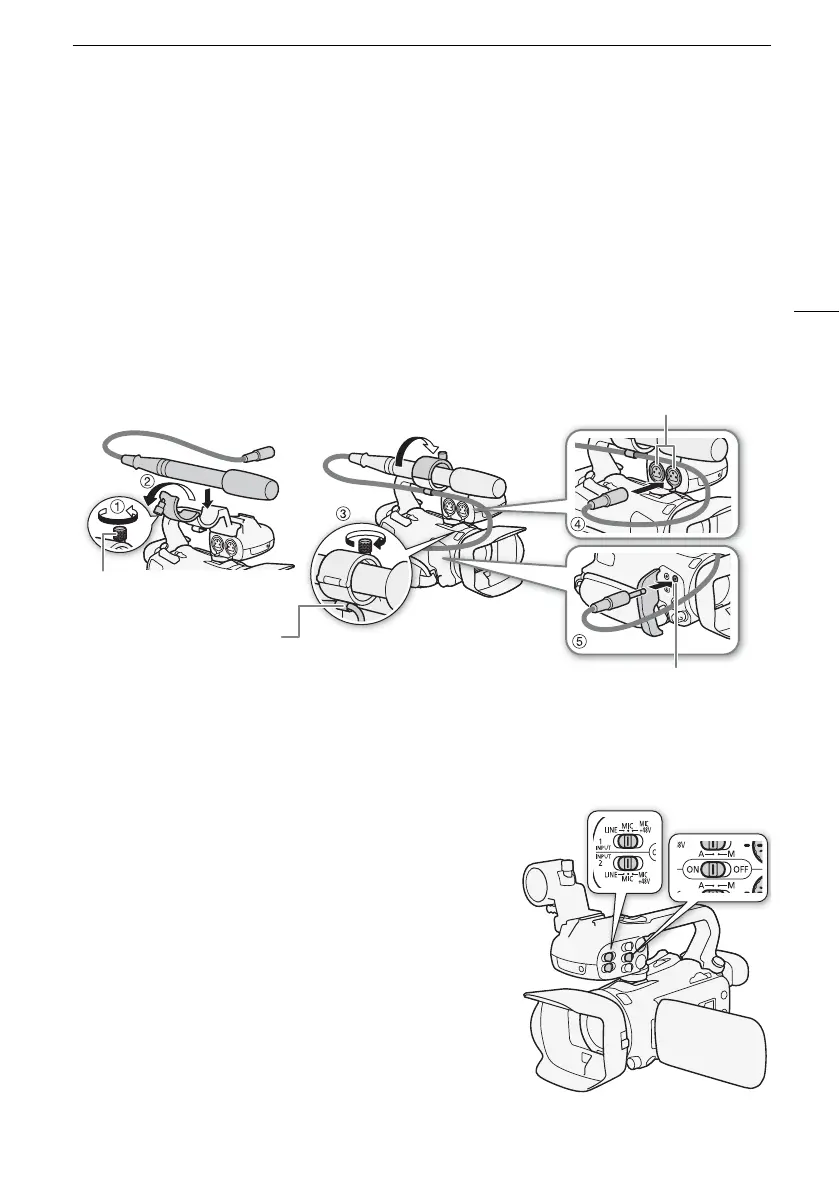
1 Loosen the microphone lock screw (햲 ), open the microphone holder and insert the
microphone (햳).
2 Tighten the lock screw and put the microphone cable through the microphone cable
clamp under the microphone holder (햴).
3 Plug the microphone or external device's cable into the desired INPUT terminal (햵) or the
MIC terminal (햶).
Using Line Input or an External Microphone Connected to an INPUT
Ter m i na l
1 Set the INPUT terminal ON/OFF switch to ON.
2 Set the input selection switches for INPUT 1/INPUT 2 to
LINE or MIC.
• To supply a microphone with phantom power, set the
switch to MIC+48V instead. Make sure to connect the
microphone first, before turning the phantom power on.
Keep the microphone connected when turning off the
phantom power.
Microphone lock screw
Cable clamp
INPUT 1/INPUT 2 terminals
MIC terminal



 To Next Page
 Loading...










