www.DaikinApplied.com 25 OM 1085-6 • MICROTECH III CONTROLLER
The following section describes how to create a
communication network drawing and import the WSHP Device
Template into the network using CT.
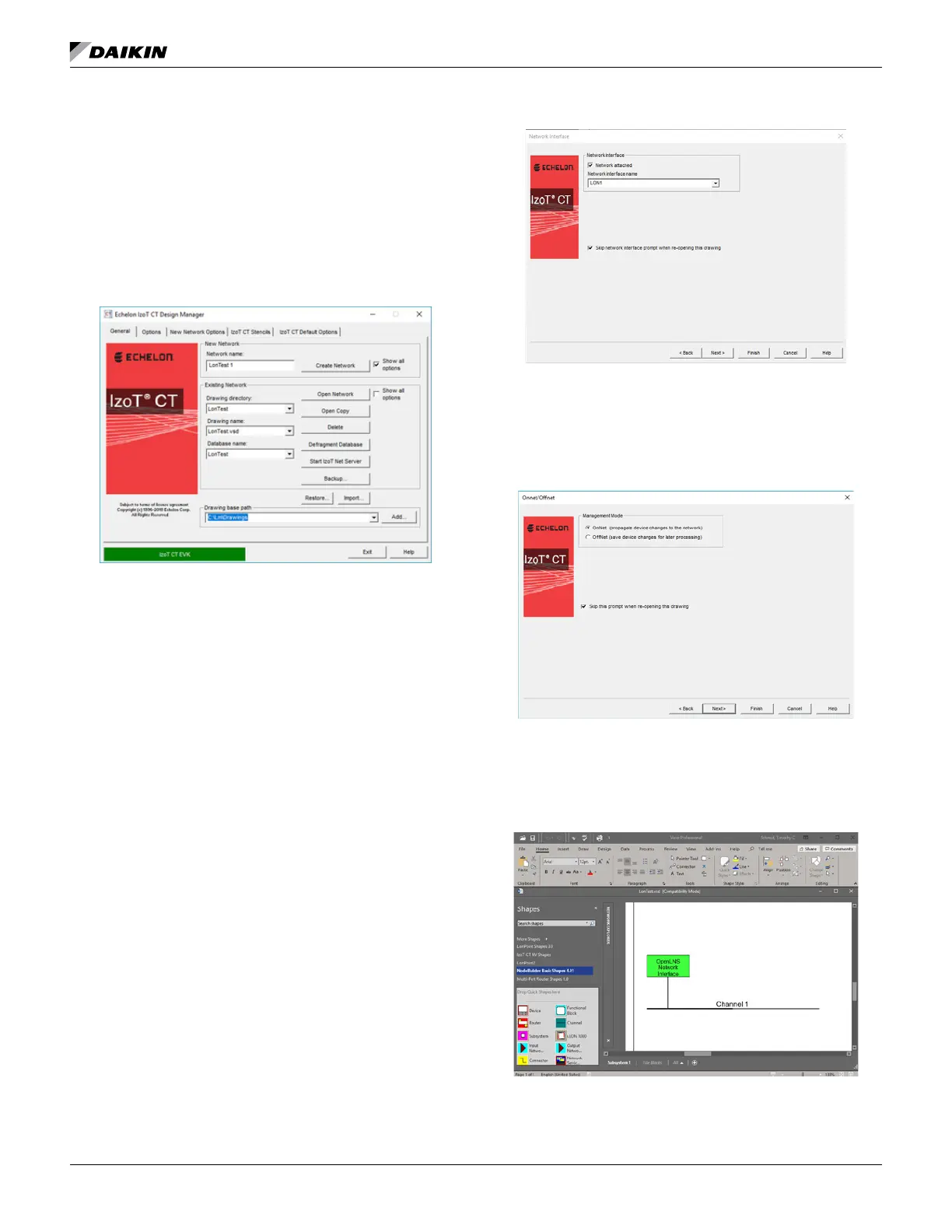
1. Open the Echelon IzoT Commissioning Tool. The Design
Manager screen appears (Figure 50).
IzoT Commissioning Tool Design Manager
2. Either create a new network or select an existing
network.
a. To select an existing network:
i. Select the network from the Drawing directory
drop-down menu.
ii. Click on Open Network.
iii. Proceed to the Commissioning the
Communication Module section.
b. To create a new network:
i.
then click Create Network.
3. Select the Network Interface Name (Figure 51) as
determined from step 5 of the Installation and Setup
section (Figure 48).
Interface Name
4. Click Next.
5. Verify the Management Mode is OnNet and click Finish
(Figure 52).
Management Mode
6. A screen similar to Figure 53 appears.
7. Drag the Device icon (shown on the left-hand side of the
image in Figure 53) to the center of the screen.


 To Next Page
 Loading...