17
Installation and operation manual for
conventional fire panels
EATON www.eaton.com
Connecting the Input/Output Cables
Connect the cables (clearly labelled with the external equipment
reference) to the appropriate input or output terminals, observing
the correct polarity where applicable.
CAUTION
MAKE SURE TO FOLLOW THE INSTALLATION GUIDES OF ANY
EXTERNAL EQUIPMENT AND CHECK THE CORRECT WIRING
POLARITY AND THAT THE EQUIPMENT IS COMPATIBLE WITH
THE CONTROL PANEL BEFORE POWERING UP THE SYSTEM.
Connecting a Repeater Panel
Connect the cables from the repeater panel to the Repeater
terminals on the main board of the fire alarm panel, observing the
correct polarity (see Figure 13 on the previous page).
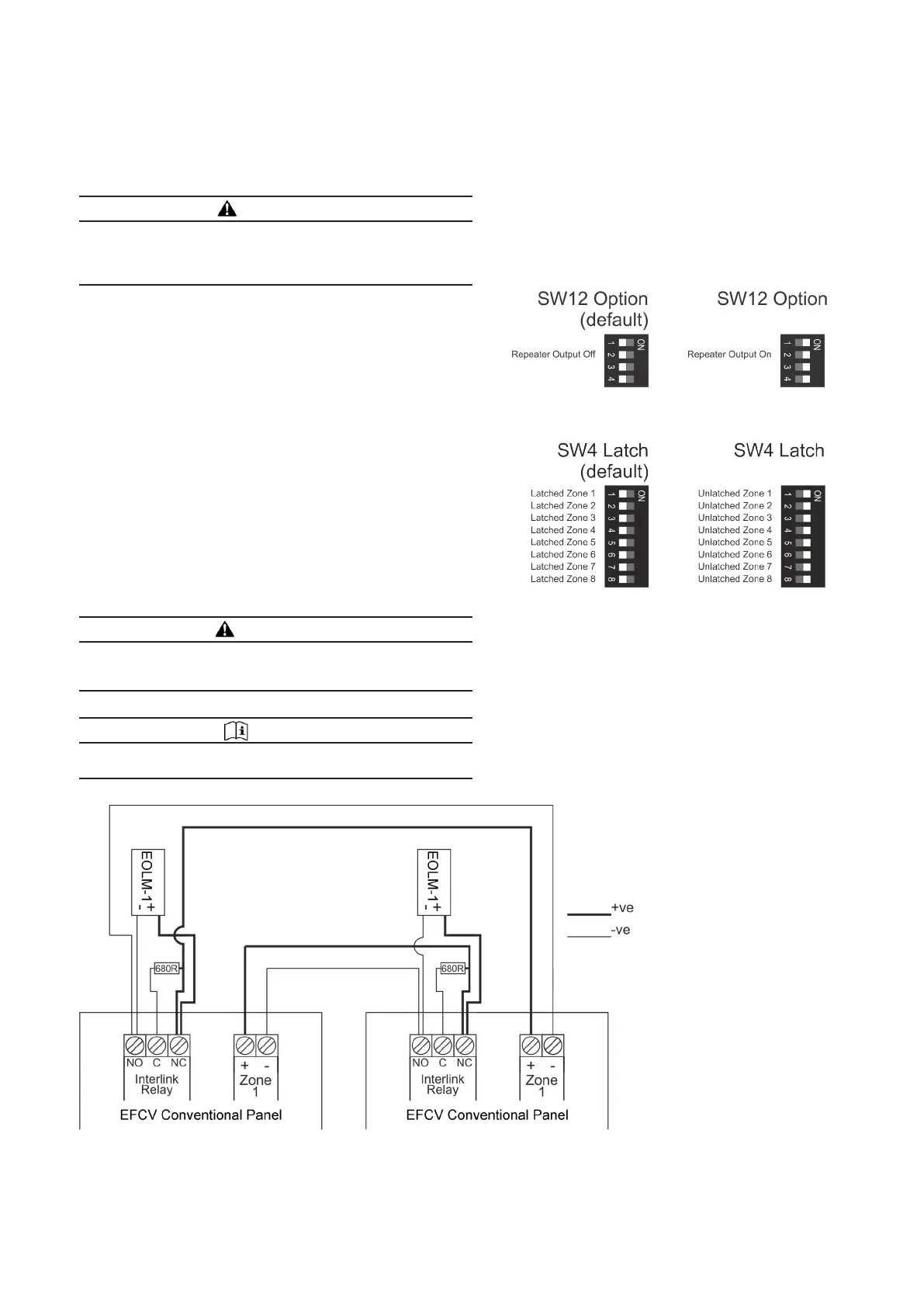
To enable the repeater output switch 2 of SW12 on the panel main
board must be changed to the Repeater Output On setting (see
Figure 23).
Interlinking Two Panels
Wire the two panels together as shown in Figure 25.
The EOLM-1 must be fitted for the zone circuits on both panels to
be monitored for fault conditions.
The 680ohm resistor must be fitted so that the zone input will
detect the fire condition and activate its fire alarm devices.
In order for the interlink to operate correctly the zone inputs on
both panels being used for interlinking must be set to unlatched,
therefore the associated switch on SW4 must be set to the
Unlatched Zone x
setting (see Figure 24).
WARNING
THE UNLATCHING SETTING IS NOT TO BE USED WITH
DETECTION ZONES AS THIS WILL MAKE THE PANEL NON-
COMPLIANT.
NOTE
NO OTHER DEVICES ARE TO BE CONNECTED TO A ZONE
CONFIGURED FOR INTERLINKING.
Figure 23. Repeater Output setting
Figure 24. Interlink settings
Figure 25. Interlink wiring diagram
Technical Data 25-16733-A
Effective
October 2019


 To Next Page
 Loading...