Unlock the Ignition Switch in an Emergency
#
Set up to ID number input mode
1.
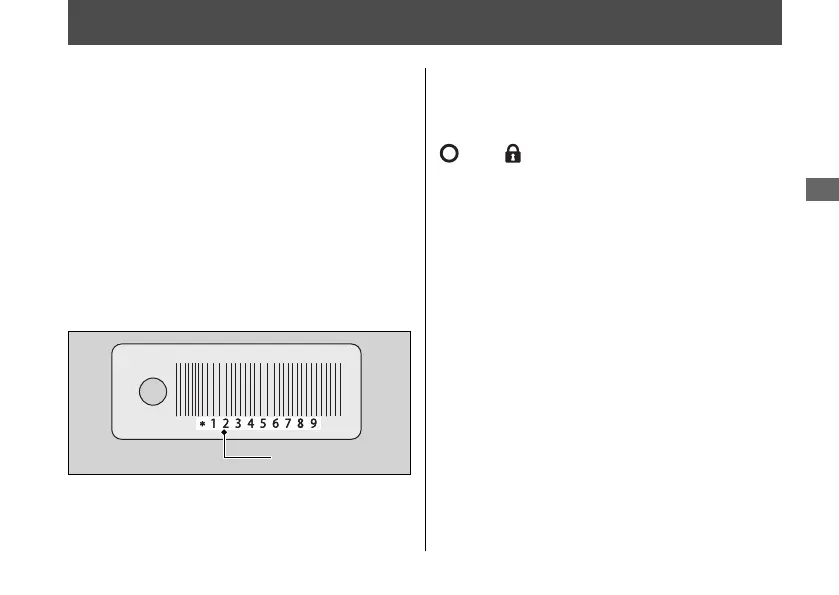
Check the ID number on the ID tag.
2.
Press and hold the ignition switch for
more than 4 seconds.
u The Honda SMART Key indicator
flashes.
3.
Press the ignition switch while the Honda
SMART Key indicator is flashing.
u The Honda SMART Key indicator stay
lit, and the ID number input mode
turns on.
#
ID number input
You can input your ID number by pressing the
ignition switch when the ignition switch is
(Off), (Lock) and SEAT position. Input
the ID number on the ID tag in order from the
left in turn by pressing the ignition switch.
The ID number is authenticated according to
the number of times the ignition switch is
pushed.
Push the ignition switch the desired number
of times within 5 seconds when the Honda
SMART Key indicator comes on. After 5
seconds, the Honda SMART Key indicator
goes off and comes on again. This means
that the inputted number is fixed, and you
can input the next number.
u
If the Honda SMART Key indicator does not
come on, the battery may be low.
Contact your dealer.
20220404183646_32K2SD000_eng_BOOK Page 122 Monday, April 04 2022 18:39:28 JST
Troubleshooting
119
Continued
ID number


 To Next Page
 Loading...