4 Unpacking the Equipment
This chapter describes how to unpack and check the delivered equipment to ensure that all the
materials are included and intact.
Context
NOTE
When transporting, moving, or installing the equipment, components, or parts, you must:
l Prevent them from colliding with doors, walls, shelves, or other objects.
l Wear clean gloves, and avoid touching the equipment, components, or parts with bare hands, sweat-
soaked gloves, or dirty gloves.
CAUTION
l After a cabinet or an BBU is unpacked, it must be powered on within 7 days.
l After an RRU is unpacked, it must be powered on within 24 hours.
Procedure
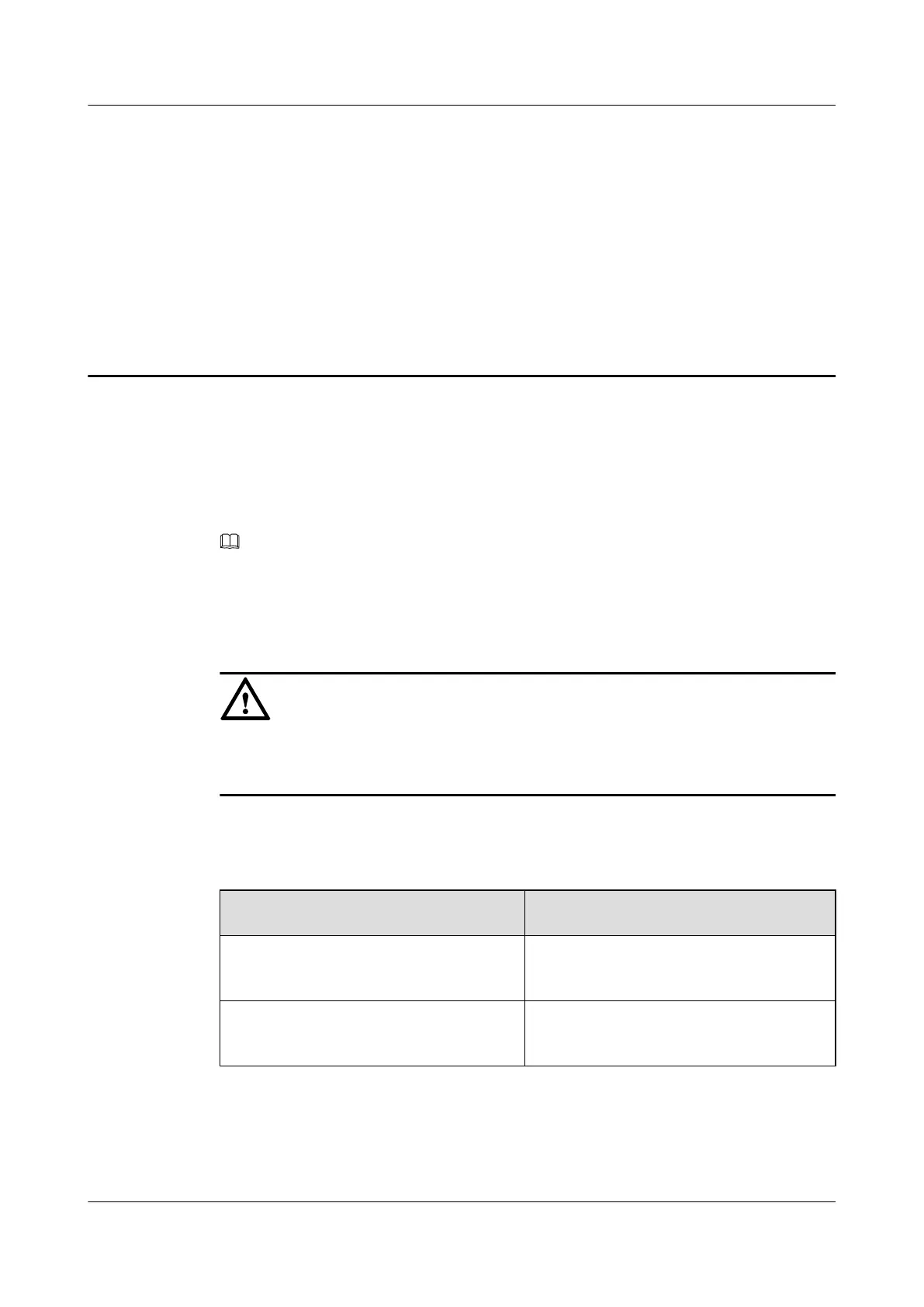
Step 1 Check the total number of articles in each case according to the packing list.
If ...
Then ...
The total number tallies with the packing
list
Go to Step 2.
The total number does not tally with the
packing list
Find out the cause and report any missing
articles to the local Huawei office.
Step 2 Check the exterior of the packing case.
RRU3201
Installation Guide 4 Unpacking the Equipment
Issue 06 (2012-04-16) Huawei Proprietary and Confidential
Copyright © Huawei Technologies Co., Ltd.
25


 To Next Page
 Loading...










