Component Names and Functions I 1-5
01
Component Names and Functions
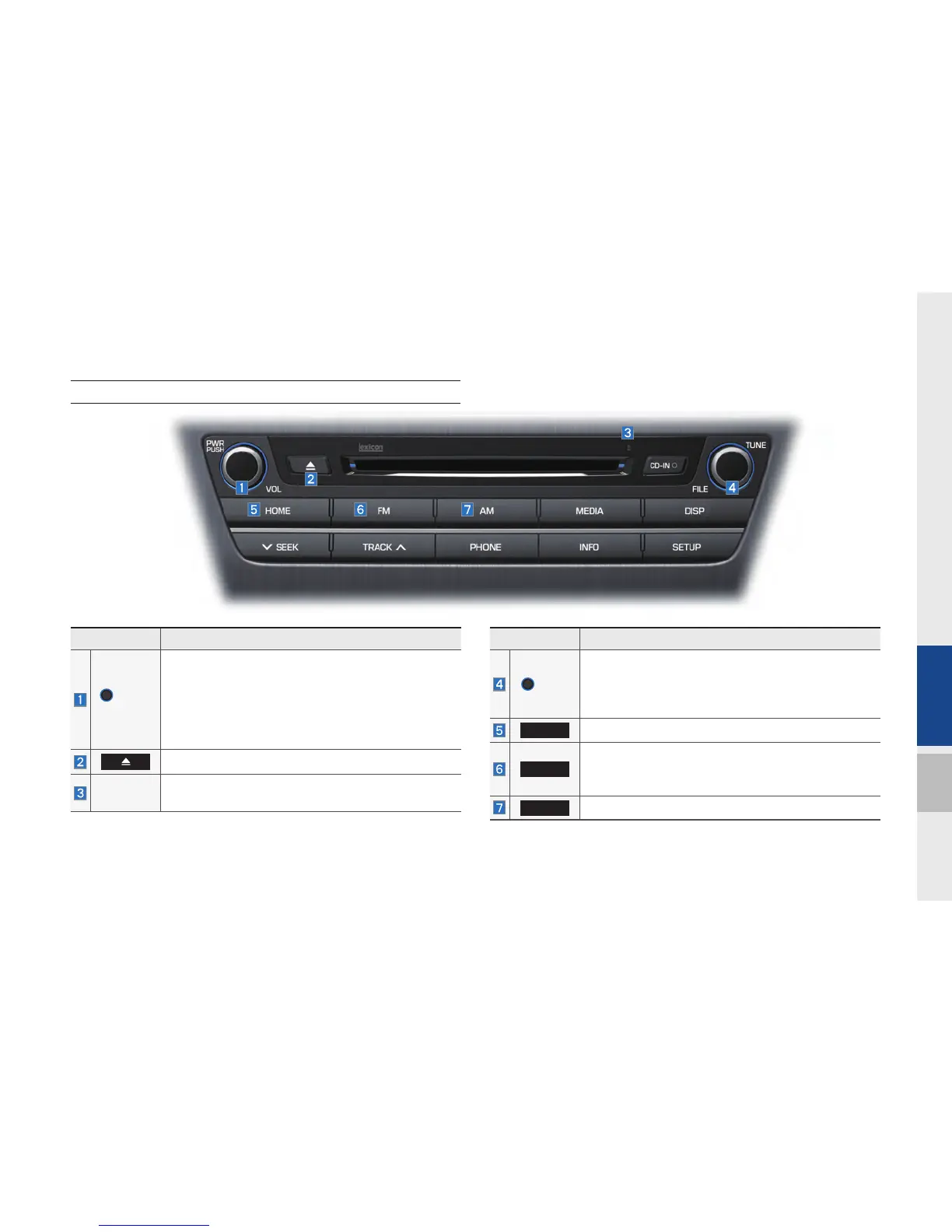
Head Unit
Name Description
PWR/
VOL
•
When power is off, press to turn power on
•
When power is on, press and hold (over 0.8 sec-
onds) to turn power off
•
When power is on, press shortly (under 0.8 sec-
onds) to turn Audio off
•
Turn left/right to control volume
Press to insert or eject disc
RESET
Resets the system settings. (Preset radio channels
and other data will not be deleted.)
Name Description
TUNE
•
FM/AM mode : changes the frequency
•
MEDIA (Disc/USB/iP
od/My Music) mode :
changes the track, file or title(except USB Image,
Bluetooth A
udio and AUX)
HOME
Converts to HOME mode
FM
Converts to FM mode
•
Each time the key is pressed, the mode is
changed in order of FM1
→
FM2
→
FM1
AM
Converts to AM mode
H_DH_G4.5[L]AV PART1.indd 1-5H_DH_G4.5[L]AV PART1.indd 1-5 2014-07-02 오후 4:56:252014-07-02 오후 4:56:2


 To Next Page
 Loading...