Bluetooth Connection I 3-5
03
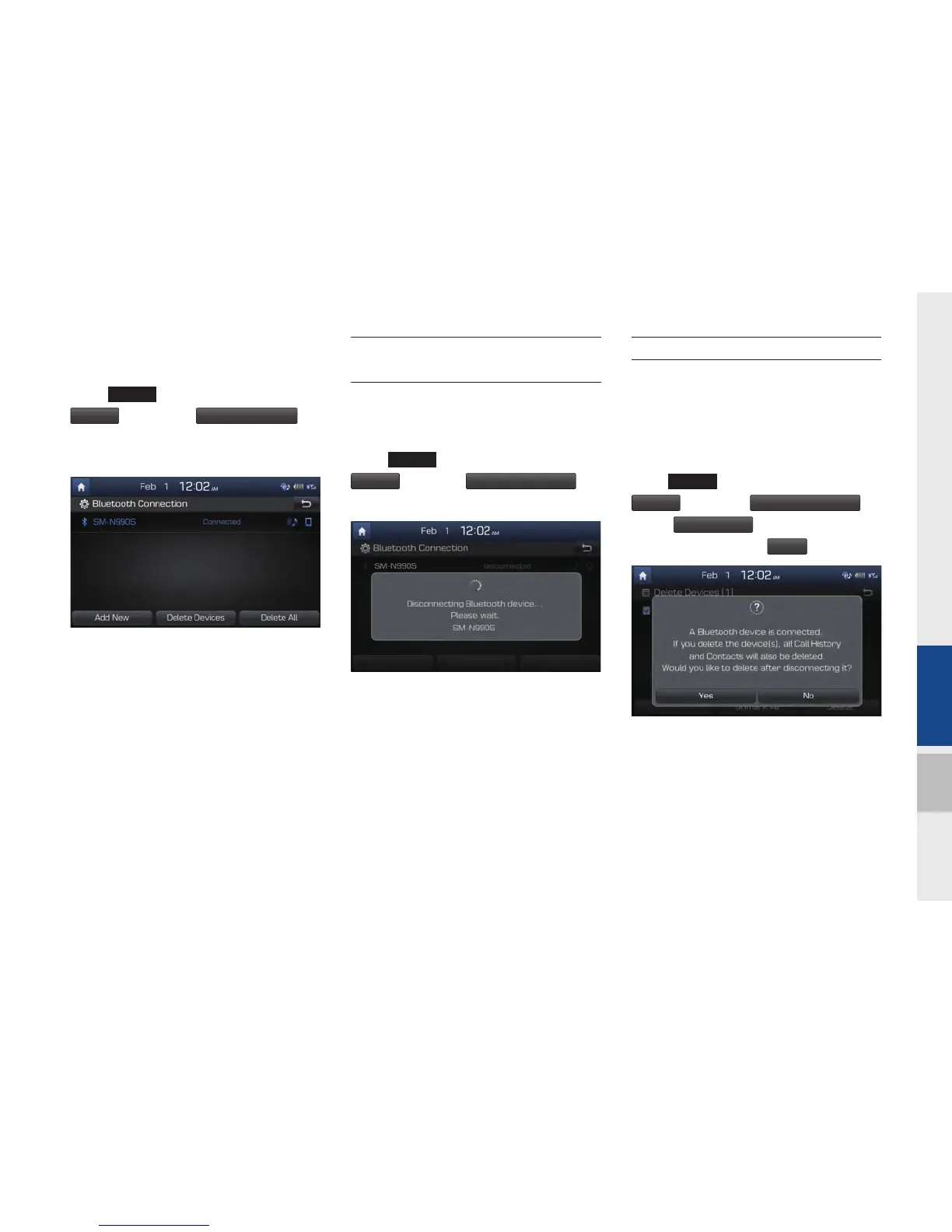
Connecting Devices Through the
Phone Settings
Select
SETUP
key in the head unit.
▶
Select
Phone
.
▶
Select
Bluetooth Connection
.
▶
Select the name of the device to connect.
▶
Connect Bluetooth.
Disconnecting
Bluetooth Devices
Disconnects Bluetooth devices that are
connected.
Select
SETUP
key in the head unit.
▶
Select
Phone
.
▶
Select
Bluetooth Connection
.
▶
Select the name of the device to disconnect.
Deleting Bluetooth Devices
Deletes the Bluetooth devices that you
added. Note that deleting a Bluetooth
device will delete all Call History and
Contact Info downloaded along with it.
Select
SETUP
key in the head unit.
▶
Select
Phone
.
▶
Select
Bluetooth Connection
.
▶
Select
Delete Devices
.
▶
Select the device
name to delete.
▶
Select
Delete
.
H_DH_G4.5[L]AV PART3.indd 3-5H_DH_G4.5[L]AV PART3.indd 3-5 2014-07-02 오후 5:14:232014-07-02 오후 5:14:2


 To Next Page
 Loading...