4-2 I Other Features
Other Features
Climate Mode
Operating Climate Mode
Press the
CLIMATE
key for the climate system to see status infor-
mation in the full screen display.
While multimedia is in use, the climate system information will be
displayed over top when you control the temperature (TEMP) or
turn on the air conditioner (A/C).
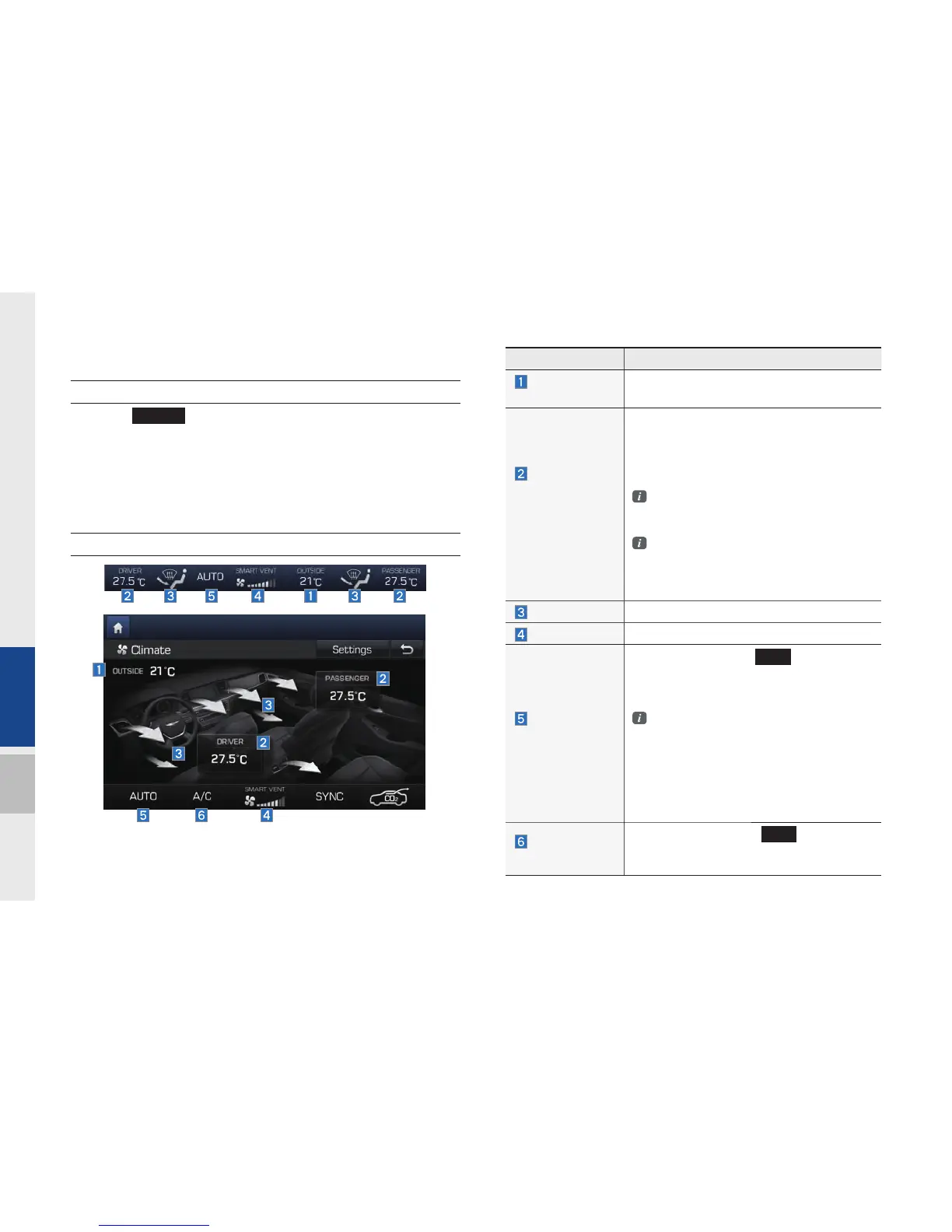
Basic Mode Screen
Name Description
Outside
Temperature
Displays the current temperature outside the
vehicle
Set the tem
perature of the
driver's seat
and passenger
seats
Displays the configured temperature settings
for the driver's seat and the passenger seats.
Cooling and heating will continue until the
temperature matches the configured tem-
perature settings.
The internal temperature can be cotrolled
in increments of 0.5°C within a range of
17.5°C to 31.5°C.
LOW is displayed when the temperature
is set to anything below 17.5°C, and
HIGH is dis pla
yed when it is set to
anything above 31.5°C.
Air direction Displays the configured air direction settings.
Air volume Displays the configured air volume settings
Cooling/
heating control
status (AUTO)
It is displayed when the
AUTO
key is selected,
and cooling/heating operates automatically
according to the configured temperature set-
tings
AUTO will be off when you try do the fol
low ing with AUTO on:
- Control the air volume
- Control the air direction
- Turn on/off the air conditioner (A/C)
- To turn on the moisture removal
function for the windshield
Air conditioner
control status
It is displayed when the
A/C
key is
selected and the air conditioner starts cool-
ing/heating.
H_DH_G4.5[L]AV PART4.indd 4-2H_DH_G4.5[L]AV PART4.indd 4-2 2014-07-02 오후 5:16:152014-07-02 오후 5:16:1


 To Next Page
 Loading...