About USB I 2-19
02
Supported Video Image Specifi cations
i
Information
• The playback timestamp may appear incorrectly for files with variable
bitrates.
• If you get errors during playback or your file’s format is not supported
for video playback, please convert the format of the fi le using up-to-date
software such as Gom Encoder, Umile Encoder, and Daum Pot Encoder.
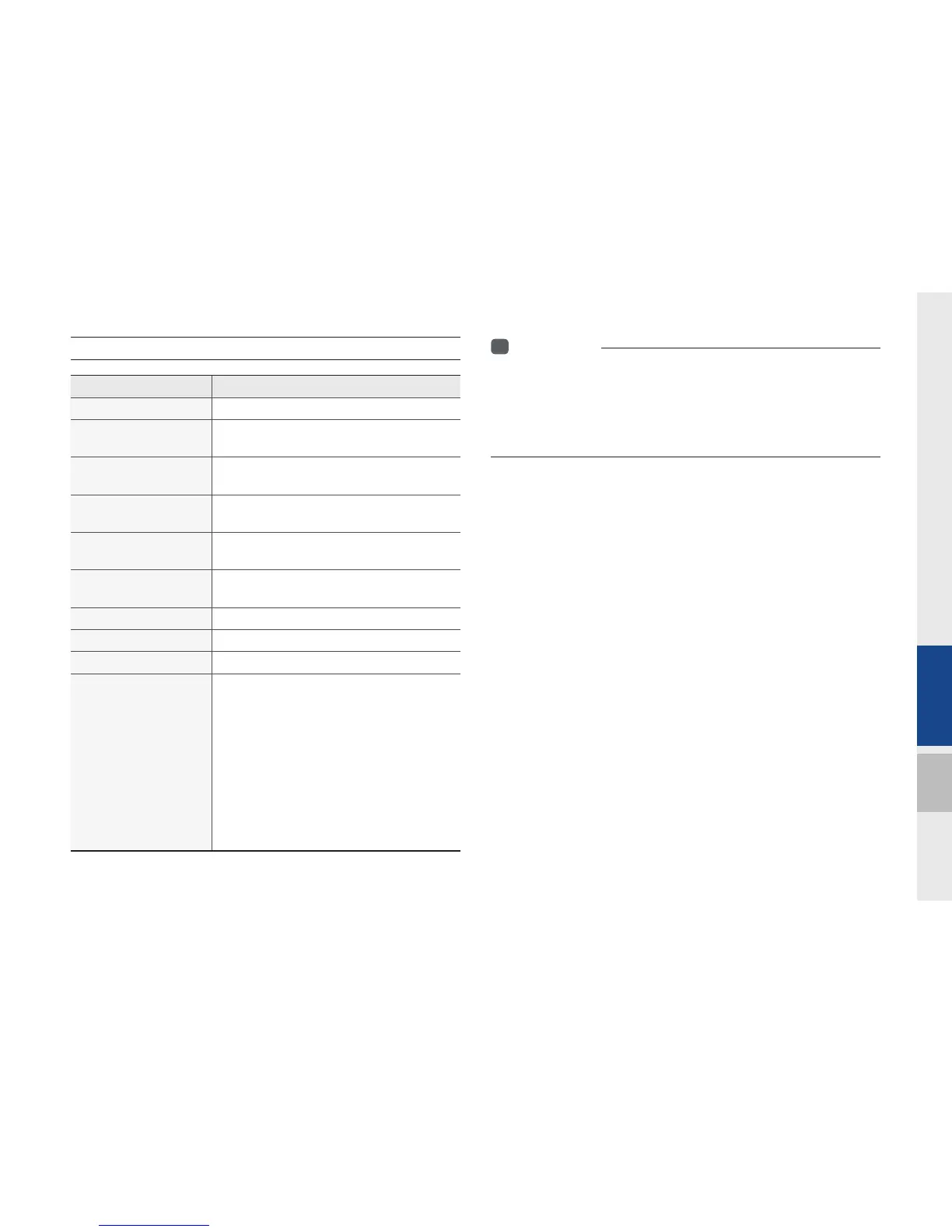
Name Description
File format AVI (DIVX), MPEG, 3GP, WMV
Image format
JPG, GIF, BMP, PNG (animated GIF, etc.
are not supported)
Extension
.avi, .divx, .mpg, .mpeg, .mp4, .3gp, .3gpp,
.3gpp2, .wmv, .asf
Supported image res-
olution
5M pixels for JPG, BMP, PNG (1M pixels
maximum for GIF)
Supported image file
size
5M pixels for JPG, BMP, PNG (1M pixels
maximum for GIF)
Video codec
DivX3/4/5/6. XviD, MPEG1/4 (excluding
MPEG2), H264, WMV9
Video resolution DivX: 720 x 576, MPEG: 720 x 576
Audio codec MP3, OGG, WMA…
Subtitles SMI
Files not supported for
playback
Files which do not conform to the sup-
ported specifications
Modified files (files with changed formats)
Converted files (e.g., an AVI file encoded
in the WMV video codec)
DivX files which are encoded in MJPEG,
H.263
Files without indexes
Other requirements are based on DivX’s
certification standards (screen display
specifications and playback specifications)
H_DH_G4.5[L]AV PART2.indd 2-19H_DH_G4.5[L]AV PART2.indd 2-19 2014-07-02 오후 5:11:242014-07-02 오후 5:11:2


 To Next Page
 Loading...