– 61 –
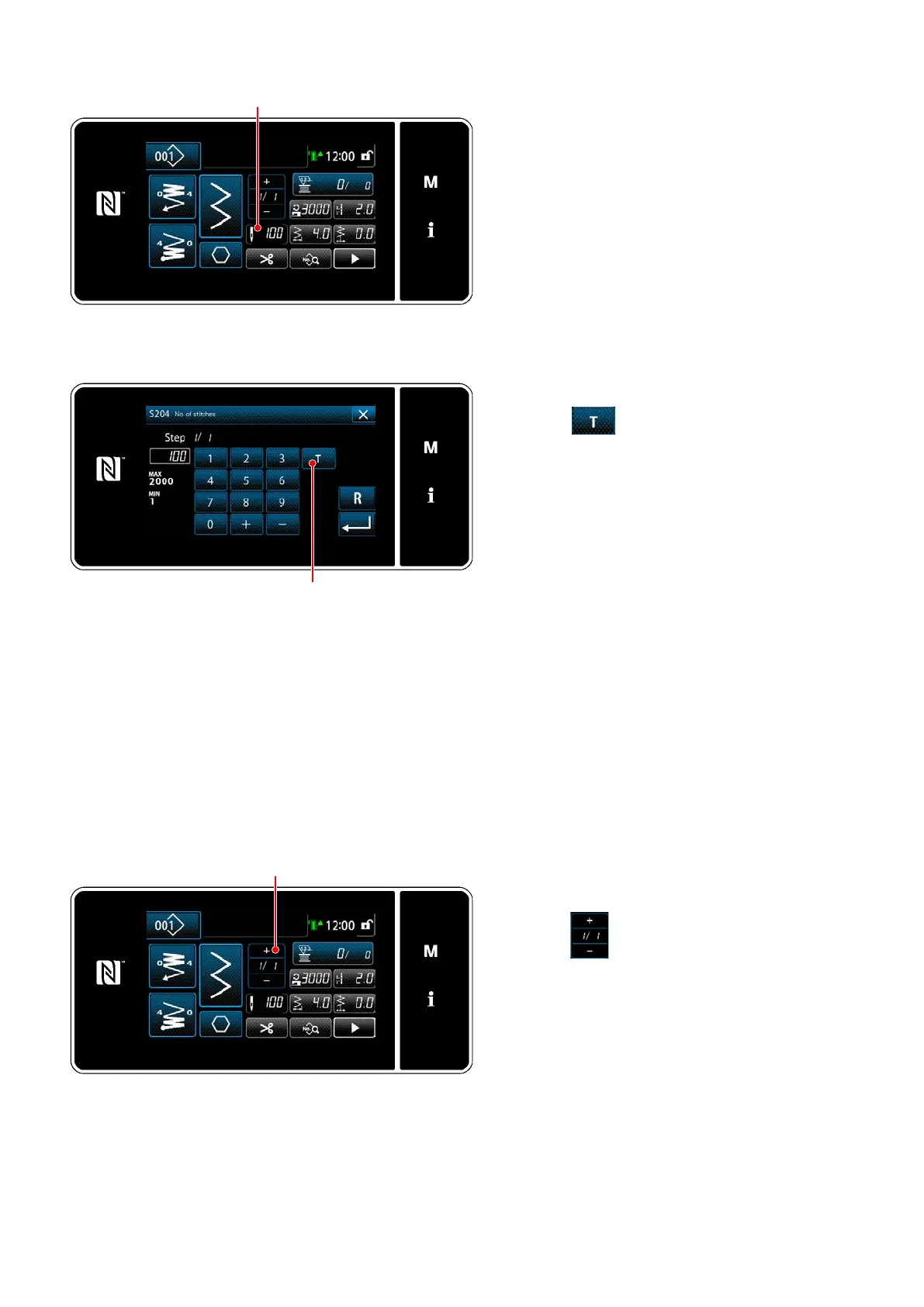
(2) How to set (polygonal-shape stitching)
Displaying the number of stitches input
screen
Press
on the sewing data list screen.
Then, the "number of stitches input screen" is
displayed.
Turning ON the teaching function
Press
to turn ON the teaching func-
tion.
Starting teaching
The input value is set to 0 (zero). Carry out
sewing until the needle entry position at which
you want to nish sewing by depressing the
pedal. Then, count the number of stitches
sewn using the teaching function.
Conrming the teaching content
Carry out sewing until the end (last stitch)
of sewing step is reached. Then, carry out
thread trimming to conrm the content of
teaching.
Return the current screen to the "sewing
screen (polygonal-shape stitching) (mainte-
nance personnel mode)".
<Number of stitches input screen>
<Sewing screen (polygonal-shape stitching)
(Maintenance personnel mode)>
Proceeding to the next step
When
is pressed, the sewing step is
proceeded to the next one.
Carry out the steps of setting procedure
through
in repetition.
* If there is no step available for registration,
the transition to the next step cannot be car-
ried out.


 To Next Page
 Loading...