ENGLISH
13OPERATIONS
• PHONEBOOK: Shows the 1st listed name/phone
number of the phone book of the unit = go to
the following step. To transfer the phone book
memory, see page 26.
• PRESET: Shows the list of preset numbers. =
go to the following step.
• DIAL NUMBER: Shows the phone number entry
screen
= “How to enter phone number” (see
the following).
• VOICE DIAL (Only when the connected cellular
phone has the voice recognition system): Speak
the name (registered words) you want to call.
* Displays only when the dialed or received number
is made through the unit.
4 Select the name/phone number you want to
call.
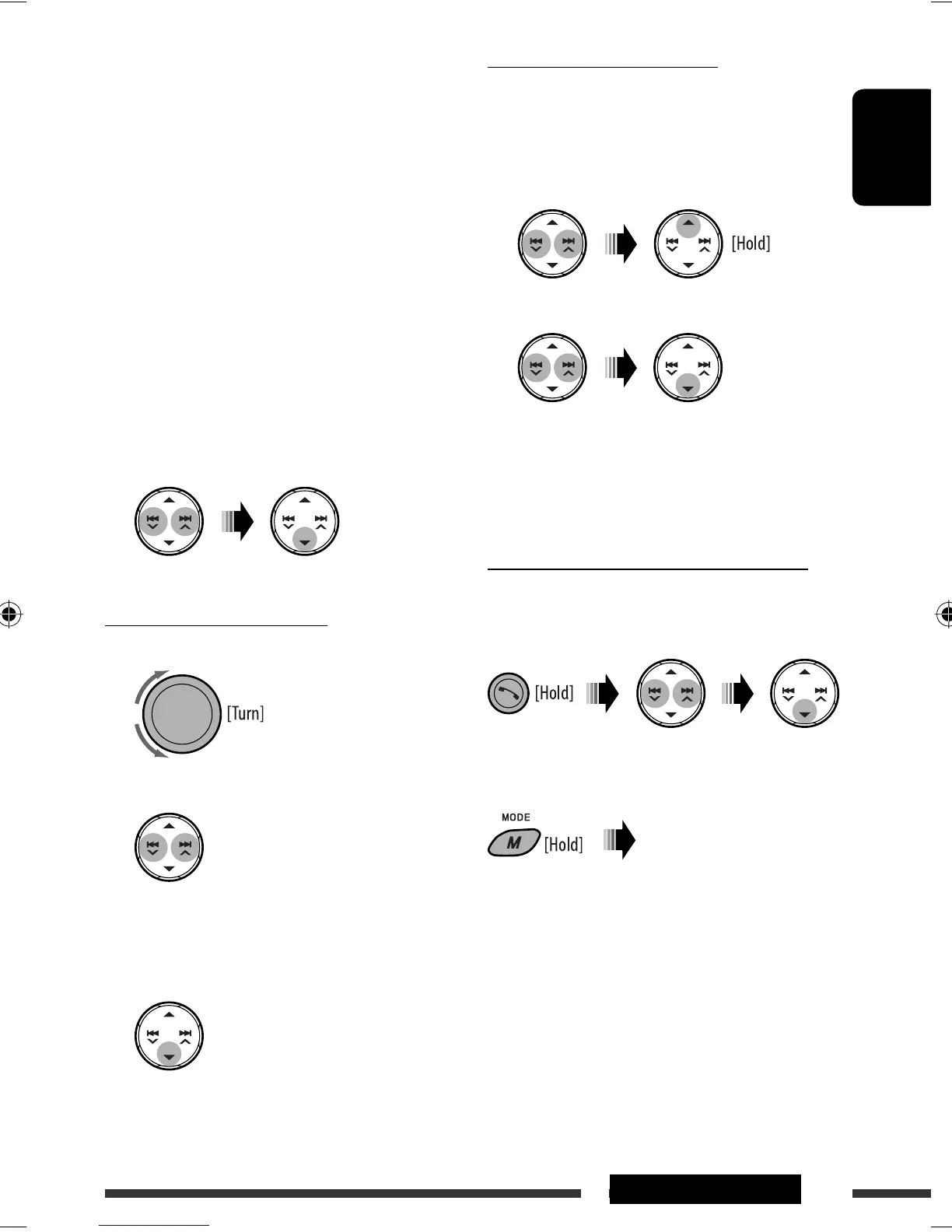
How to enter phone number
1 Select a number.
2 Move the entry position.
3 Repeat steps 1 and 2 until you finish
entering the number.
4 Confirm the entry.
To delete the phone numbers
• Make sure that the Bluetooth phone is connected.
1 Display the phone number you want to
delete by using one of the “CALL” items.
2 Select the phone number (or name).
3 Select “DELETE” or “DELETE ALL.”
DELETE: Deletes the selected phone number.
DELETE ALL: Deletes the phone number listed in
step 1.
• To cancel, press
5.
Direct operations to redial / Voice Dialing
You can use the following functions regardless of the
current source.
To redial
To activate Voice Dialing
You can make a call by your voice.
Speak the name (registered
words) you want to call
slowly and clearly.
Continued on the next page
EN08-15_KD-BT11[J]f.indd 13EN08-15_KD-BT11[J]f.indd 13 11/30/07 3:21:34 PM11/30/07 3:21:34 PM



 To Next Page
 Loading...