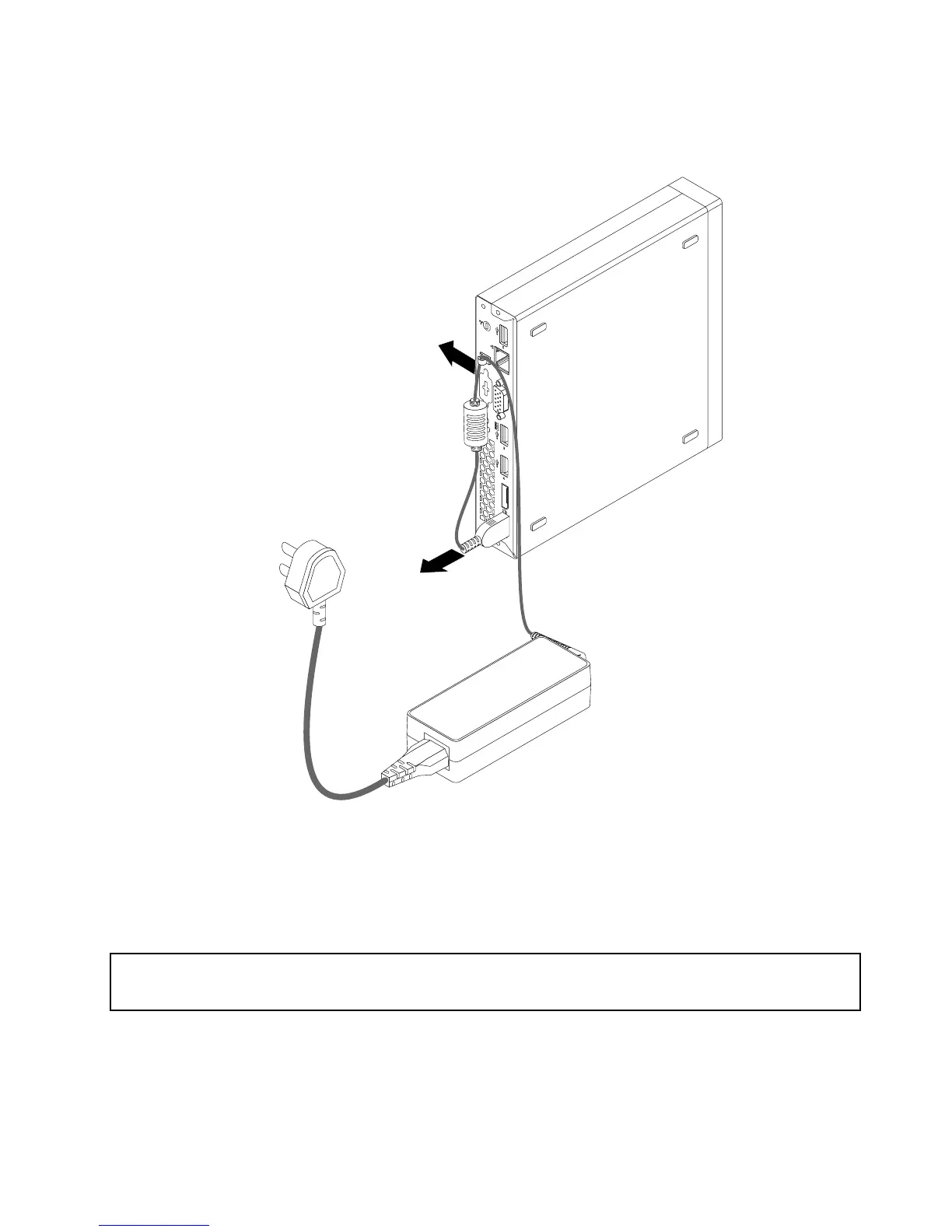
2.Removethepowercordfromtheacpoweradaptercableloopattherearofthecomputerandthen
disconnecttheacpoweradapterfromthecomputer.
Figure8.Disconnectingtheacpoweradapter
Whattodonext:
•Toworkwithanotherpieceofhardware,gototheappropriatesection.
Installingorremovingtheverticalstand
Attention:
Donotopenyourcomputerorattemptanyrepairbeforereadingandunderstandingthe“Importantsafetyinformation”
onpagev.
Thissectionprovidesinstructionsonhowtoinstallorremovetheverticalstand.
Note:TheverticalstandandVideoElectronicsStandardsAssociation(VESA)mountbracketareoptional
parts.IfyourcomputercomeswiththeVESAmountbracketinstalled,ensurethatyouremovetheVESA
mountbracketbeforeyouinstalltheverticalstand.ToremovetheVESAmountbracket,see“Installingor
removingtheVESAmountbracket”onpage33
.
Chapter5.Installingorreplacinghardware31





 To Next Page