10.UsetheSetupUtilityprogramtosetthedate,time,andanypasswords.SeeChapter7“UsingtheSetup
Utilityprogram”onpage87.
Replacingthepowerswitchboard
Attention:
Donotopenyourcomputerorattemptanyrepairbeforereadingandunderstandingthe“Importantsafetyinformation”
onpagev.
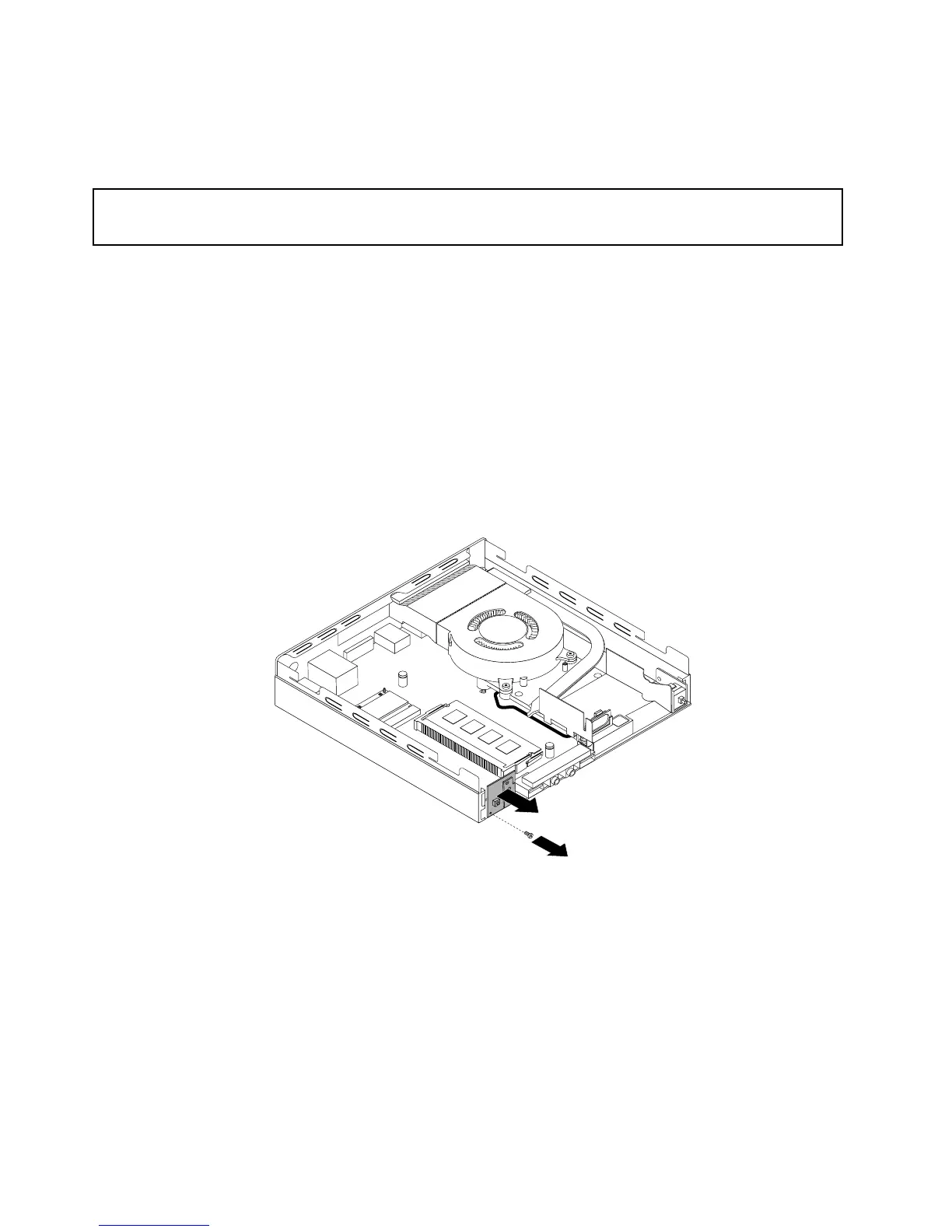
Thissectionprovidesinstructionsonhowtoreplacethepowerswitchboard.
Toreplacethepowerswitchboard,dothefollowing:
1.Turnoffthecomputeranddisconnectallpowercordsfromelectricaloutlets.
2.Removethecomputercover.See“Removingthecomputercover”onpage51.
3.Locatethepowerswitchboard.See“Locatingcomponents”onpage12.
4.Removetheharddiskdriveassembly.See“Installingorremovingtheharddiskdriveassembly”on
page53.
5.Disconnectthepowerswitchboardcablefromthecorrespondingconnectoronthesystemboard.
6.Removethescrewthatsecuresthepowerswitchboardtothecomputer,andthenpullthepower
switchboardtoremoveitfromthecomputer.
Figure47.Removingthepowerswitchboard
58ThinkCentreM73UserGuide


 To Next Page
 Loading...