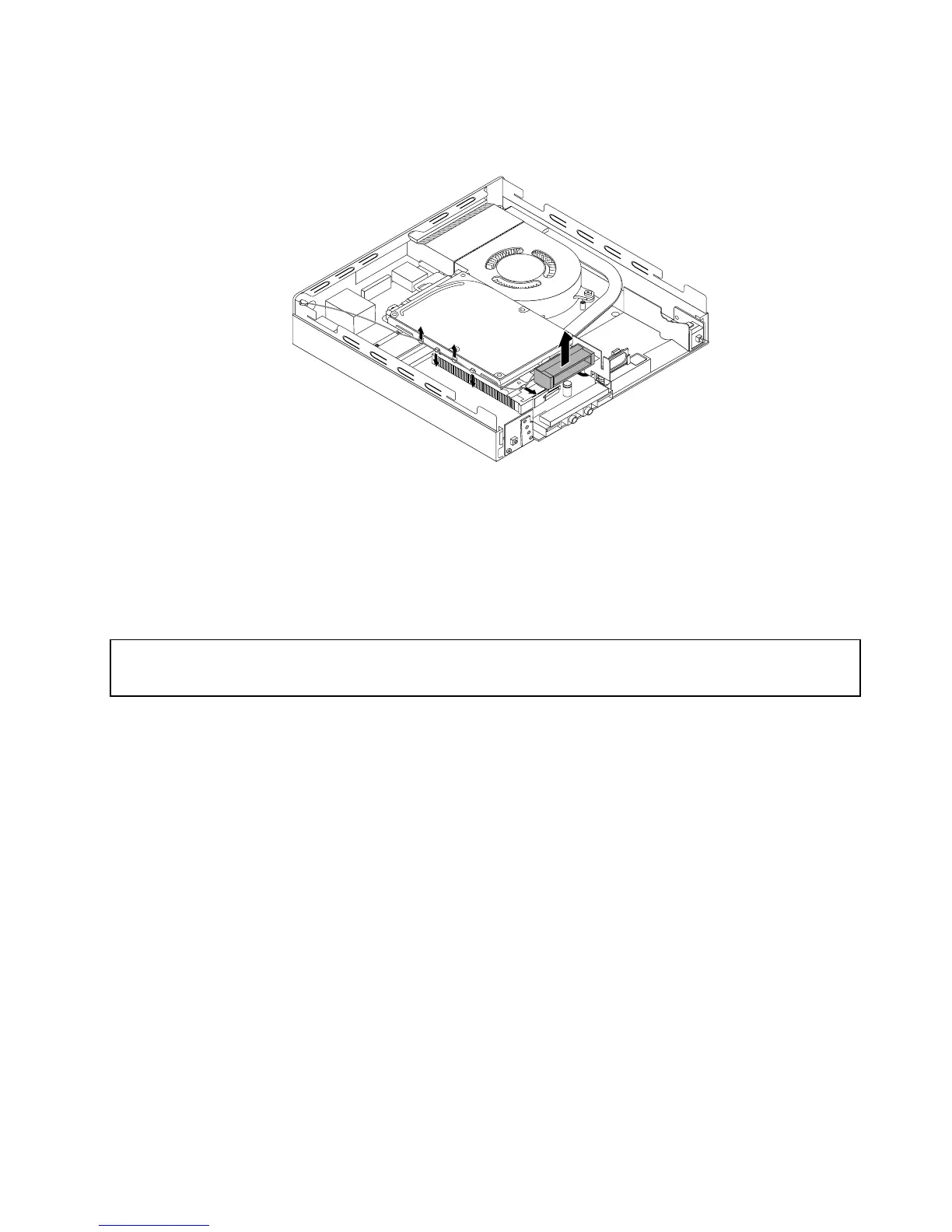
5.ReleasethefrontWi-Fiantennacablefromthehooksontheharddiskdrivebracket.Then,unstickthe
frontWi-Fiantennafromtheharddiskdrivebracket.
Figure57.RemovingthefrontWi-Fiantennacable
Whattodonext:
•Toworkwithanotherpieceofhardware,gototheappropriatesection.
•Tocompletetheinstallationorreplacement,goto“Completingthepartsreplacement”onpage76
.
InstallingorremovingtherearWi-Fiantenna
Attention:
Donotopenyourcomputerorattemptanyrepairbeforereadingandunderstandingthe“Importantsafetyinformation”
onpagev.
ThissectionprovidesinstructionsonhowtoinstallorremovetherearWi-Fiantenna.
Note:TherearWi-Fiantennaisonlyavailableonsomemodels.
ToinstalltherearWi-Fiantenna,dothefollowing:
1.Turnoffthecomputeranddisconnectallpowercordsfromelectricaloutlets.
2.InstalltherearWi-FiantennatotherearWi-Fiantennacableconnectorattachedontherearofthe
computer.
Chapter5.Installingorreplacinghardware63


 To Next Page
 Loading...