99
PARENTAL CONTROL / RATING
This function operates according to information from the
broadcasting station. Therefore if the signal has wrong
information, this function dose not operates.
Lets you set up blocking schemes to block specific chan-
nels and ratings.
A password is required to gain access to this menu.
This set is programmed to remember which option it was
last set to even if you turn the set off.
Recording and TimeShift Mode can be made even when
locked or rated.
When it is locked or rated with the delayed state, the
message “locked program” is displayed without display-
ing the password window.
In case of recording the locked programme or the rated
programme, the recorded programme will be a locked
programme unless you enter the password before the
recording is finished. If you want to play the locked pro-
gramme, you should enter the password.
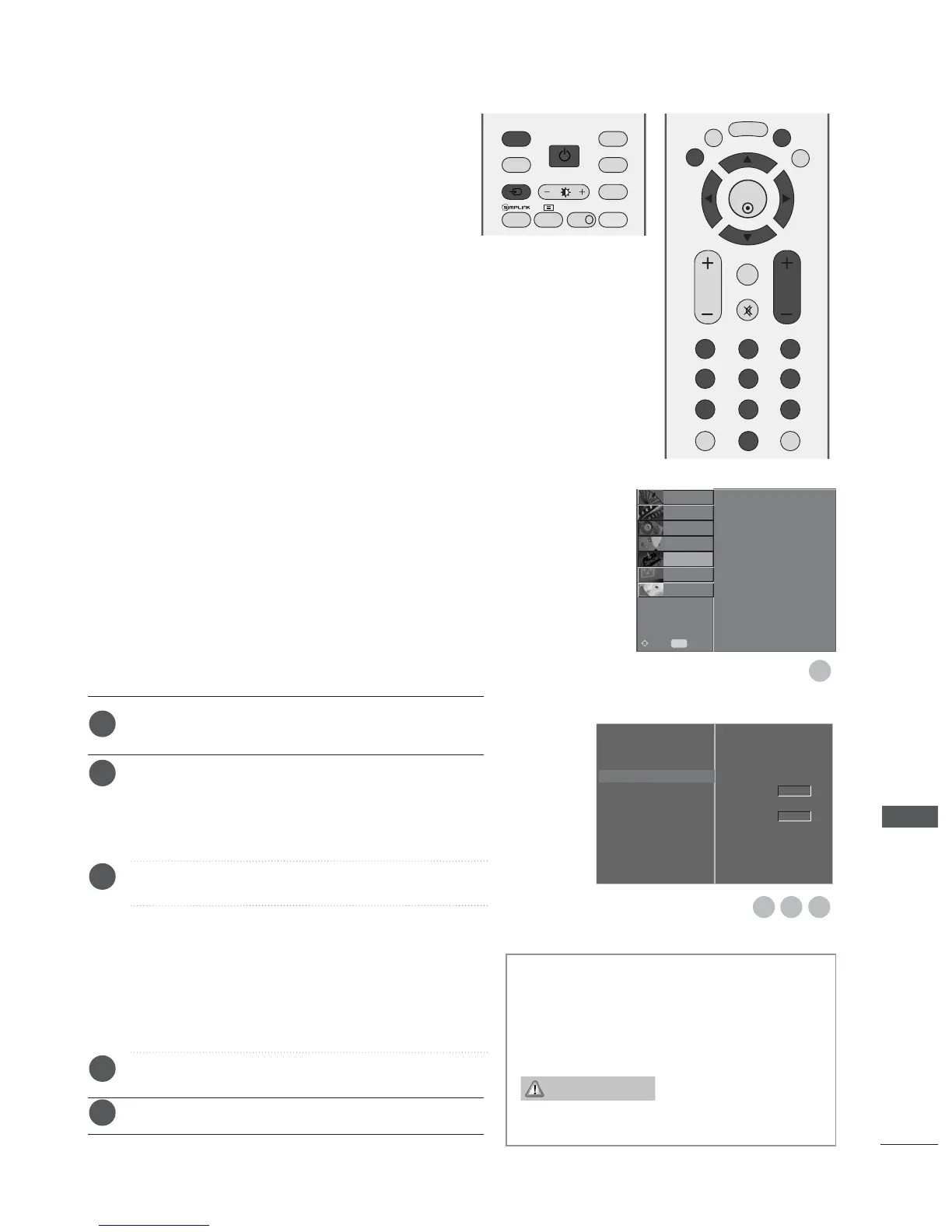
Press the MENU button and then
D
or
E
button to
select the OPTION menu.
Press the
G
button and then
D
or
E
button to select
Parental Control.
Then, press the
G
button to enter the password as
requested.
The TV is set up with the initial password “0-0-0-0”.
Press the
G
button and then
F
or
G
button to select
Parental Guidance or Key Lock.
PPaarreennttaall GGuuiiddaannccee
(In Digital mode only)
Prevents children from watching certain adult’s TV pro-
grammes, according to the ratings limit set.
KKeeyy LLoocckk
The set can be set so that the remote control is
needed to control it. This feature can be used to pre-
vent unauthorized viewing.
Press the
D
or
E
button to make appropriate adjust-
ments.
Press the
EEXXIITT
button to return to normal TV viewing.
PARENTAL CONTROL
Language
Country
Lock System
Parental Control
G
Input Label
SIMPLINK
Factory Mode
1
1
2
3
4
5
In
Key Lock
‘
On
’, if the set is turned off, press
the
r / I, INPUT, PR
D
or
E
button on the set
or POWER, INPUT,
DD //AA
, PR + or - or NUMBER
buttons on the remote control.
With the Key Lock On, the display
appears on the screen if
any button on the front panel is pressed
while viewing the set.
Parental Guidance
Key Lock
Off
Off
3 42
Language
Country
Lock System
Parental Control
Input Label
SIMPLINK
Factory Mode
SETUP
O
PICTURE
O
SCREEN
O
D V R
O
Prev.
MENU
Move
AUDIO
O
TIME
O
OPTION
G
Key Lock On


 To Next Page
 Loading...