EasyManua.ls Logo

LG 42PT85 - Sound & Language Control; Auto Volume Leveler

LG 42PT85
120 pages
Print Icon
To Next Page IconTo Next Page
To Previous Page IconTo Previous Page
Loading...
84
SOUND & LANGUAGE CONTROL
OK
EXIT
TIME
SHIFT
TIME
SHIFT
VOL PR
GUIDE
BACK MENU
DVR
MARK
FAV
1
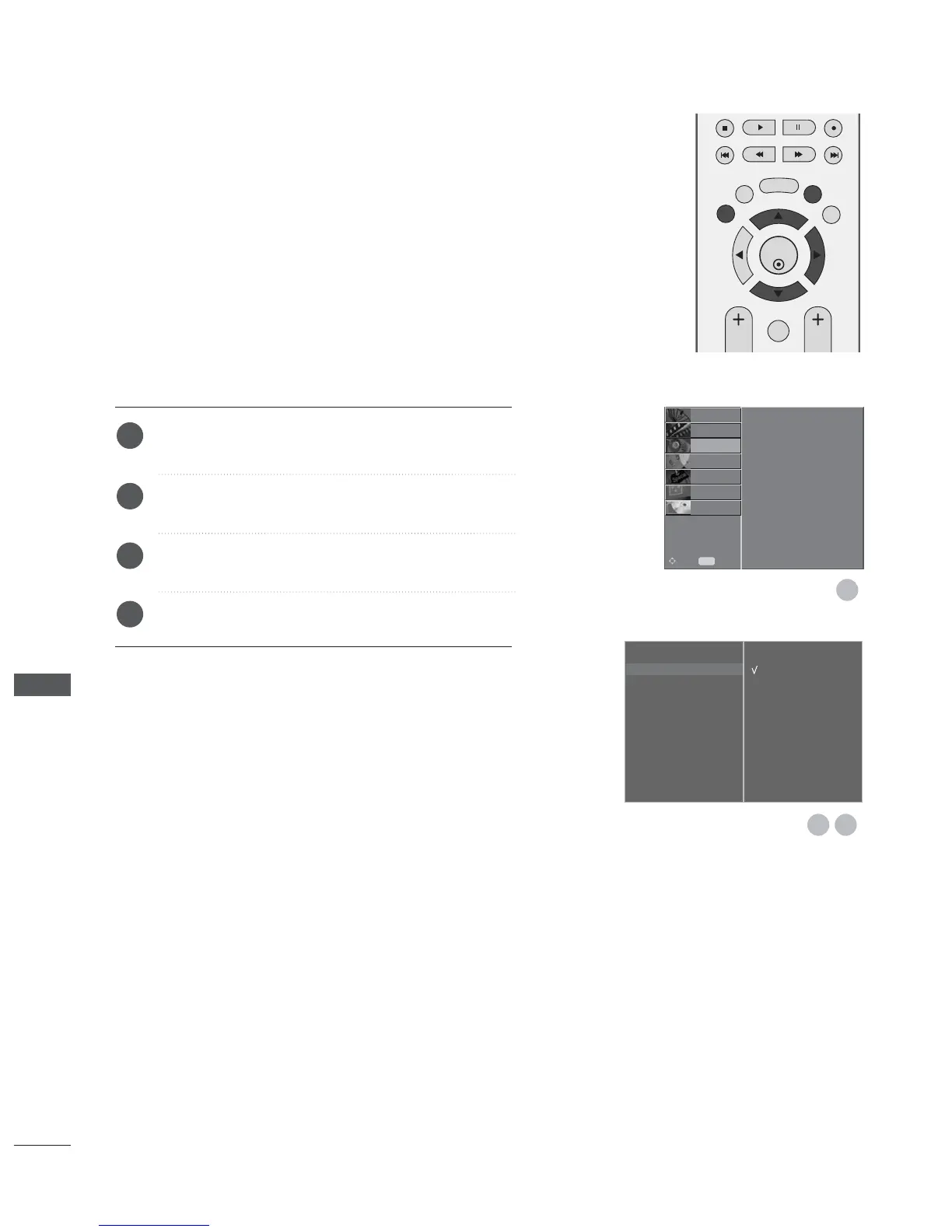
AVL automatically keeps on an equal volume level even if
you change programmes.
Press the MENU button and then
D
or
E
button to
select the AUDIO menu.
Press the
G
button and then
D
or
E
button to select
Auto Volume.
Press the
G
button and then
D
or
E
button to select
Off or On.
Press the EXIT button to return to normal TV viewing.
AUTO VOLUME LEVELER
Sound Mode
Auto Volume
G
Balance 0
TV Speaker
Digital Audio Out
Off
On
1
2
3
4
32
Sound Mode
Auto Volume
Balance 0
TV Speaker
Digital Audio Out
SETUP
O
PICTURE
O
TIME
O
OPTION
O
SCREEN
O
D V R
O
Prev.
MENU
Move
AUDIO
G
SOUND & LANGUAGE CONTROL

Table of Contents

Other manuals for LG 42PT85

Related product manuals