can also search a folder if you press SEARCH again.
2. Press OK or N to play the selected file. When you search a folder, press OK to select a file in the
folder, then press OK or N again. The selected file is played.
On the remote control
1. Press PRESET·FOLDER W/S or C/V repeatedly until a desired folder appears.
2. Press N to play it. The first file of folder will be played.
Note
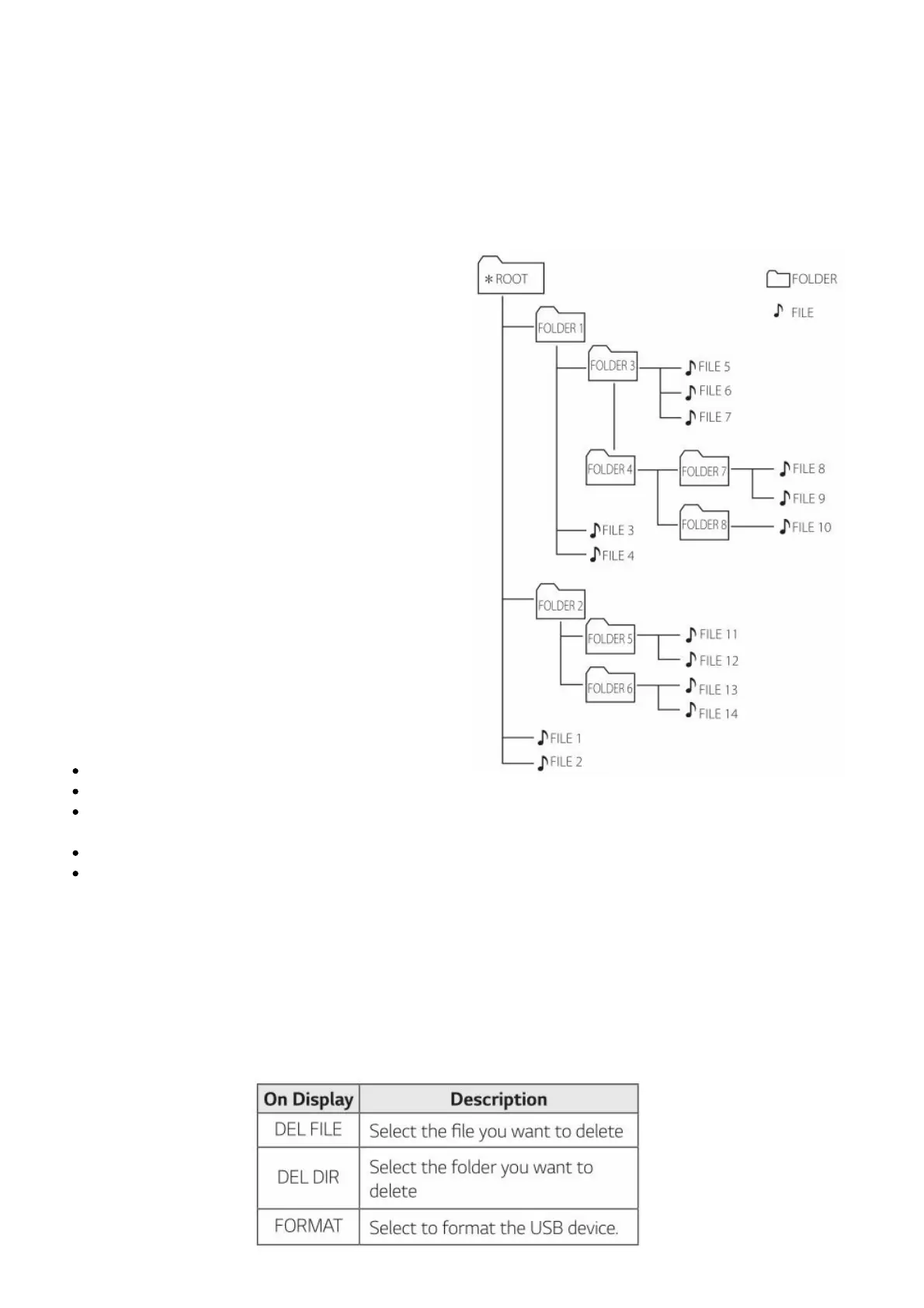
CD / USB Folders/Files are recognized as below.
If there is no file in a folder, the folder will not appear.
Folders will be presented as the following order;
ROOT → FOLDER 1 → FOLDER 3 → FOLDER 7 → FOLDER 8 → FOLDER 5 → FOLDER 6
File will be played from Music file No.1 to Music file No.14 one by one.
Files and folders will be presented in order recorded and may be presented differently according
to the record circumstances.
*ROOT : The first screen you can see when a computer recognize the CD/USB is “ROOT”.
Deleting a file/folder or format
You can delete file, folder on your USB or format the USB.
1. Select USB function by pressing F.
2. Press DELETE on the remote control repeatedly, the display changes as followings. DEL FILE →
DEL DIR → FORMAT If you want to exit the


 To Next Page
 Loading...