70
Connecting to a Printer
Connecting to Televisions, Computers, and Printers
j Connecting the USB Cable
• When connecting the USB cable, be sure that the connectors are oriented correctly. Do not
use force when connecting the USB cable. When disconnecting the USB cable, do not pull
the connector at an angle.
• Do not pinch the connector cover between the camera’s USB connector and the USB cable
connector when connecting the cable to the camera.
Printing Pictures One at a Time
After connecting the camera to the printer correctly (c 69), print pictures by
following the procedure below.
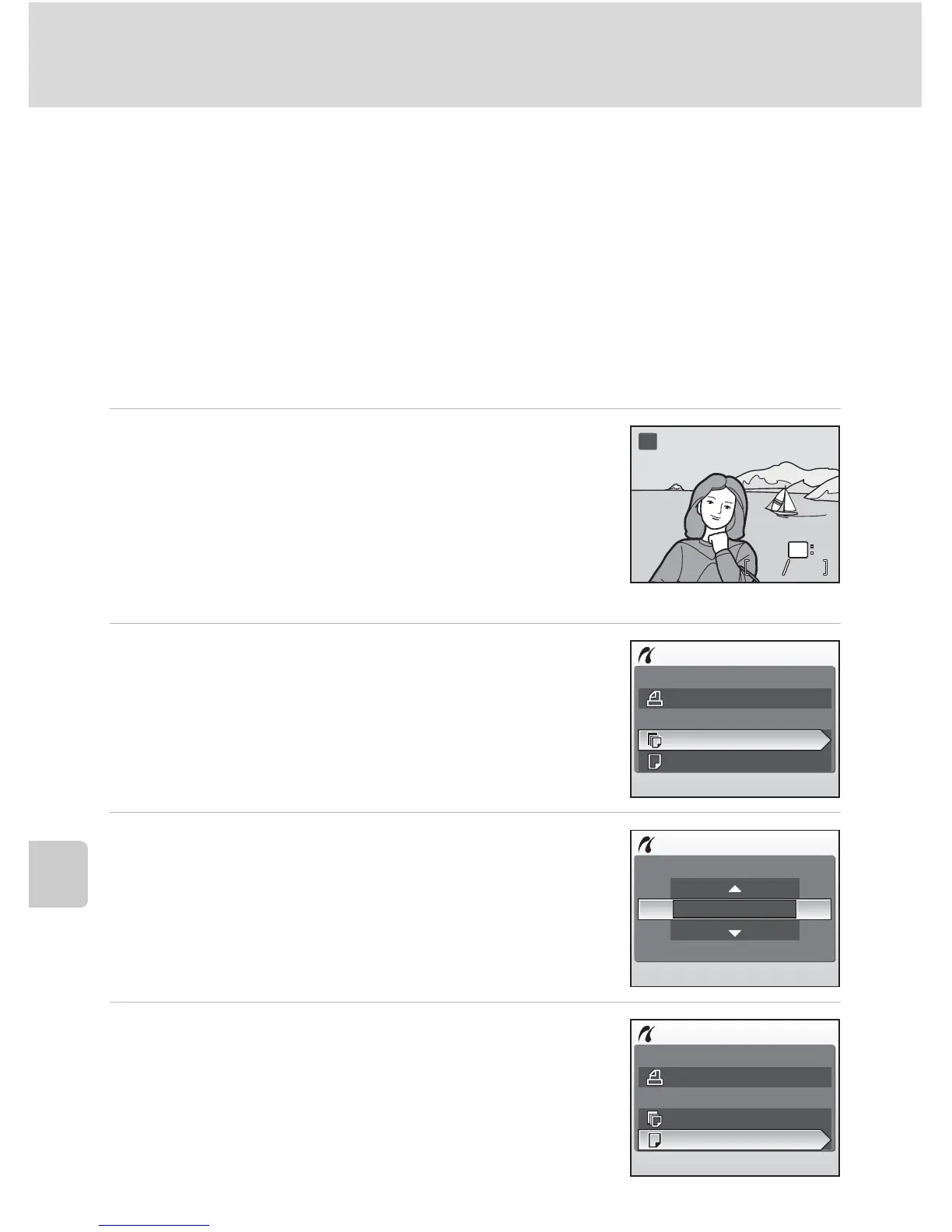
1 Press the multi selector GHIJ to
choose a picture and press d.
The PictBridge menu is displayed.
To choose a picture from a list of thumbnails, press
the zoom control t (j) and use the multi selector
to choose the desired picture, or press to v (k) to exit
to full-frame playback.
2 Press GH to choose [Copies] and press
d.
3 Press GH to choose number of copies
(up to 9) and press d.
Monitor display returns to the PictBridge menu
(step 2).
4 Press GH to choose [Paper size] and
press d.
44 44
ww
MM
v
OK
PictBridge
Start print
Copies
Paper size
Copies
8
PictBridge
Start print
Copies
Paper size


 To Next Page
 Loading...











