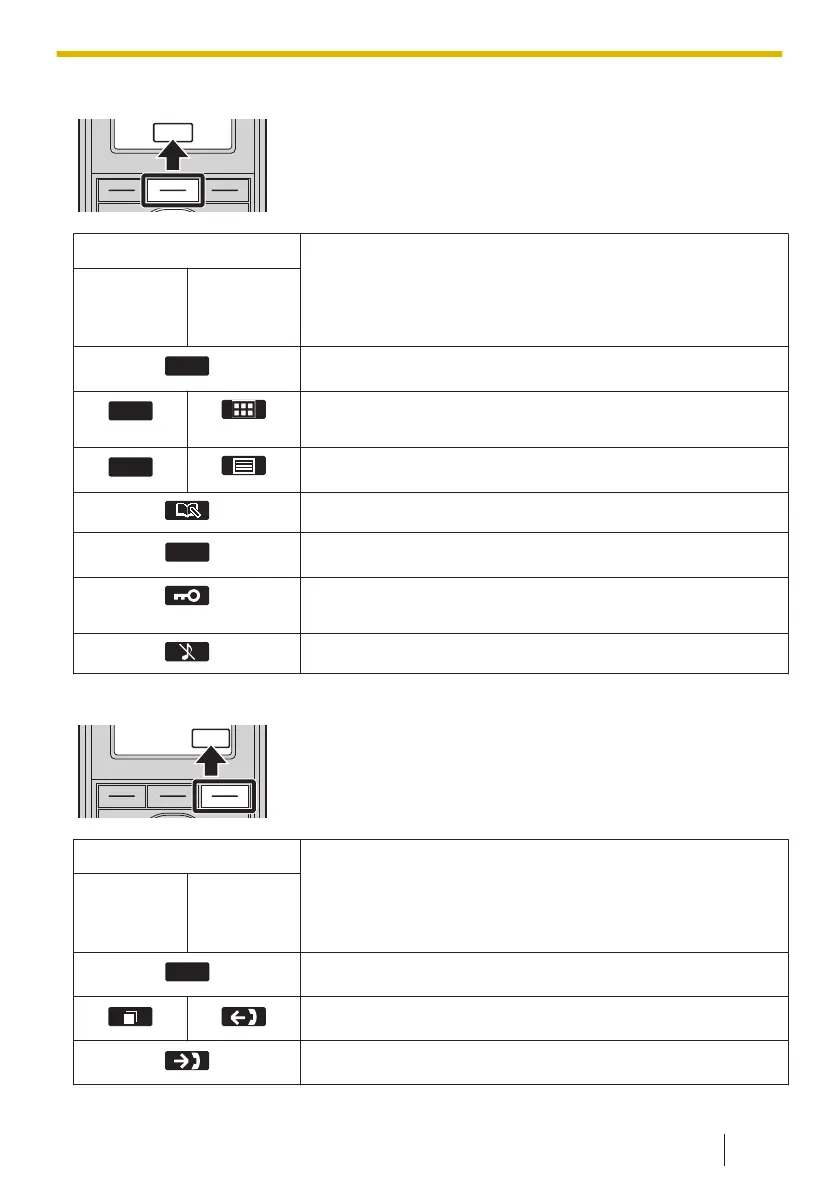
Soft Key B (Middle key)
Suffix
Meaning
(none)/C/L
A/LC/AG/
BR
A/UK/AL/
RU/CE
Confirms the entry.
Opens the main menu. When in standby mode, pressing
this key for more than 2 seconds locks all keys.
Opens the list menu (edit/delete in the phonebook, etc.).
Stores a new item in the phonebook.
Makes a call.
Displayed when in Key Lock mode. Pressing this key for
more than 2 seconds unlocks the keys.
Turns the ringer off.
Soft Key C (Right key)
Suffix
Meaning
(none)/C/L
A/LC/AG/
BR
A/UK/AL/
RU/CE
Advances to the next display.
Displays the Outgoing Call Log.
Opens the Incoming Call Log.
2.4.3 Soft Keys (KX-TPA60/KX-TPA65)
53


 To Next Page
 Loading...