43
English
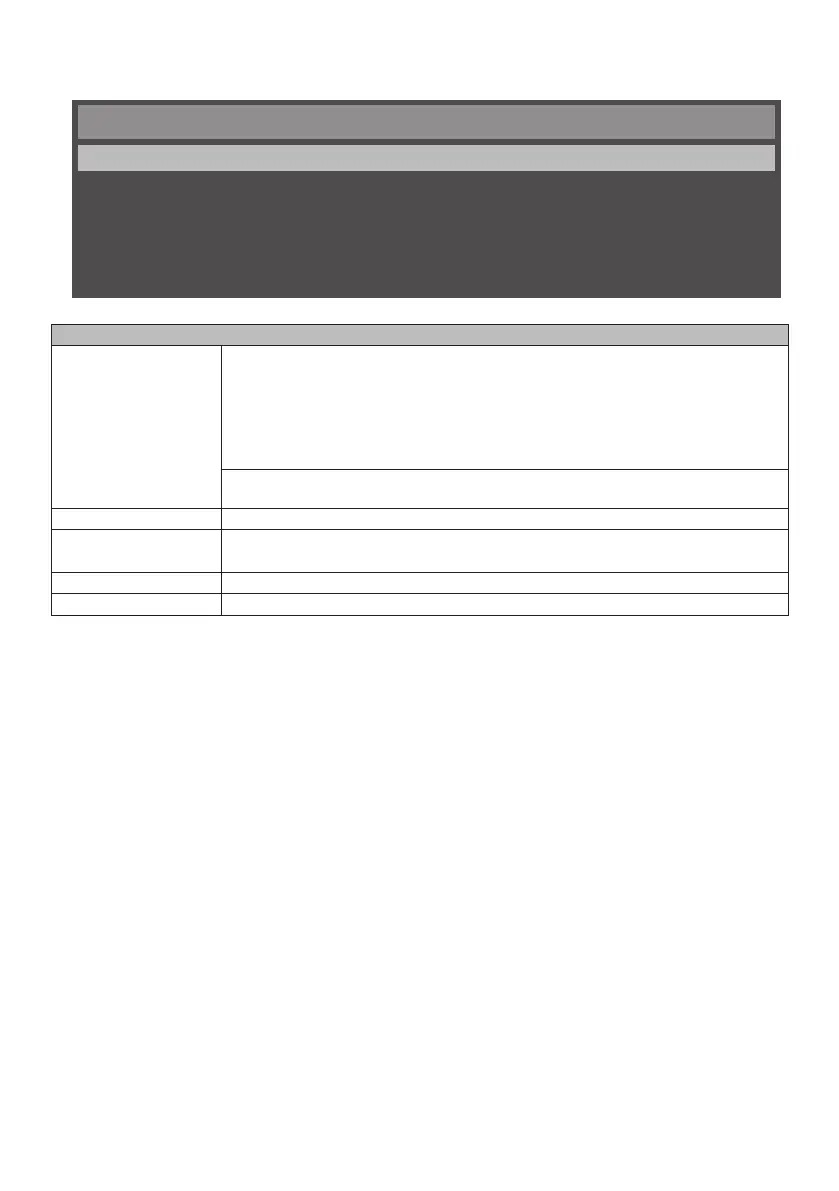
■ Menu screen of sound
You can adjust sound by either selecting [Sound] in the [Main Menu] and pressing the [OK] button of the remote
control, or by displaying the [Sound] menu with the [SOUND] button of the remote control.
Sound
Sound Mode
Surround Sound
Output Select
Audio Source
Reset Audio Setting
Dynamic
Off
EXT SP
HDMI1
Menu screen of sound
[Sound Mode] You can go to the [Sound Mode] menu by using the [OK] button of the remote control
and you can change to the following modes.
[Sound Style]: You can select the mode that is suitable to the audio.
[Standard]: Factory default setting
[Dynamic]: Setting for emphasizing audio
[Custom]: Use the custom audio settings saved earlier
You can adjust high volume, low volume, and balance that decide the audio style.
Adjusting this will store the value as [Sound Style: Custom].
[Surround Sound] Turns on / off the surround sound.
[Output Select] [EXT SP]: Audio will be output from the speaker connected to the EXT SP terminal.
[AUDIO OUT]: LINE OUT signal of audio will be output from the AUDIO OUT terminal.
[Audio Source] Either [AUDIO IN / HDMI1] or [AUDIO IN / HDMI2] is selected as the audio source.
[Reset Audio Setting] Settings will be restored to the factory default settings.


 To Next Page
 Loading...