PDR-7000 Operation Manual
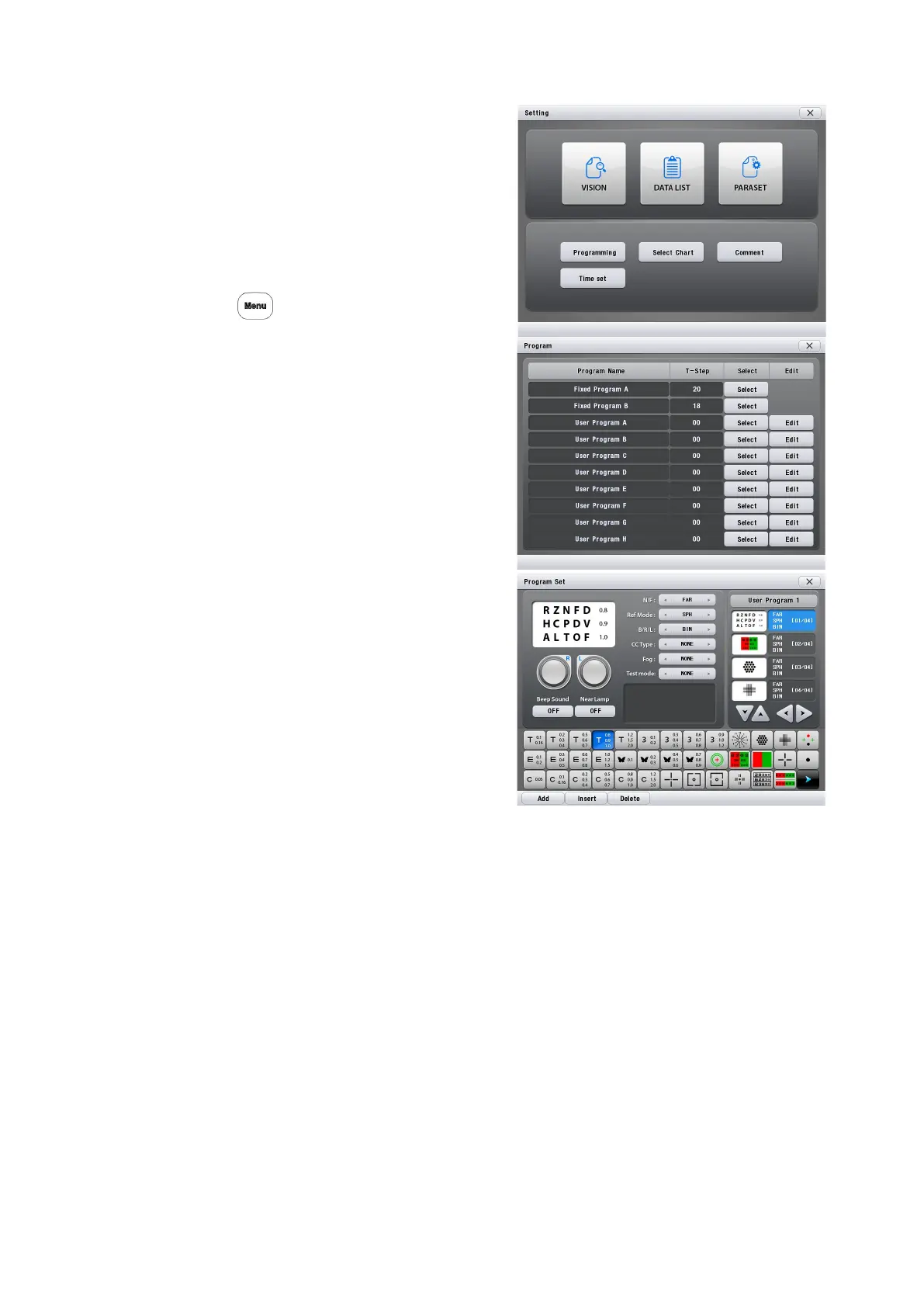
3.10.1 Programming
To program Fixed Program A or B, set
these programs to User beforehand.
1. Display the Programming screen.
Call up the Main Menu screen.
Press
2. Press [Programming].
[Select] : Selecting preset program
[Edit] : Editing the selected program
3. Select the program to be changed or
programmed.
Press [Edit] button of the desired
program.
The contents of the selected program
are
displayed. (When the program is empty,
each step button is blank.
4. Select the step button to be written or changed.
5. Select a desired chart to be programmed.
Select the chart with the chart button.
6. Select a mode and message to be set with the chart.
Press the desired items.
• Set the auxiliary lenses and fog amount.
• Also set the mask functions (horizontal and vertical lines, single letter) and the red-green
filter.
The following items are programmable.
• Chart (including the mask functions)
• Far or near mode
- 46 -


 To Next Page
 Loading...
