Chapter
5
102
5-1 Preparing for Recording
Chapter 5 Recording/Playback
Recording/Playback
5-1 Preparing for Recording
5-1-1 Setting Switches and Menus
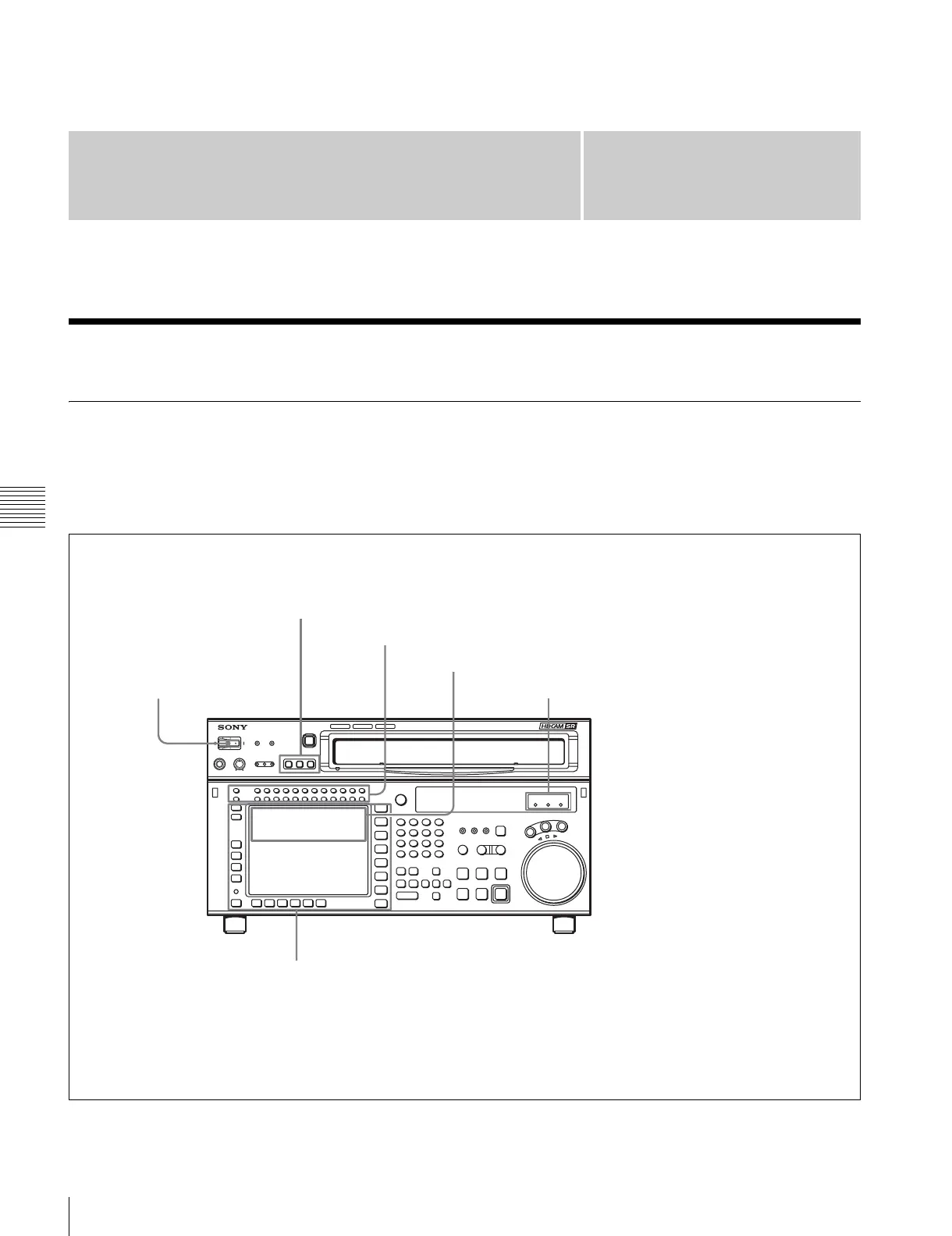
Before recording, set the switches and menus as shown in
the diagram below.
For details, see the pages indicated in the parentheses.
SRW-5000
HD DIGITAL VIDEO CASSETTE RECORDER
REMOTE buttons: None of these buttons light up.
MONITOR SELECT buttons: Audio channels to be monitored (page 103)
Recording level indication: Reference level or appropriate recording level (page 104)
POWER switch: ON
Indicators: Check the reference signal.
Menu settings
[F2] (REC INH) button in the HOME menu: off
[F1] (TIMER SEL) button in the TC menu: Select the time data to be displayed.
[F6] (REGENE SOURCE) button in the TC menu: int-LTC, int-VITC, ext-LTC, SDI-V, SDI-L (page 56)
[F7] (TCG MODE) button in the TC menu: regene, prst, auto (page 56)


 To Next Page
 Loading...