66
Using the wide mode
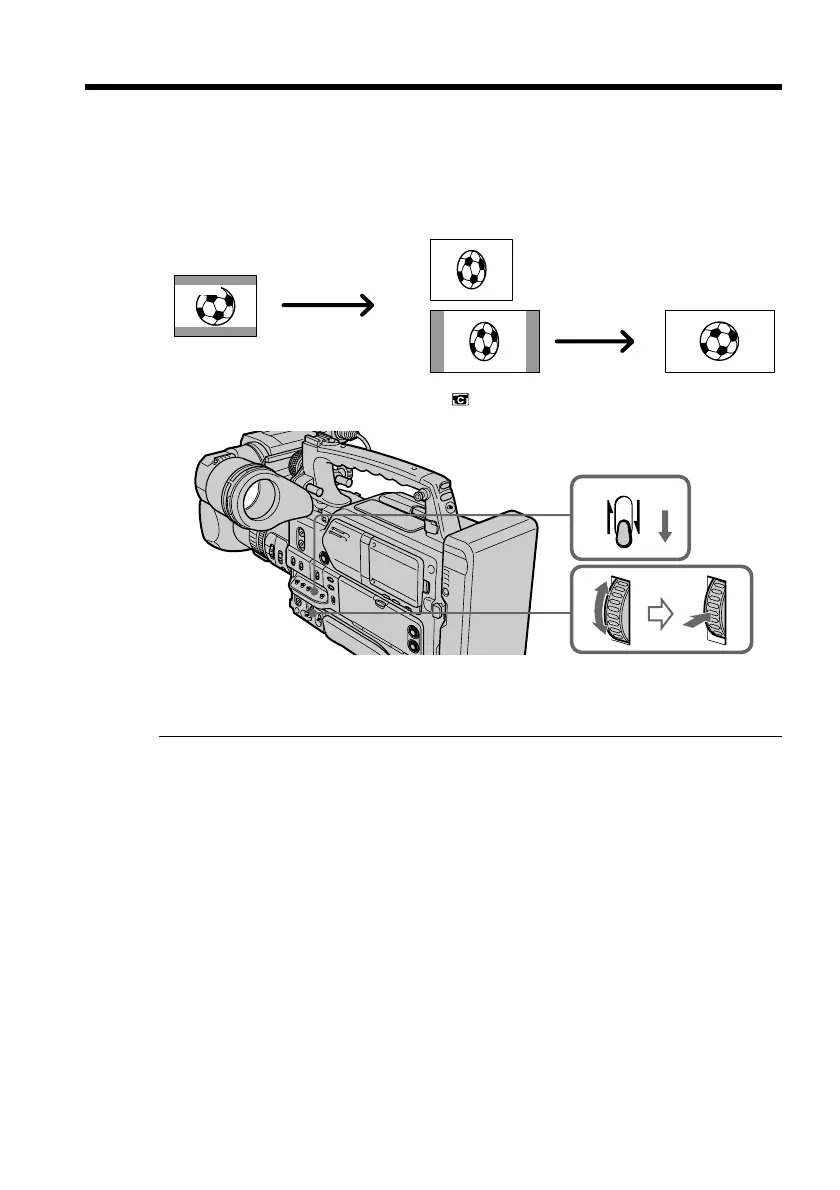
You can record a 16:9 wide picture to watch on a 16:9 wide-screen monitor (16:9WIDE).
Black bands appear on the LCD screen or in the viewfinder during recording in
16:9WIDE mode [a]. The picture during playback on a normal monitor [b] or on a wide-
screen monitor [c] is compressed in the widthwise direction. If you set the screen mode
of the wide-screen monitor to the full mode, you can watch pictures of normal images
[d].
In standby mode, set 16:9WIDE to ON in in the menu settings (p. 120).
To cancel the wide mode
Set 16:9WIDE to OFF in the menu settings (p. 120).
In wide mode, you cannot select the following modes:
•Old movie
•Progressive mode
Connection to a monitor
Pictures recorded in 16:9WIDE mode automatically appear on the monitor screen at full
size when you connect your camcorder to a monitor that is compatible with the video
ID (ID-1/ID-2) system and when you connect to the S video input jack on a monitor.
ID-1 system
The ID-1 system sends aspect ratio information (16:9, 4:3, or letter box) using video
signals. If you connect a monitor compatible with the ID-1 system, the screen size is
automatically selected.
ID-2 system
The ID-2 system sends a copyright protection signal with ID-1 signals inserted between
video signals when you connect your camcorder to other equipment using an A/V
connecting cable.
During recording
You cannot operate the wide mode function. When you cancel the wide mode, set your
camcorder to the standby mode and then set 16:9WIDE to OFF in the menu settings.
[a]
[c]
[b]
[d]
16:9
WIDE
CUSTOM
PRESET
MENU


 To Next Page
 Loading...