76
4 Press the THUMBNAIL button to
start streaming.
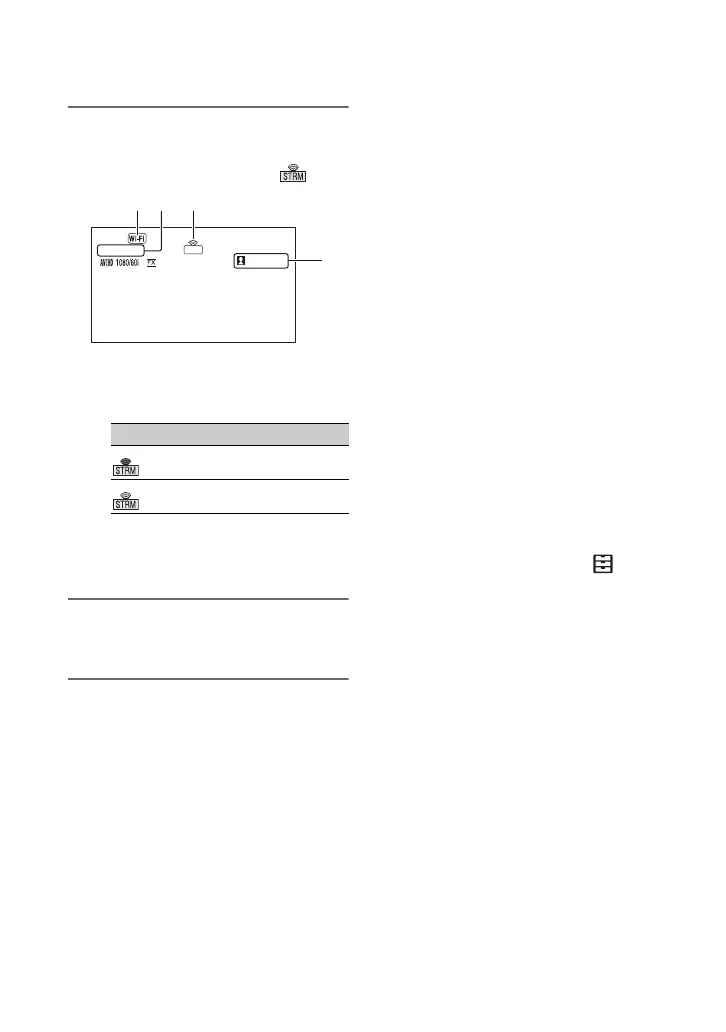
• The screen icon changes to .
1Wi-Fi or LAN
2USTREAM
3Streaming status indicator
4Number of viewers
“>1000000” is displayed if the number
of viewers exceeds 1,000,000.
5 To stop streaming, press the
THUMBNAIL button again.
b Notes
• Check that the date and time have been set
correctly on the camcorder before starting
streaming.
• When a channel is selected, text characters not
supported on the camcorder may not be
displayed correctly.
• The streaming function is not available when
using the following settings and functions.
– XAVC S HD
– In the following formats when the file format
is AVCHD:
1080/60p, 1080/50p, 720/60p, 720/50p
– DV MODE
– During movie recording
– During movie playback
– During THUMBNAIL screen display
– When using Wi-Fi remote control
– When using S&Q MOTION
• The following functions are not available when
the USTREAM function is on.
– Menu operation
– Wi-Fi remote control
– SIMULTANEOUS REC/RELAY REC
–DATE REC
– ZEBRA
– PEAKING
– MARKER
– FACE DETECTION
– COLOR BAR
–S&Q MOTION
– FOCUS MAGNIFIER
– AUTO MODE SET
– WB SET (during streaming)
• Only wired LAN connection is supported when
[AIRPLANE MODE] is set to [ON].
• Some frames may not be played, depending on
the network status.
z Tips
• If the channel name is not displayed correctly,
select the appropriate language in
(OTHERS) t [LANGUAGE].
• To simultaneously record movies to memory
card while USTREAM streaming, start
recording after USTREAM streaming is in
standby state.
Camcorder operation when using
USTREAM
The following functions are enabled when
using USTREAM. Use the hardware
switches and buttons to control the
camcorder. Operation from the menu is not
supported.
• Zoom
• Focusing
• Streaming volume adjustment
• Exposure adjustment (iris, gain and
shutter speed)
• White balance
Icon Meaning
Streaming standby
Streaming
USTREAM
XXXXXXX
STRM
4
Streaming movies using USTREAM (Continued)


 To Next Page
 Loading...