Since you have a total of
ten characters to define
your Peformance Memory,
make sure that your
Performance Name conveys
the basic approach of the
specific Performance Memory.
Performance Name
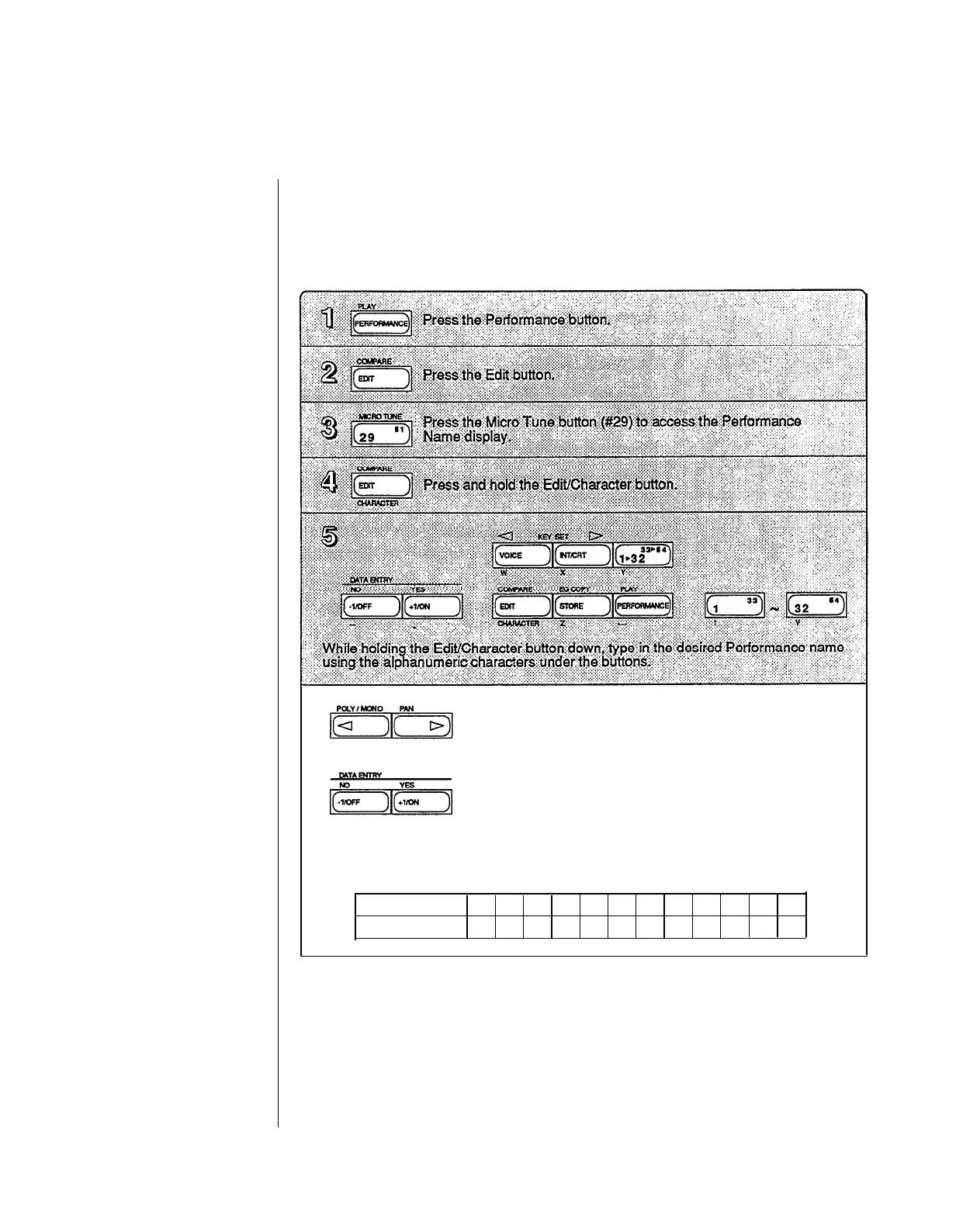
You can enter a Performance Name of up to ten characters. To do so, follow the
instructions below.
Using the left and right cursor buttons while holding the
Edit/Character button lets you place the cursor over a
specific character position. This allows you to easily
edit any character within a name.
Using the Data Entry buttons while NOT holding the
Edit/Character button lets you switch between Large
or small characters. The +1 button selects the Large
character mode, the -1 button selects the small character
mode.
In addition to letting you enter small alpha characters, the small character input
mode lets you enter the following symbols as well.
Large mode
1
2
3
4
5 6
7
8
9
0
-
.
small mode
!
@
#
$ % ^ & * ( ) + ,
Voice Number
Each time you select a Performance, one of the 64 Internal or 64 Cartridge Voices is also
selected. You determine which voice will be selected via this display.
-35 -


 To Next Page
 Loading...