Confidential
5-65
5.1.48 Top Cover ASSY
NOTE: Be sure not to open the Top cover ASSY in a dusty place.
(1) Remove the six cup B M4x12 Taptite screws.
(2) Remove the Top cover ASSY from the Scanner base ASSY.
Fig. 5-82
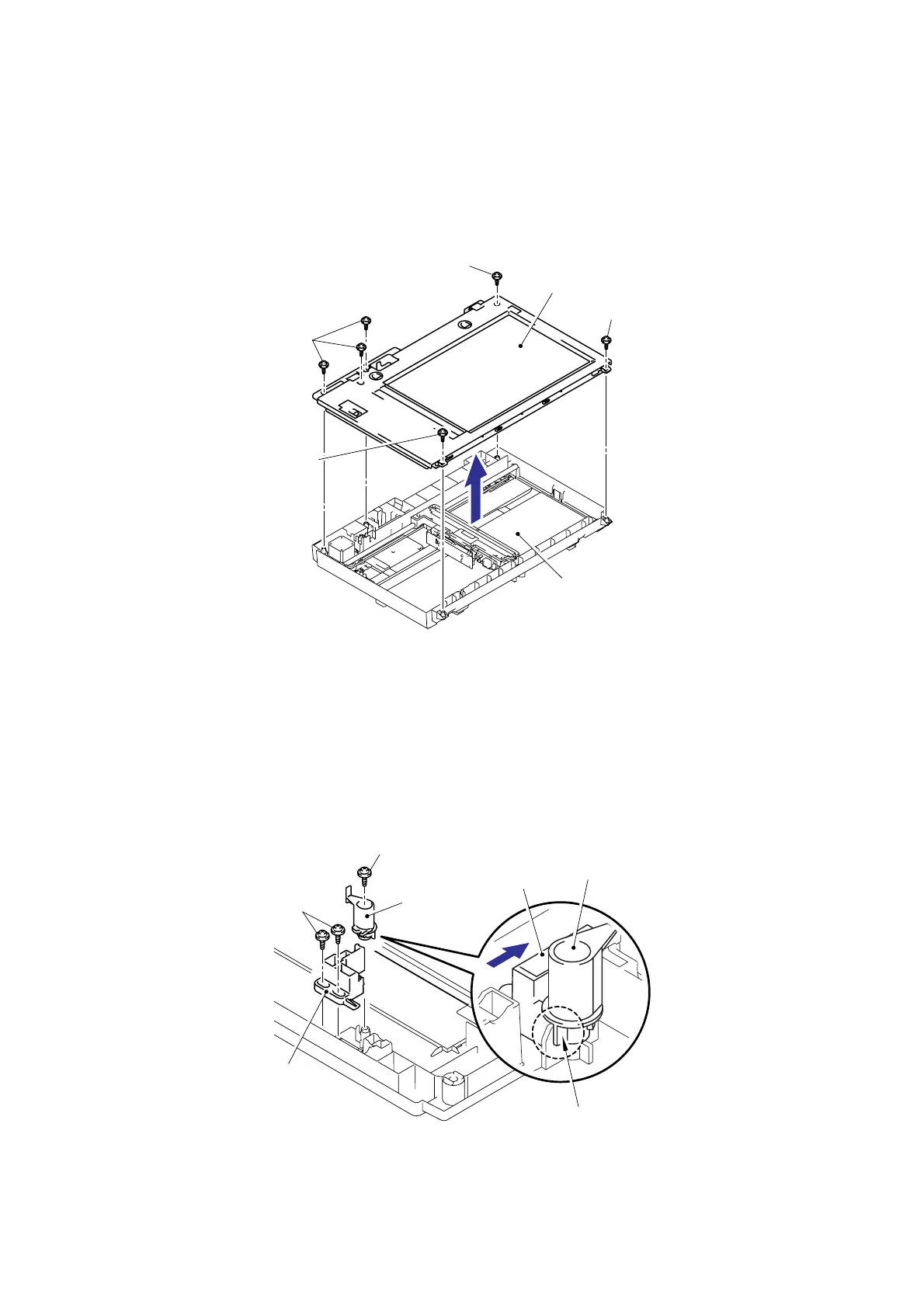
5.1.49 Lock Lever B/ Lock Lever ASSY
(1) Remove the cup B M3x6 Taptite screw, and then remove the Lock lever B.
(2) Remove the two cup B M3x6 Taptite screws, and then remove the Lock lever ASSY.
NOTE: After moving the Lock lever ASSY to “A” direction, assemble “B” of the Lock lever B
that is to the direction of the top cover rib in touch.
Fig. 5-83
Scanner base ASSY
Taptite, cup B M4x12
Taptite, cup B M4x12
Taptite, cup B M4x12
Taptite, cup B M4x12
Top cover ASSY
Taptite, cup B M3x6
Lock lever B
Taptite, cup B M3x6
Lock lever ASSY
Lock lever B
Lock lever ASSY
“B”
“A”


 To Next Page
 Loading...