21
Before Using the Camera – Basic Operations
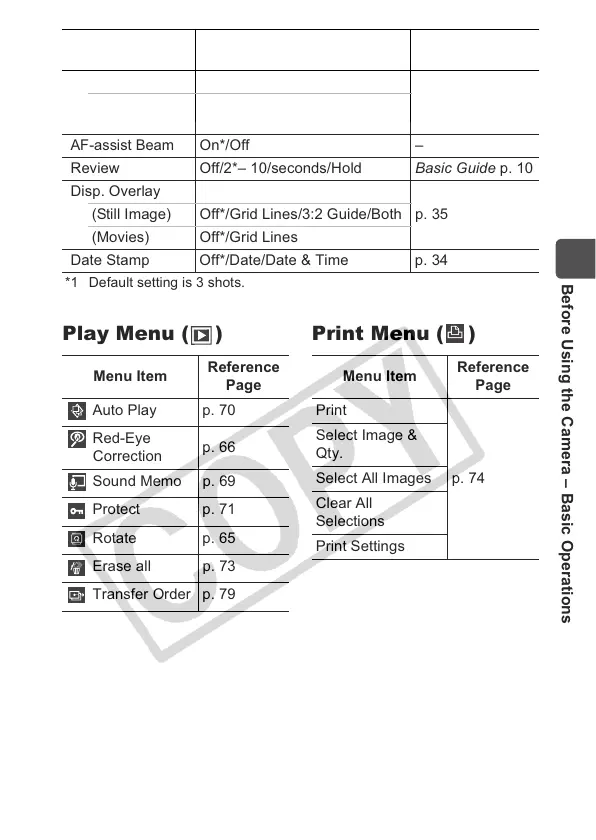
*1 Default setting is 3 shots.
Play Menu ( ) Print Menu ( )
Self-timer 10 sec.*/20 sec./Custom
Basic Guide p. 16
Custom Delay: 0 – 10*, 15, 20, 30 sec.
Shots: 1 – 10*
1
AF-assist Beam
On*/Off –
Review Off/2*– 10/seconds/Hold Basic Guide p. 10
Disp. Overlay
p. 35(Still Image) Off*/Grid Lines/3:2 Guide/Both
(Movies) Off*/Grid Lines
Date Stamp Off*/Date/Date & Time p. 34
Menu Item Options
Summary/
Reference Page
Menu Item
Reference
Page
Auto Play p. 70
Red-Eye
Correction
p. 66
Sound Memo p. 69
Protect p. 71
Rotate p. 65
Erase all p. 73
Transfer Order p. 79
Menu Item
Reference
Page
Print
p. 74
Select Image &
Qty.
Select All Images
Clear All
Selections
Print Settings


 To Next Page
 Loading...