DES-3028 DES-3028P DES-3052 DES-3052P Layer 2 Fast Ethernet Managed Switch
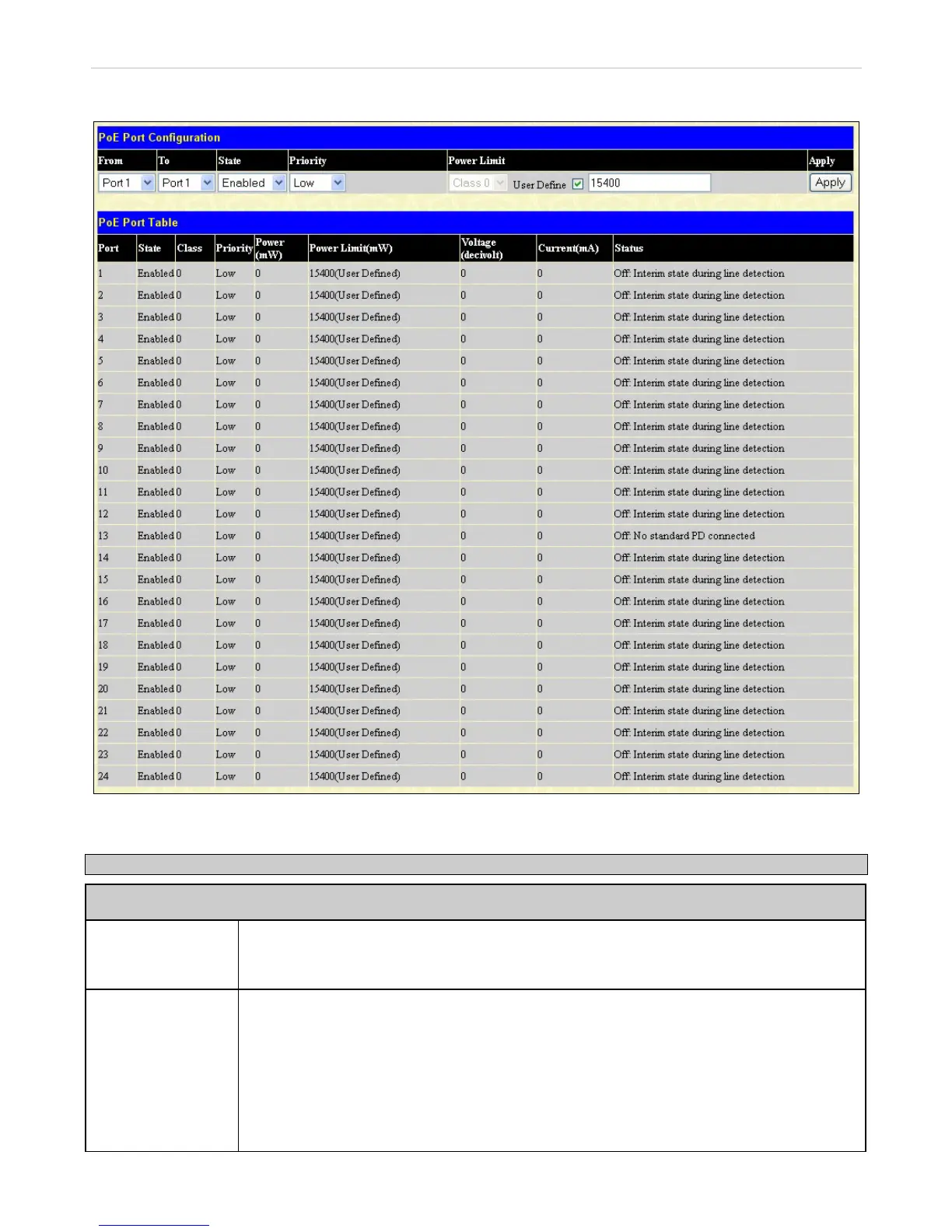
PoE Port Configuration
Figure 6- 41. PoE Port Configuration window
The previous window contains the following fields to configure for PoE:
Parameter Description
PoE System
Power Limit
Sets the limit of power to be used from the Switch’s power source to PoE ports. The user may
configure a Power Limit between 37 and 185W (for the DES-3028P) and 37 and 370W (for the
DES-3052P). The default setting is 185W (DES-3028P) and 370W (DES-3052P).
Power Disconnect
Method
The PoE controller uses either Deny next port or Deny low priority port to offset the power
limit being exceeded and keep the Switch’s power at a usable level. Use the drop down menu
to select a Power Disconnect Method. The default for the Power Disconnect Method is Deny
next port. Both Power Disconnection Methods are described below:
Deny next port - After the power limit has been exceeded, the next port attempting to power
up is denied, regardless of its priority.
Deny low priority port - After the power limit has been exceeded, the next port attempting to


 To Next Page
 Loading...










