BACK LIGHT
You can set the desired brightness mode.
(Refer to "Back Light Setting" on page 22.)
COLOR TEMP.
You can adjust color temperature ("NORMAL", "WARM",
"COOL").
(Refer to "Color Temperature" on page 22.)
DTVCC
In addition to the basic closed caption described
on page 18, DTV has its own closed caption called
DTVCC.
(Refer to"DTV Closed Caption" on page 20.)
PC SETTING
You can adjust the position, stability and clarity of the
PC screen.
This menu will appear only in PC mode, and can only
be set when the unit detects the PC input signal.
(Refer to "PC Settings" on page 26.)
[]Auto Channel Scan
If youswitch wires(e.g.,betweenantennaandCAI"V)orifyoumovethe
unittoadifferentareaafterthe initialsetting,orif yourestorethe DTV
channelyoudeleted,youwill needto performautochannelscan.
Beforeyoubegin:
Makesureiftheunitisconnectedtoantennaorcable.
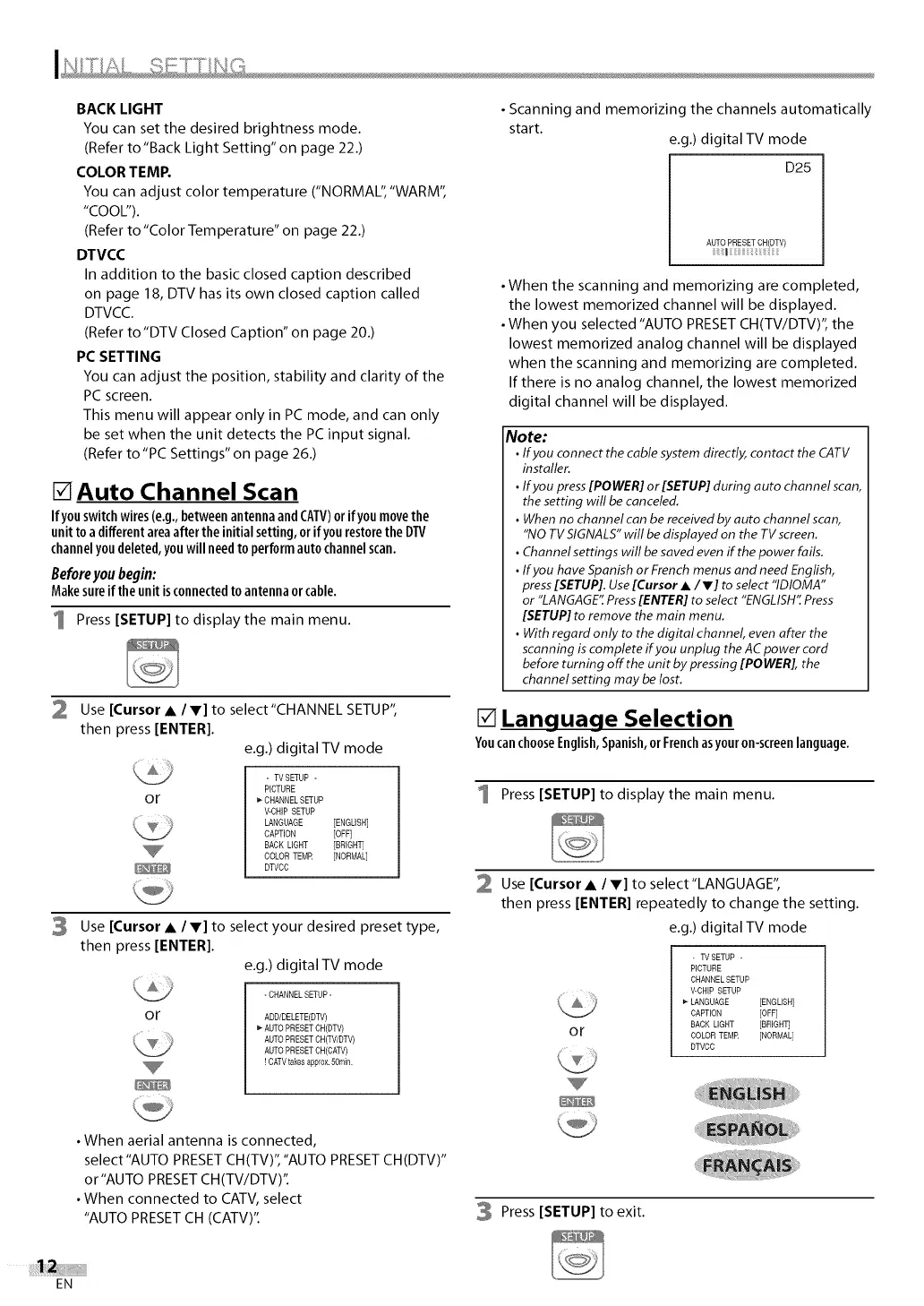
1 Press [SETUP] to display the main menu.
2
Use [Cursor • / V] to select"CHANNEL SETUP",
then press [ENTER].
e.g.) digital TV mode
or
- TVSETUP -
PICTURE
CHANNEL SETUP
V-CHIP SETUP
LANGUAGE [ENGLISH]
CAPTION [OFF]
BACK LIGHT [BRIGHT]
COLOR TEMR [NORMAL]
DTVCC
3 Use [Cursor • / V] to select your desired preset type,
then press [ENTER].
e.g.) digital TV mode
or
-CHANNELSETUP-
ADD/DELETE(DTV)
_-AUTO PRESETCH(DTV)
AUTO PRESETCH(TV/DTV)
AUTO PRESETCH(CATV)
! CAW takes approx.5ornin.
• When aerial antenna is connected,
select"AUTO PRESET CH(TV)","AUTO PRESET CH(DTV)"
or"AUTO PRESET CH(TV/DTV)".
• When connected to CATV, select
"AUTO PRESET CH (CATV)".
• Scanning and memorizing the channels automatically
start.
e.g.) digital TV mode
D25
AUTO PRESETCH(DTV)
I :; :;
• When the scanning and memorizing are completed,
the lowest memorized channel will be displayed.
• When you selected "AUTO PRESET CH(TV/DTV)", the
lowest memorized analog channel will be displayed
when the scanning and memorizing are completed.
If there is no analog channel, the lowest memorized
digital channel will be displayed.
Note:
• Ifyou connect the cable system directly, contact the CATV
installer.
• Ifyou press[POWER]or [SETUP]during auto channel scan,
the setting will be canceled.
• When no channel can be received by auto channel scan,
"NOTV SIGNALS"will be displayed on the TV screen.
• Channel settings will be saved even if the power fails.
• Ifyou have Spanishor French menus and need English,
press[SETUP].Use[Cursor •/V] to select "IDIOMA"
or "LANGAGE'[Press[ENTER] to select "ENGLISH"Press
[SETUP] to remove the main menu.
• With regard only to the digital channel, even after the
scanning iscomplete if you unplug the AC power cord
before turning off the unit by pressing [POWER], the
channel setting may be lost.
[] Language Selection
YoucanchooseEnglish,Spanish,orFrenchasyouron-screenlanguage.
Press [SETUP] to display the main menu.
2 Use [Cursor • / V] to select"LANGUAGE",
then press [ENTER] repeatedly to change the setting.
e.g.) digital TV mode
or
- TVSETUP -
PICTURE
CHANNEL SETUP
V-CHIP SETUP
_" LANGUAGE [ENGLISH]
CAPTION [OFF]
BACK LIGHT [BRIGHT]
COLOR TEMR [NORMAL]
DTVCC
3 Press [SETUP] to exit.
EN


 To Next Page
 Loading...