66
QSlide
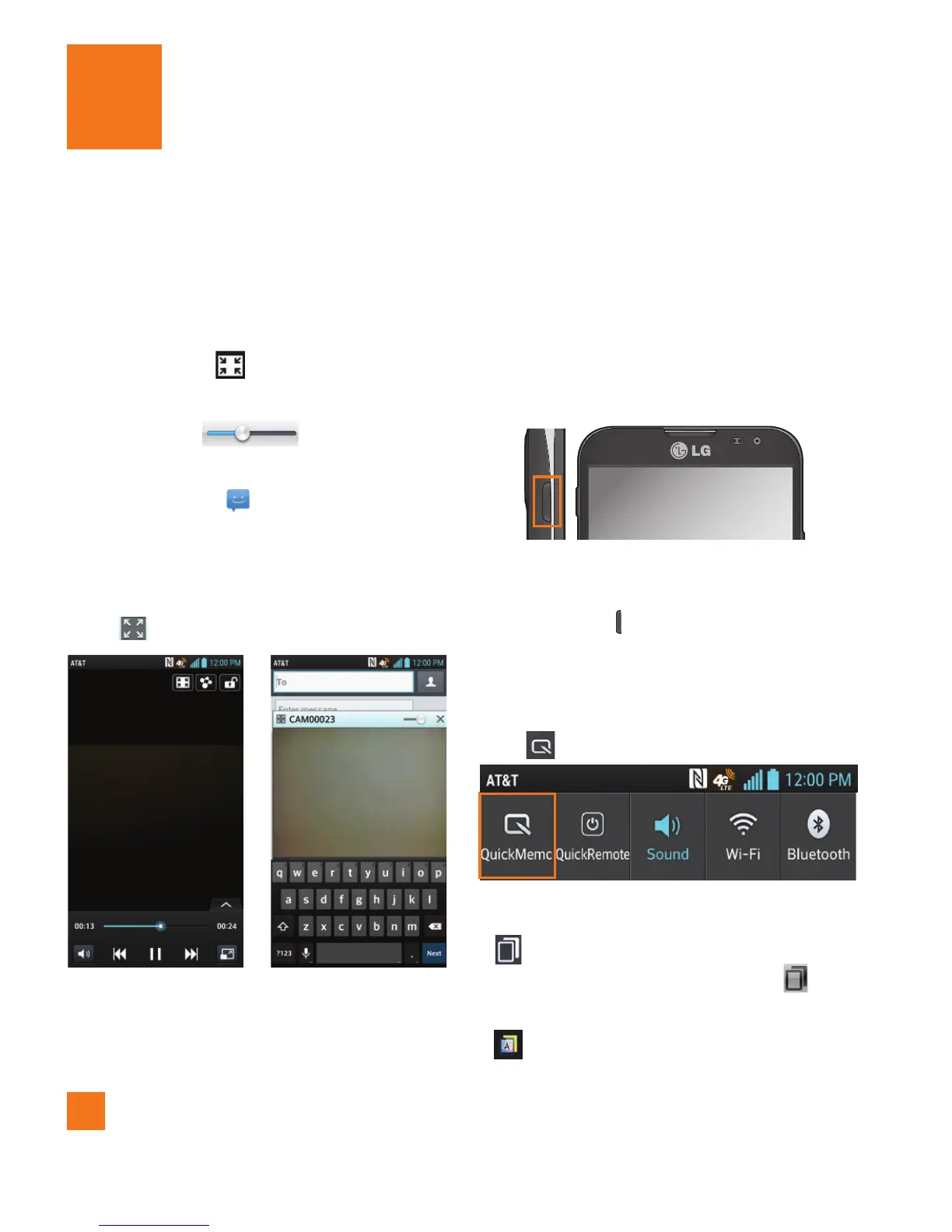
The QSlide function enables an overlay on your
phone's display for easy multitasking.
1 While watching a video that is stored on
your phone, tap
. The video continues to
play as an overlay on your phone.
2 Use the slider
to adjust the
transparency of the overlay.
3 Tap Messaging
to send a text while
in QSlide mode. You can also make a call,
browse the web, or choose other phone
options.
4 Tap
to exit the QSlide function.
%
NOTE
The QSlide can support up to two windows at
the same time.
QuickMemo
The QuickMemo feature allows you to create
memos and capture screen shots.
You can use QuickMemo to easily and
efficiently create memos during a call, with a
saved picture or on the current phone screen.
1 While viewing the screen you want to
capture and create a memo on, press the
QuickButton
to access the QuickMemo
feature.
OR
Touch and drag the Status Bar down and
tap .
2 Create a memo using the following options:
- Tap to keep the memo on top and and
continue using the phone. Tap to
exit the overlay mode.
- Tap to select whether to use the
current screen as the background or a
Utilities


 To Next Page
 Loading...