Before first use
31
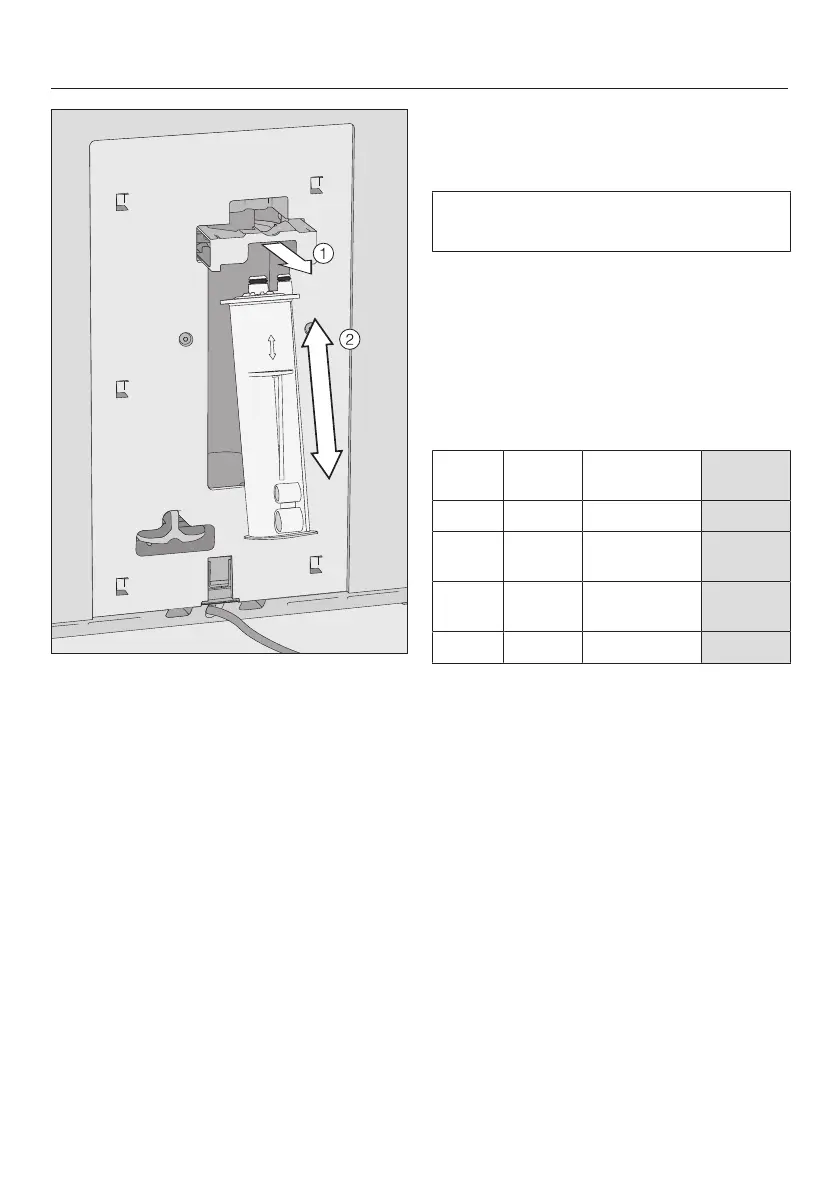
Pull the cartridge holder forwards
and insert the descaling cartridge.
Push the cartridge upward as far as it
will go.
Push the holder back into position.
Put the cover back on.
The next time the coffee machine is
switched off, the descaling cartridge
will fill with water. You will hear water
being pumped into the cartridge at
frequent intervals.
When a descaling cartridge is installed,
a message will appear regarding the
current start time set for automatic
descaling.
Confirm withOK.
If you want to change the start time,
tap Start time and select the required
time.
You can also change the start time for
automatic descaling at a later time.
Setting the water hardness
Your local water authority will be able to
tell you the hardness of the water in
your area.
The machine has four programmable
hardness levels:
°dH gr/gal ppm
(mg/l CaCO
3
)
Setting*
0–8.4 0–8.7 0–150 Soft
8.4–14 8.7–
14.6
150–250 Medium
14–21 14.6–
21.9
250–375 Hard
>21 > 21.9 > 375 Very hard
* The hardness levels shown in the display may
differ from the hardness level designations in your
area. You must follow the values in the chart to
set the correct water hardness level for your area.
Select the hardness level.
TapOK to confirm.
The setting is now saved.
Miele@home communication enabled
household appliance appears in the
display. You can connect your coffee
machine to your Wi-Fi network (see
“Networking”).
Confirm withOK.
The coffee machine is now successfully
set up for use. You can now fill the bean
system.


 To Next Page
 Loading...










