Control System 32Service Manual – SC2000
Removal and Installation
Function Electronic Board (EB1) Removal/Replacement
1. Drive the machine on a level oor and remove the operator key.
2. Disconnect the red battery connector by pressing the emergency push-button.
3. Lift the recovery tank assembly and the driver’s seat.
4. Remove the 3 screws and remove the upper cover.
5. Remove the 2 screws and remove the function electronic board front cover.
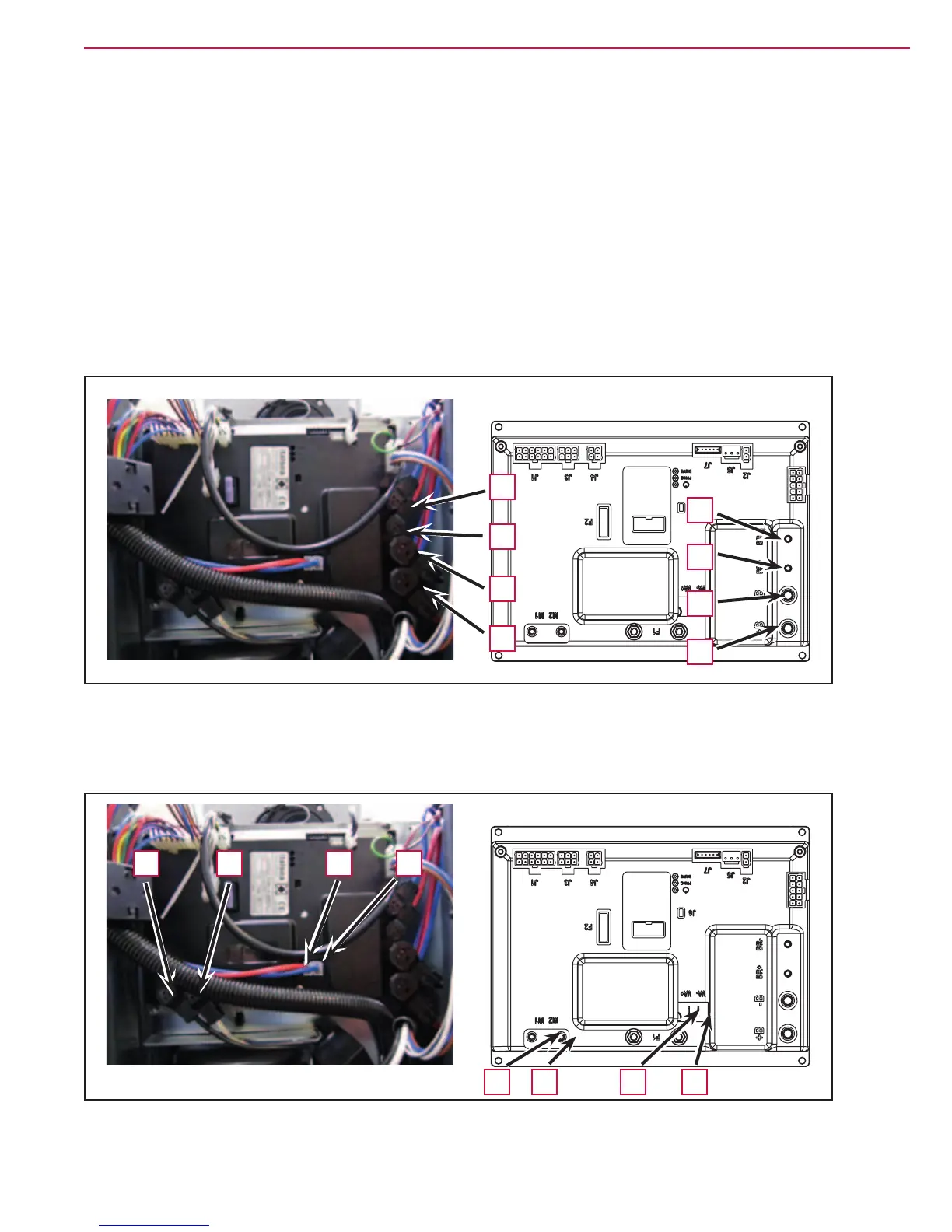
6. Disconnect the following connections sequentially (Figure 11):
◦ (A) and (B) Electronic board power supply connection (B+) and (B-).
◦ (C) and D) Brush motor connection (BR+) and (BR-).
Figure 11
A
B
D
C
A
B
D
C
7. Disconnect the following connections sequentially (Figure 12):
◦ (E) and (F) Drive system motor connection (M1) and (M2).
◦ (G) and (H) Vacuum system motor connection (VA+) and (VA-).
Figure 12
E F G H
GE F H



 To Next Page
 Loading...