01-07-2002
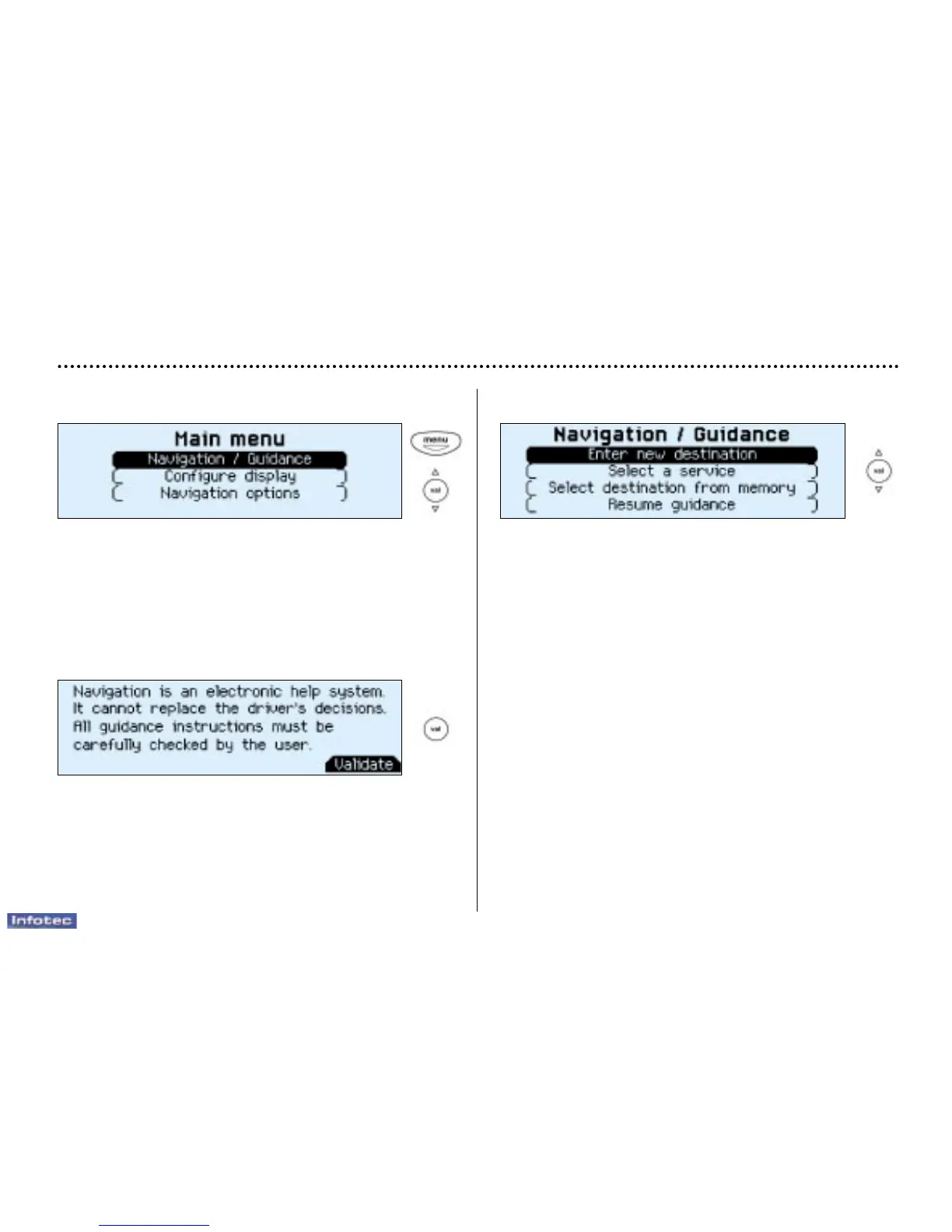
Main menu
Switch on the ignition.
Press the "Menu" button to access the main menu.
Select a function using the direction arrows, then confirm
("VAL" button).
The "Navigation/guidance" menu offers various options
for selecting guidance:
- By entering the address of a new destination,
- By selecting a service (Hotel, station, airport...) available
in a town,
- By selecting an address stored in one of the two directo-
ries,
- By resuming previously interrupted guidance or by stop-
ping current guidance. Two messages may be displayed
depending on the previous actions: "Resume guid-
ance" or "Stop guidance",
- Radio functions are suspended when the system is in
guidance mode.
YOUR 406 COUPE IN DETAIL
77
Navigation / Guidance
Following selection of the "Navigation/guidance" menu,
a screen warns you about the use of the navigation sys-
tem. Follow the regulations in force and do not use the
remote control while driving.
Press the "VAL" button to access the next screen.


 To Next Page
 Loading...