SilverCrest SCW 5 A2
42 - English
Toggling the status LEDs on/off
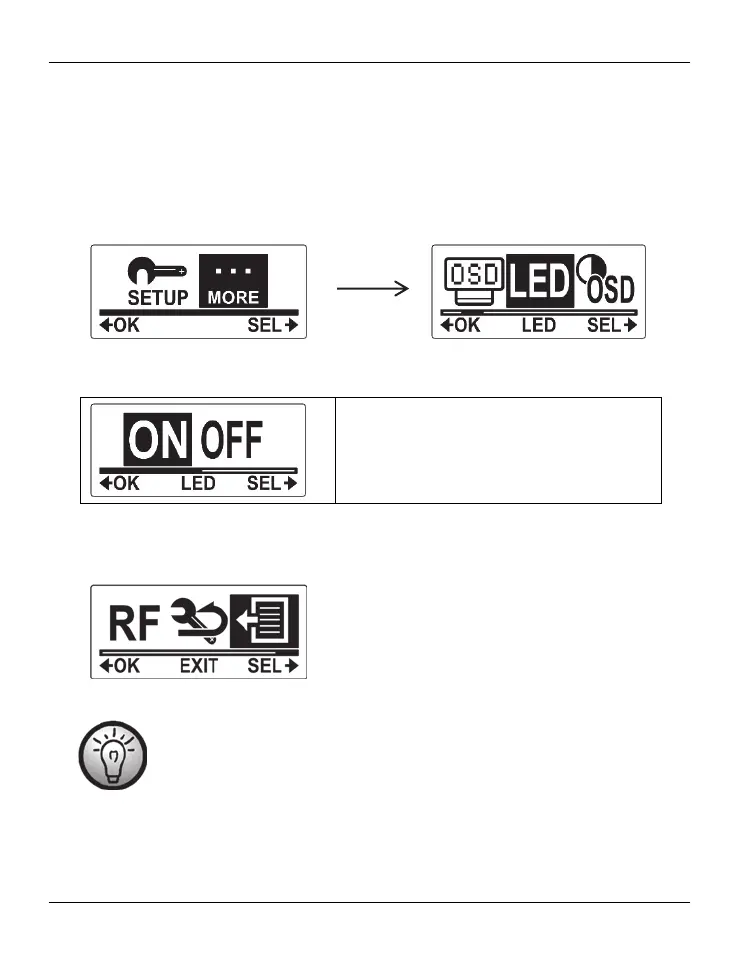
This menu allows you to enable or disable the camcorder’s status LEDs. Proceed as follows:
Press the On/Off/Mode button [2] multiple times to select the MORE menu and then
press the record button [9] to confirm.
Press the On/Off/Mode button [2] multiple times until the LED menu is highlighted. Press
the record button [9] to open the LED menu.
Press the On/Off/Mode button [2] to select an option. The following settings are
available: “ON“ and “OFF“.
Selecting “ON” will enable the camcorder’s
status LEDs and selecting “OFF” will disable
them.
Press the record button [9] to confirm your selection.
To exit the MORE menu, press the On/Off/Mode button [2] multiple times until the EXIT
item is highlighted and then press the record button [9] to confirm.
The status LED [6] will flash orange during battery charging even if the
status LEDs have been switched off.


 To Next Page
 Loading...