As the subwoofer does not emit highly directional signals, you can place it wherever you want.
[10] Preparation 1. Installing speakers
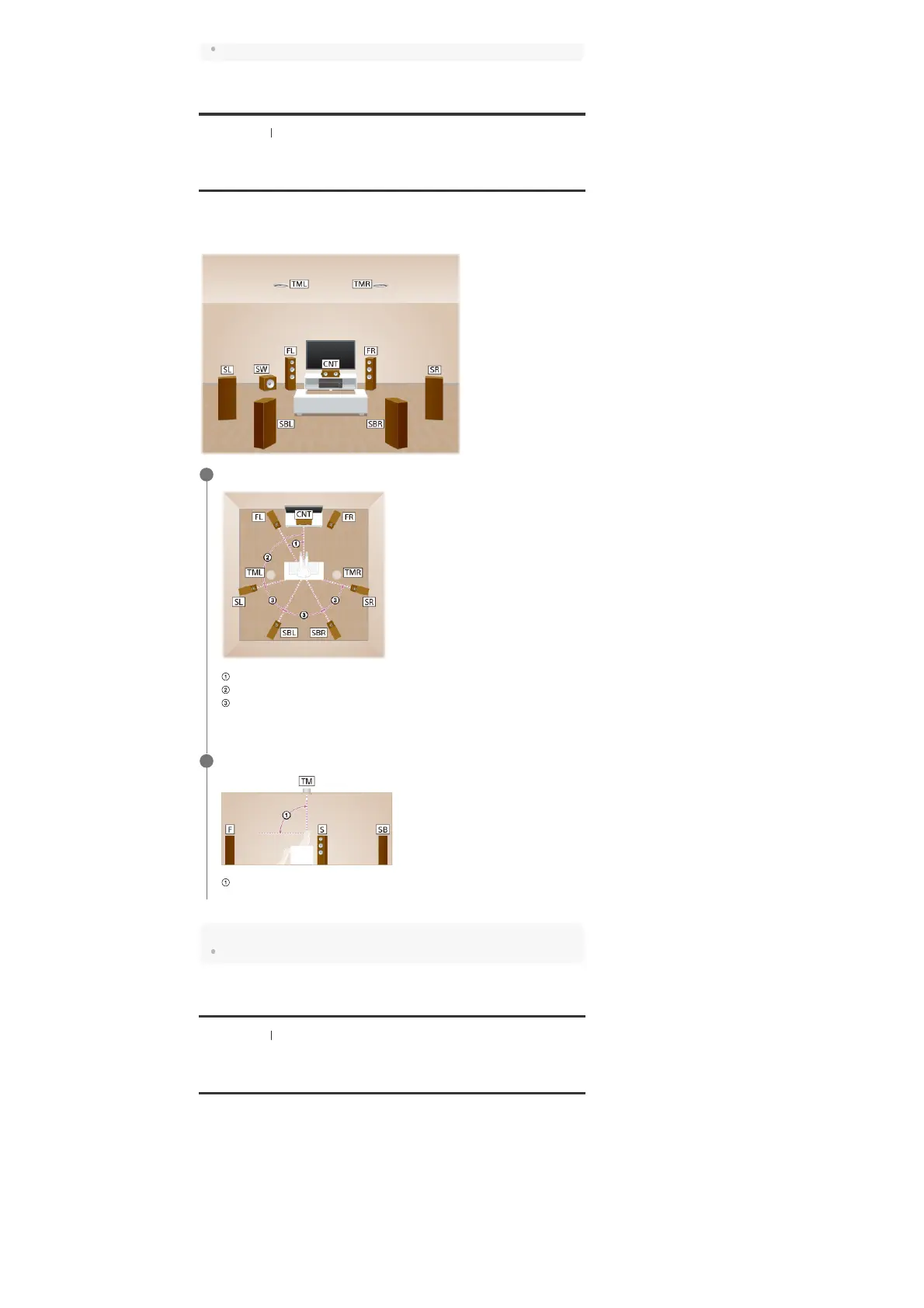
Installing 7.1.2-channel speaker system using top
middle speakers
This speaker installation is configured by adding top middle speakers to 7.1-channel speaker
system consisting of standard 5.1-channel speaker system and additional surround back
speakers placed on the listener-level.
Hint
As the subwoofer does not emit highly directional signals, you can place it wherever you want.
[11] Preparation 1. Installing speakers
Installing 7.1.2-channel speaker system using front
Dolby Atmos enabled speakers
This speaker installation is configured by adding front Dolby Atmos enabled speakers (*) to 7.1-
channel speaker system consisting of standard 5.1-channel speaker system and additional
surround back speakers placed on the listener-level.
Place the speakers on the listener-level at the angles shown below.
30°
100° - 120°
Same angle
1
Install the overhead (top) speakers at the angles shown below.
65° - 100°
2
You can enjoy the exciting and powerful sound of the Dolby Atmos 3D content without installing overhead (top)
speakers by using Dolby Atmos enabled speakers which reflect off the ceiling.
*



 To Next Page
 Loading...











