7-2
122994-513 Operator Manual Troubleshooting
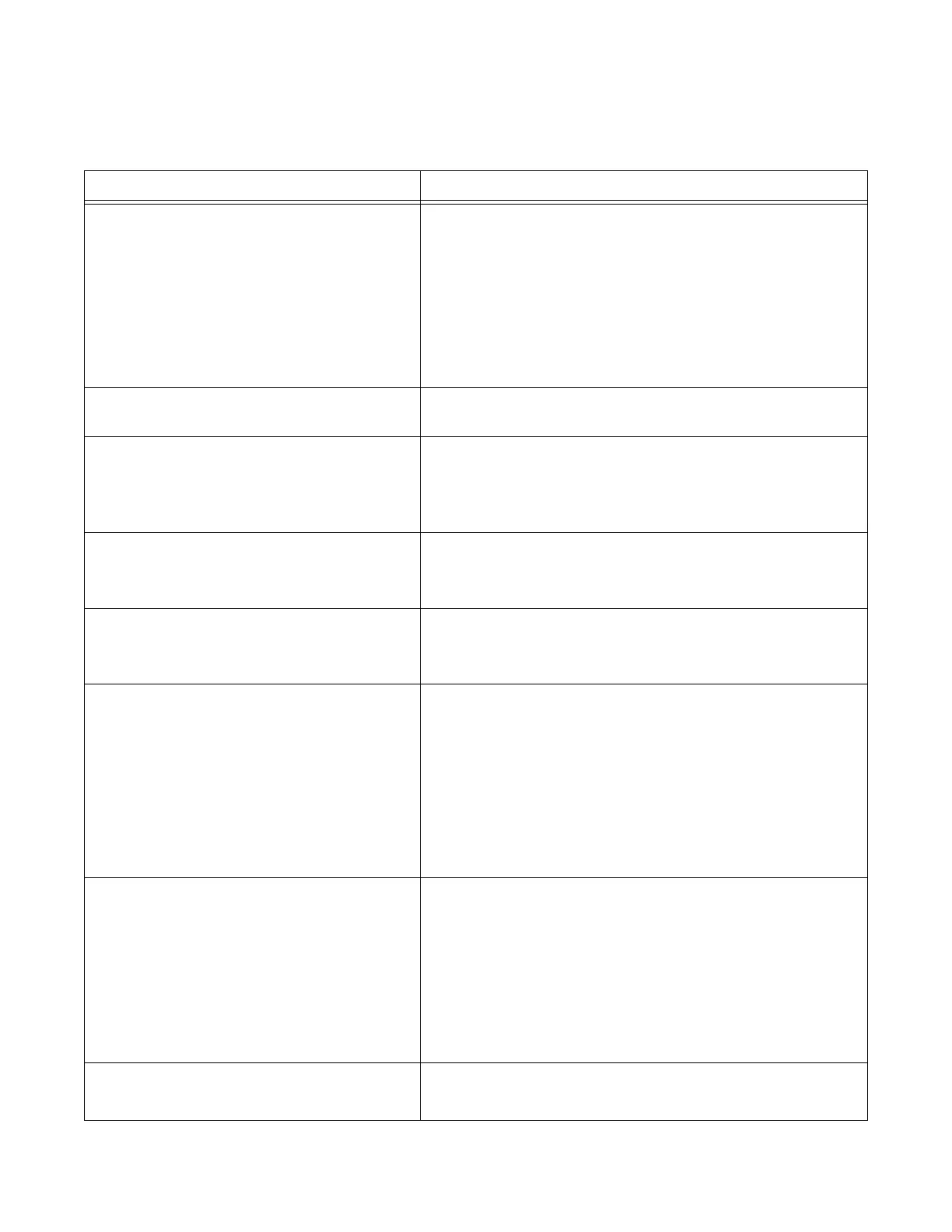
Table 7-1. Troubleshooting Chart – No Alarm Screen and Printout
PROBLEM POSSIBLE CAUSE AND CORRECTION
1. Interior light does not turn on. 1. POWER-OFF/STANDBY switch in OFF/STANDBY posi-
tion. Position to POWER.
2. Unit is still in Service mode. Switch washer to Automatic
mode before starting processing by pressing EXTEND
CYCLE touch pad.
3. Interior light bulb is burned out. Replace bulb.
4. Open fuse on connector PC board inside console assem-
bly. Call STERIS.*
2. If washer is equipped with double door,
unload door fails to open.
Safety interlock feature engaged. Unload door does not
open until washer has run one complete cycle.
3. Display is locked; pressing touch pad
has no effect.
1. Multiple alarm conditions have occurred simultaneously;
position POWER-OFF/STANDBY switch to OFF/
STANDBY, then back to POWER.
2. If condition reoccurs, call STERIS.*
4. Screen indicates "SERVICE TEST" when
POWER-OFF/STANDBY switch is posi-
tioned to POWER.
1. Washer in Service mode. Switch washer to Automatic
mode by pressing EXTEND CYCLE touch pad.
2. Call STERIS.*
5. Cycle does not start when CYCLE/
START touch pad is pressed or pump
does not start during a treatment.
1. Chamber door open. Close door and press CYCLE/
START touch pad.
2. Call STERIS.*
6. Generated printout is light or blank, or parts
of characters are missing on printout.
1. Printer paper installed backward. Reinstall paper roll with
paper feeding downward from back of roll (refer to S
EC-
TION 6.9).
2. Incorrect printer paper used. Use recommended products.
Use only STERIS thermal paper (P129359-008).
3. Printer head is dirty. Call STERIS.*
4. Printer is defective. Call STERIS.*
5. Printer PC board is defective. Call STERIS.*
7. Insufficient or no water entering chamber
through rotary spray arm assemblies,
manifold and/or bottom rotary spray
arms.
1. Accessory header(s) incorrectly positioned in chamber.
Ensure each accessory header is positioned directly over
a manifold connector.
2. Rotary spray arms clogged. Clean spray arms (refer to
S
ECTION 6.4).
3. Chamber debris screens clogged. Clean screens (refer to
S
ECTION 6.3).
4. If condition reoccurs, call STERIS.*
8. Water leaks from unit. 1. Tighten all clamps and connections.
2. If condition reoccurs, call STERIS.*
*Service charges may be incurred. Consult your warranty for details.


 To Next Page
 Loading...