GENERAL INFORMATION
58
To enable or disable the blind spot radar:
▼ From the Settings menu, push the
joystick down/up to select the Blind
Spot Radar option.
▼ Push the joystick right to move the
slider dot to the right to enable
Blind Spot Radar control.
▼ Push the joystick left to move the
slider dot to the left to disable Blind
Spot Radar control.
For more information on blind spot
radar, see page 73.
Settings - Turn Signals
The turn signals setting can be
changed.
To change the turn signals setting:
▼ From the Settings menu, push the
joystick down/up to select the Turn
Signals option.
▼ Press the joystick center to confirm.
▼ Push the joystick down/up to select
the required Turn Signal option.
Press the joystick center to confirm.
Turn Signal Settings Options
Manual
The self-canceling function is off.
The turn signals must be
manually canceled using the
turn signal switch.
Self-Cancel
The self-canceling function is on.
A short press on the turn signal
switch activates the turn signals
for three flashes.
A longer press on the turn
signal switch activates the turn
signals for eight seconds and an
additional 71 yards (65 meters).
For more information on turn signals,
see page 63.
Settings - Factory Reset
The Factory Reset option allows the
Settings options to be reset to the
default setting.
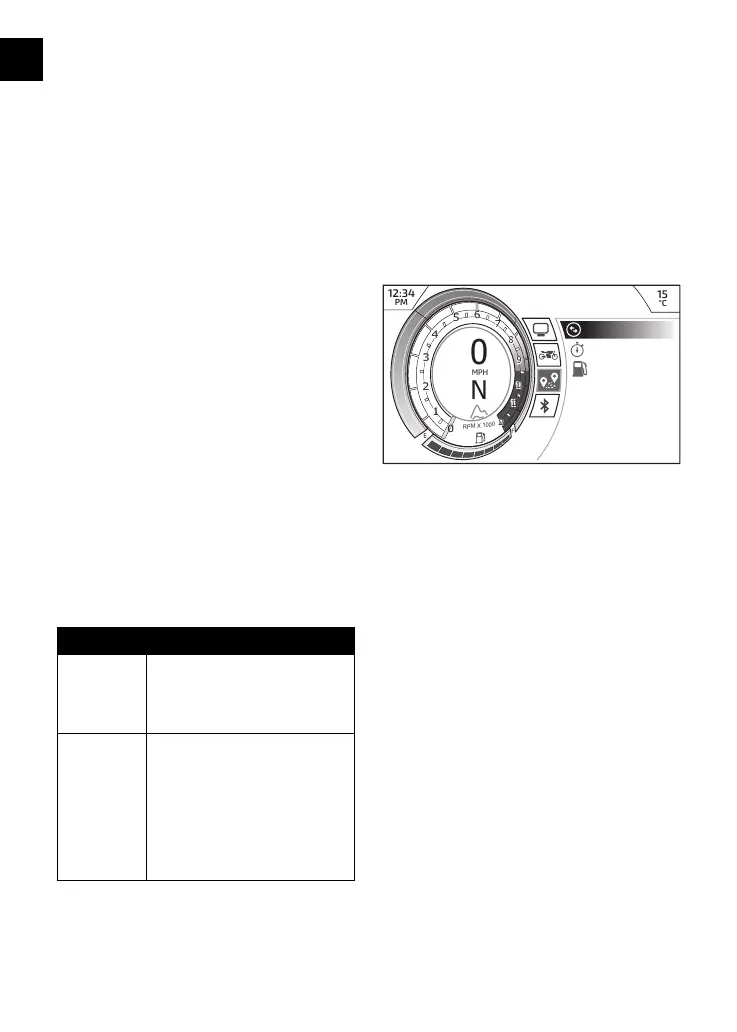
Journey Menu
The Journey menu allows configuration
of the motorcycle journey information.
12:34
PM
15
°C
0
F
E
N
MPH
RPM X 1000
8
9
10
11
1
2
3
4
5
6
7
8
9
10
11
1
2
3
4
5
6
7
0
1212
Trip
Lap Timer
Fuel Status
Journey
To access the Journey menu:
▼ From the Main menu, push the
joystick down and select the Journey
option.
▼ Press the joystick center to confirm.
▼ Select the required option from
the list to access the relevant
information.


 To Next Page
 Loading...